Try Weglot for free





AI is a fast, affordable, and effective way to translate your website into Spanish and reach 600+ million speakers across Spain, Latin America, and the US.
But using Google Translate alone can be damaging. It’s incredibly time-consuming, and there’s no guarantee you’ll receive high-quality translations or that your site will appear in international search results.
In this guide, you’ll learn the right way to translate your website using AI, what makes the Spanish market worth prioritizing, and how to boost success once your multilingual site is live.
Whether you operate in the US, the UK, or in the European or South American continent, Spanish is hard to beat as your first expansion opportunity.
It’s the second-most-spoken native language in the world, with demand that stretches across 3 major geographies:
Most businesses will primarily focus on one of these opportunities. But it’s reassuring to know that a well-executed global Spanish translation could serve all 3 markets at once.
Yes, Spanish is one of the best languages for AI translation.
It’s a high-resource language, which means AI models have been trained on vast volumes of Spanish text. The result is strong, natural-sounding translations out of the box.
In our study with Nimdzi Insights on the state of machine translation for websites, almost every translation engine could reliably translate Spanish.

DeepL, one of the translation engines Weglot uses, was the most reliable.
AI gets you most of the way, and the right tool gives you a safety net to review and refine before publishing. In Weglot, that takes the form of an AI Translation Model and a Visual Editor.
The AI Translation Model delivers on-brand translations from day one. Powered by OpenAI and Gemini, it learns from your brand guidelines, tone of voice, glossary terms, target audience, manual edits, and any custom instructions you provide to deliver high-quality translations in your brand’s unique voice.
The Visual Editor gives your team full control to review and refine everything before it goes live.
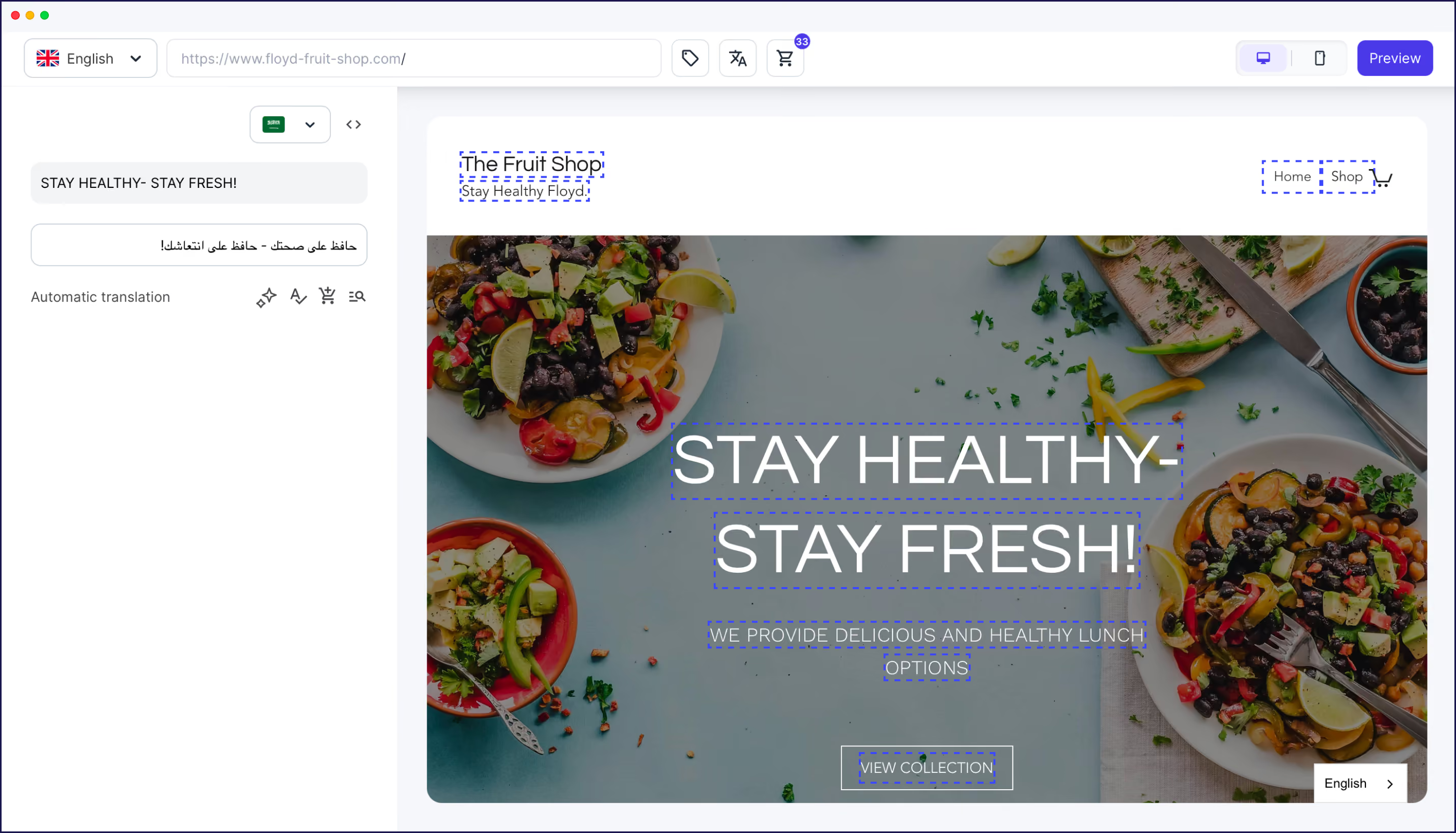
By viewing translations in the context of your live site rather than in a CMS dashboard, you can see whether a Spanish translation causes issues like:
Fixing these issues is easy. Within the Visual Editor’s sidebar, you can make an edit yourself, request a new automatic translation using AI, or send it to a human translator who’ll also be able to see translations in the context of your site.
If you’re ready to go live, here’s a practical 4-step process you can follow. It works regardless of your business model or CMS.
Start by laying the groundwork for a successful translation. A few decisions now will save you plenty of rework later.
Weglot handles much of the technical work for you, especially when it comes to increasing SEO and GEO visibility. It creates URLs and adds hreflang tags (which help search engines and LLMs to find, index and cite your content in the correct language for each user).
It even tracks translation analytics. More on that later.
While a Spanish-language website can serve multiple geographies, accounting for your primary market’s tone and vocabulary can increase conversions.
For example:
If you’re targeting multiple Spanish markets, a neutral, widely understood translation will work well.
Now it’s time to quickly translate your content into Spanish using AI.
Weglot’s end-to-end website translation tool automatically detects, translates, and displays your content in Spanish – as well as 110+ other languages.
The software’s onboarding wizard makes it incredibly easy to get started:
Here’s what the onboarding wizard looks like:
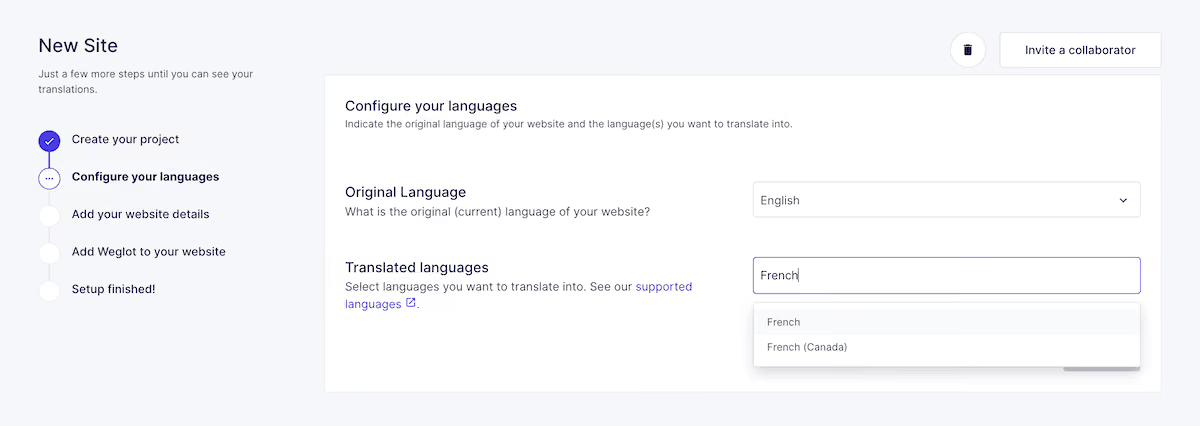
Connecting Weglot to your website is as simple as inserting a single code snippet into your site’s header.
Alternatively, use one of the dedicated integration solutions for platforms like WordPress, Shopify, Webflow, or Squarespace.
Once complete, Weglot automatically scans and translates your entire site. That includes page titles, meta descriptions, image alt tags, form labels, and checkout flows.
It draws on a combination of DeepL, Google Translate, and Microsoft Translator, selecting the best engine for each language pair.
Because Weglot is a tool, not an engine, it also handles technical multilingual SEO elements, such as URLs and hreflang tags, as discussed earlier.
Weglot also adds a language switcher to your site so that visitors can switch to Spanish with a click.
Localization is the process of adapting your website for specific international markets, beyond translations.
A fully localized store accounts for regional customs and expectations, delivering a smooth user experience that builds trust and drives higher conversions.
When localizing your new Spanish site, you’ll want to cover the following elements:
You don’t have to localize all of your content before going live. Many businesses launch their sites immediately and then refine their pages as opportunities arise.
Resource management software Napta adopted this gradual process. After translating its site into German with Weglot, Napta hired SEO experts to optimize content to target the right keywords for the market.
The company’s efforts saw a 4x increase in German traffic.
“I would 100% recommend this SEO approach. Yes, it implies having a budget for optimization, but the results are worth it.” – Estelle Barthes, Communications and Content at Napta
Translating your site is just the start. Apply the following best practices to drive conversions in this market and any others you enter.
Use Weglot’s Glossary feature and AI Translation Model to define how your brand sounds across every language.
Glossaries control how you translate key terms – or whether they’re translated at all. For example, in Weglot, you can create a glossary rule that leaves brand and product names untouched across all languages.

Weglot’s AI Translation Model handles the tone.
In addition to learning from your previous edits, glossary rules, and target audience, it uses your brand guidelines to ensure translations align with your in-house style.
For instance, your brand guidelines could instruct the AI Translation Model to:
The more information you provide Weglot’s AI model, the more consistent and on-brand your translations will be.
The problem with many translation methods, and even some AI tools, is that your site becomes outdated as soon as you add new content.
Weglot’s continuous translation feature solves this by constantly monitoring your site for new or edited content.
Once changes are detected, it automatically translates and publishes translations across every language.
This feature lets small teams have an outsized impact. For example, French ecommerce store The Bradery uses continuous translation to launch 500 products a day in French, English, and Spanish without lifting a finger.
Understanding which countries your visitors come from and how they navigate your site is key to improving the user experience and prioritizing new market expansion.
For example, high bounce rates on newly translated pages could indicate a broken design or a mismatched intent.
Here are the SEO and GEO metrics you should track:
You can set up Google Analytics to provide this data, as in the report below.
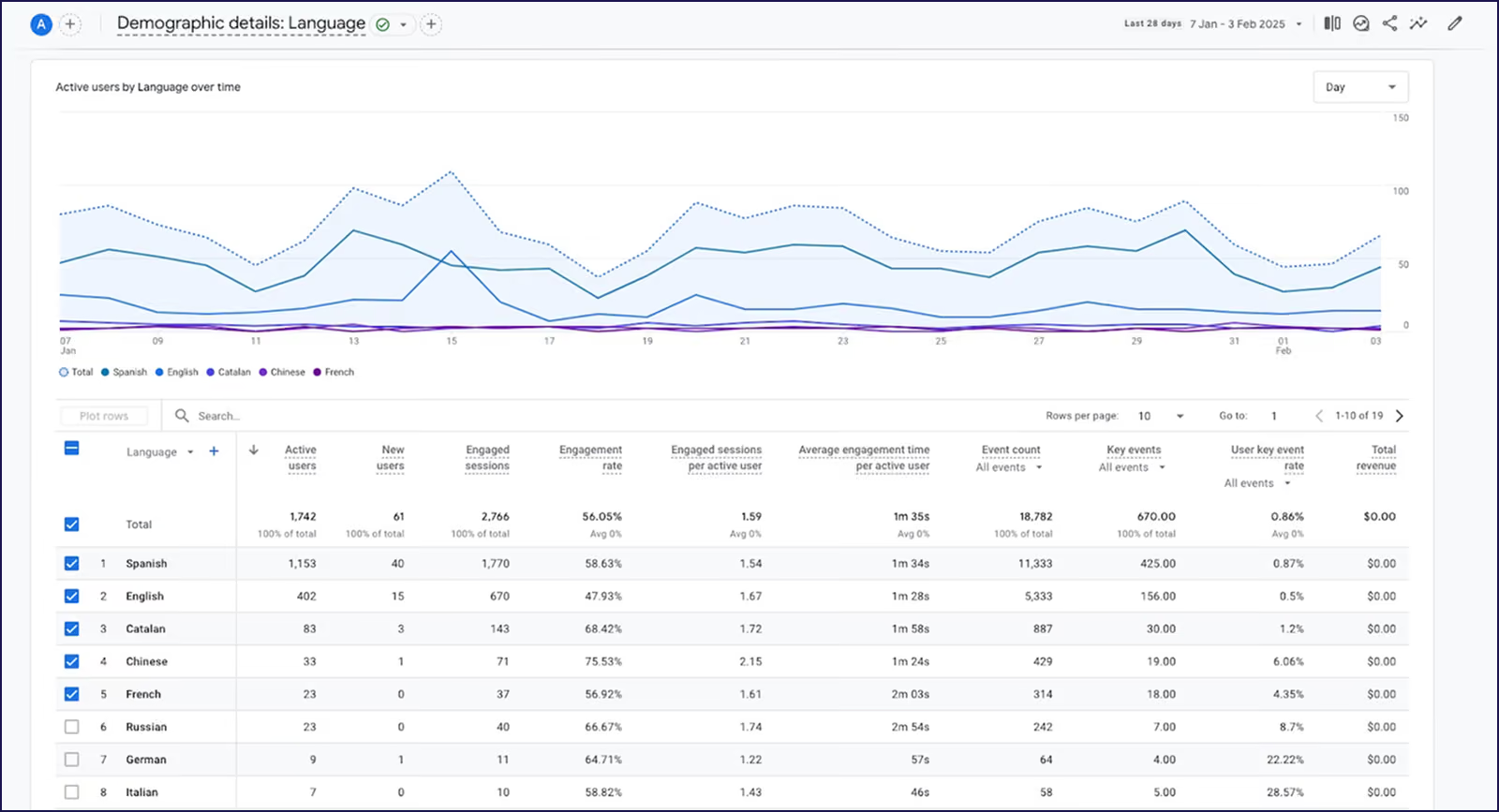
Or run Weglot’s Translation Requests feature, which shows how visitors access your translated content and how often Weglot is requested to serve translations.

It was by tracking organic traffic that SEO platform SmartKeyword could measure and optimize its multilingual SEO.
The brand began including specific keywords targeting the US and Spanish-speaking markets, replacing them directly in the Weglot Dashboard.
Reaching Spanish speakers used to mean months of work, a large budget, and a team of developers. Today, AI lets you translate content in seconds.
Over 111,000 websites use Weglot, from startups making their first move into Spanish-speaking markets to Fortune 500 companies managing international web presences.
Ready to join them? Start a 14-day free trial to translate your website into Spanish in minutes.

We’ll get your first languages live. You decide how far you want to go. Try Weglot for free today.
Trusted by 70,000+ global brands





Weglot is tested and trusted by brands worldwide since 2016. Join them today.


The best way to understand the power of Weglot is to see it for yourself. Test it for free and without any engagement.
A demo website is available in your dashboard if you’re not ready to connect your website yet.

.avif)

.avif)