

Try Weglot for free


Looking to translate your WordPress website into multiple languages? A multilingual WordPress website speaks to everyone – not just to your English-speaking audiences. By presenting your content in your visitors’ preferred languages, you ensure your message is accessible across cultures.
With so many WordPress translation plugins available, it’s easier than ever to build a multilingual website and connect with visitors from around the world. These translate your website’s content, menus, and even ecommerce elements (Weglot also translates the text inside your images), allowing you to reach a broader international audience. This approach improves user experience and creates opportunities for growth in new markets.
However, choosing the right plugin takes careful research. Key selection factors include your translation approach preferences (AI vs. manual), technical comfort level, budget, and site type. That’s why we've put together a comprehensive WordPress translation plugin comparison to help you find the best fit for your needs.
Read on to explore the top multilingual plugins that can help your website communicate across language barriers.
When choosing a translation plugin for your WordPress site, it's important to understand the two main types.
The key difference? Multilingual plugins prioritize translation quality and control, while auto translation plugins prioritize speed and simplicity. The best WordPress translation plugin depends on your need for quality control versus speed, and each approach involves distinct trade-offs.
Multilingual plugins usually offer a hybrid solution. Leading plugins like Weglot, WPML and TranslatePress all deliver automation plus manual refinement, balancing deployment time against quality control needs.
These plugins may differ in terms of storage, affecting both database size and data portability. Cloud-based plugins like Weglot store translations on external servers reducing database load. Database-based plugins like WPML and TranslatePress store translations in WordPress, giving direct data ownership but increasing database size. But multilingual plugins offer a vastly wider feature set than simple browser translations, with many including SEO, translation memory, and full product support.
Auto-translation plugins offer instant translation with minimal effort and cost, although they often come with language limitations, a higher chance of missing strings, and no built-in SEO. They can be handy for smaller projects, but you’ll need to manage all of your international search optimization manually.
Any business seriously looking to expand overseas will need to invest in a WordPress multilingual plugin, given the greater accuracy, additional features, and faster time to market.
We evaluated each plugin on the criteria that actually decide success for a multilingual site, not on feature counts. Every plugin in this comparison was scored against the same five criteria:
We also factor in nearly a decade of experience working with thousands of WordPress users, plus user reviews, ratings and download statistics from WordPress.org.
A quick overview before the details:
| Plugin | Starting price | Free tier | Visual editor | WooCommerce support | Best for |
|---|---|---|---|---|---|
| Weglot | €150/yr | Yes (1 language, 2,000 words) | Yes | Yes | On-brand AI translations, multilingual SEO built in |
| WPML | €39/yr (blog only) / €99/yr (full CMS) | No | Limited | Yes (CMS plan and up) | Complex multisite and agency builds |
| TranslatePress | €99/yr | Yes (1 extra language, manual) | Yes | Yes (Business+) | Visual frontend editing |
| Multilanguage by BestWebSoft | €39/yr | Yes | No | Yes (Pro) | Manual translation, simple sites |
| GTranslate | €85.65/yr | Yes | No | Yes (Paid tiers only) | Tight budgets, language testing |
| Polylang | €99/yr (Pro) | Yes | No | Yes (separate add-on, €99/yr) | Free / DIY, native dashboard control |
| MultilingualPress | €128/yr per domain | Yes | No | Yes | Enterprise multisite networks |
| Loco Translate | €84/yr (Pro) | Yes | No | Indirect (theme/plugin strings) | Developers, theme & plugin strings |
| Prisna GWT | Free | Yes | No | No | Basic automatic translation |
While we are one of the translation plugins featured on this list – we're proud of our work, after all – our goal is to offer a helpful, honest overview of the best plugins available. With nearly a decade of experience in the website translation space and ongoing work with thousands of WordPress users, we know what makes a plugin effective, scalable, and simple to use. This guide reflects that experience, highlighting what really matters when it comes to going multilingual on WordPress.
Before we dive in, there’s one limitation of WordPress translation plugins you should be aware of: plugins make website translation and localization quick, but AI and automatic translations still deserve a human review to check accuracy and tone.
Let’s take a closer look at what each multilanguage plugin has to offer.

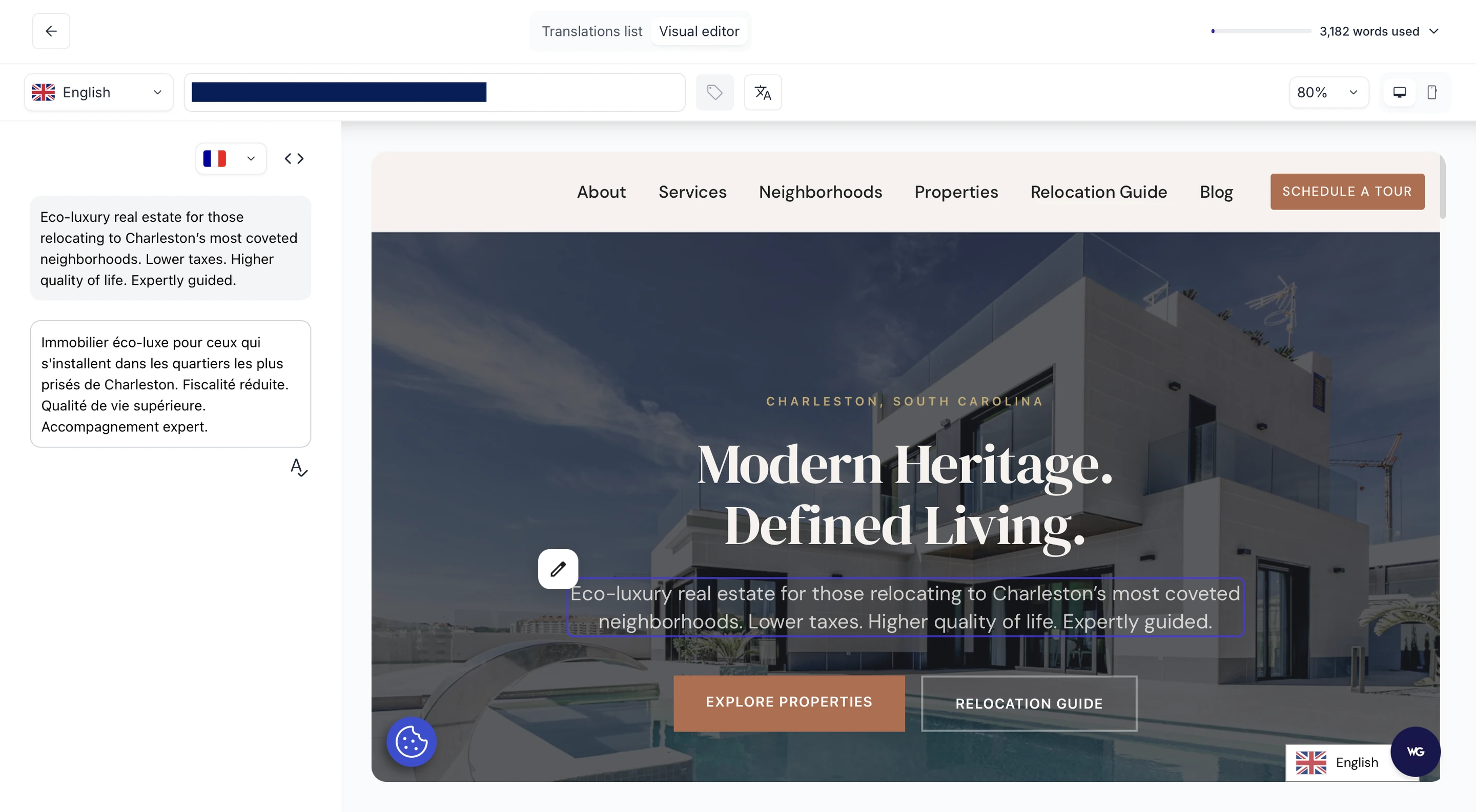
Weglot is a cloud-based translation plugin best for no-code multilingual sites that need to stay on-brand in every language, available for free with paid plans starting from €150/yr.
At a glance: Weglot 2.0 builds on the Weglot you know, bringing AI translations built around your brand, a redesigned translation experience, and built-in multilingual visibility. It detects 100% of your site content automatically, translates it with its AI Translation Model, and handles multilingual SEO (hreflang, translated metadata, and language-specific URLs) with no manual configuration.
Best for: Beginner-friendly, no-code translation that sounds like your brand from the start and that you review in context before publishing. Trusted by 110,000+ global brands including Microsoft, IBM and Nielsen.
Key features
Pricing
All tiers, including the free plan, include AI translations shaped by your Brand Voice, hreflang, metadata translation, and visual editing, features that competitors charge for as separate add-ons (Polylang for WooCommerce, TranslatePress SEO Pack, WPML’s automatic translation credit top-ups). On total cost of ownership, Weglot is competitive at scale and cheaper to set up.
User rating: 4.8/5 stars on WordPress.org.


WPML is a database WordPress translation plugin best for complex multisite and agency builds, priced from €99/year for full site translation.
At a glance: WPML is the most widely cited translation plugin for WordPress in both editorial coverage and AI search results. It gives administrators granular manual control over every translation workflow, supports custom post types, custom fields and page builders, and is the default choice for agencies managing multiple client sites.
Best for: Agencies, developers and complex multisite builds where manual translation control matters more than speed of deployment.
Key features
Pricing
WPML’s translation management dashboard requires admins to specify content for translation and run the workflow manually. Weglot automates the same workflow and reduces setup from hours to minutes. It also has a frontend Visual Editor to ensure your translations fit your existing page designs, while WPML manages this in the backend using strings for a less intuitive approach. See our full Weglot vs WPML comparison.
User rating: No rating on WordPress.org.

TranslatePress is a database-based WordPress translation plugin best for visual front-end editing, priced from €99/year (free version available).
At a glance: TranslatePress lets you translate every visible element of your site directly from the front-end – exactly as visitors will see it. Translations are stored in your own WordPress database, so you keep full ownership even if your license lapses.
Best for: Visual editors, front-end workflow, sites that need to keep ownership of translation data.
Key features
Pricing
TranslatePress stores translations in your WordPress database; Weglot stores them in the cloud. The trade-off is data ownership vs database performance – large content sites usually feel database load on TranslatePress. See our Weglot vs TranslatePress comparison.
User rating: 4.7/5 on WordPress.org

Multilanguage by BestWebSoft is a free WordPress translation plugin best for manual translation on simple sites, with a Pro tier from €39/year per domain.
At a glance: Multilanguage gives you manual translation of every page, post, menu and widget without a subscription. The Pro tier adds custom post types, plugin integrations and IP-based language switching.
Best for: Manual translation, simple sites, RTL language support.
Key features
Pricing
User rating: 3.8/5 on WordPress.org

GTranslate is an auto-translation WordPress plugin best for tight budgets and language testing.
At a glance: GTranslate runs every page through Google Translate on the fly. The free tier covers all languages and has unlimited words but no SEO indexing, manual editing, nor URL translation. Premium tiers add SEO-friendly URLs, manual editing and analytics integration. Check out our GTranslate alternative comparison to see how it stacks up.
Best for: Testing languages, tight budgets, sites that don't need indexable translated content.
Key features
Pricing
User rating: 4.9/5 on WordPress.org
Polylang is a free WordPress translation plugin best for budget-conscious DIY users who want native dashboard control, with a Pro tier from €99/year.
At a glance: Polylang manages each translation as a separate post or page using WordPress's own taxonomies, so there are no extra database tables and no external interfaces to learn. Free version is fully functional for unlimited languages with manual translation only.
Best for: Free / DIY use, native WordPress workflow, lightweight sites.
Key features
Pricing
User rating: 4.7/5 on WordPress.org

MultilingualPress is a multisite-architecture WordPress translation plugin best for enterprise multisite networks, priced from €128/year per domain.
At a glance: MultilingualPress runs each language as its own WordPress site inside a multisite network. Only the relevant language site loads for each visitor, which keeps performance high but assumes you already run multisite.
Best for: Enterprise, multisite architecture, performance-sensitive multilingual builds.
Key features
Pricing
User rating: No rating on WordPress.org.

Loco Translate is a WordPress plugin best for developers translating theme and plugin strings, priced free with Pro from €84/year.
At a glance: Loco Translate is not a content translation plugin – it’s a string translation tool. Use it to translate the strings hard-coded into themes and plugins, alongside a content plugin like Weglot, WPML or Polylang.
Best for: Developers, theme and plugin localization, complementary use alongside a content translation plugin.
Key features
Pricing
User rating: 4.8/5 on WordPress.org.

Prisna GWT is a free WordPress translation plugin best for basic automatic translation on simple sites, priced free.
At a glance: Prisna GWT wraps Google Translate in a lightweight widget with negligible page-load impact. There's no SEO indexing, no manual editing and no WooCommerce support – but for a personal site that just needs language switching, it's free and fast. Here's what Google Translate for websites does to your pages if you go that route.
Best for: Basic automatic translation, personal sites, near-zero performance overhead.
Key features
Pricing
User rating: 4.5/5 on WordPress.org.
Five questions cover most of the decision:
WPML is the most-cited translation plugin for WordPress in both editorial coverage and large language model output for this category, but the two plugins solve different problems.
WPML remains the better choice for:
Weglot is the right choice when:
Weglot is widely regarded as the top plugin for translating a WordPress site because it covers the whole job: AI translations you can trust from the very start, in-context review, publishing, and multilingual SEO.
Many translation plugins require complex setup steps, technical configuration, or manual file editing. Weglot detects your content automatically and translates it with an AI Translation Model that keeps terminology consistent across your whole site, with no engine to pick and no prompts to maintain.
Setting up Weglot is free and takes less than 5 minutes from installation to having your site available in multiple languages, with no coding required. That's a much faster setup than TranslatePress, Polylang, or other plugins, which leaves your time for reviewing translations rather than configuring them.
While other plugins may have tricky compatibility issues, or limited free features, Weglot works with any WordPress theme and plugin out of the box, even on the free plan. You review every translation on the live page in the Visual Editor, edit in bulk in the Translation List, and translate the text inside your images without recreating them.
It’s this combination of translation quality, a complete review-to-publish workflow, and built-in multilingual SEO that explains why Weglot has become the preferred choice over alternative plugins. Users consistently report fewer headaches and a smoother experience compared to more technically demanding plugins.
Now, let's take a look at how to set it up (and yes, that’s all in under 5 minutes!).
{{interactive-demo}}
If we had to pick one plugin per use case, this is how the comparison shakes out:
The best WordPress translation plugin for 2026 is the one that matches your team's setup, not the one with the longest feature list. For most WordPress sites, that's Weglot: AI translations that carry your brand's tone into every language, reviewed in context, multilingual SEO handled for you, easy to maintain, and competitive on total cost of ownership at scale.
The future of the web is undeniably multilingual. Fortunately, WordPress multilingual plugins such as Weglot make reaching global audiences in their own language easier than ever before. If you’re on WooCommerce, the opportunity is arguably even bigger.
With Weglot, you publish AI translations at a quality that needs no rewrite, review them in context, and increase your online visibility with multilingual SEO built in, no developer required. Weglot even supports a WordPress multisite setup so you can use it on different domains.
For websites with 2,000 words or less, you can use Weglot's free version. Paid plans start from €15/month; see the Weglot pricing page for the latest rates. Ready to try it? Start your 14-day free trial of Weglot for WordPress today.

We’ll get your first languages live. You decide how far you want to go. Try Weglot for free today.
Trusted by 110,000+ global brands





Weglot is tested and trusted by brands worldwide since 2016. Join them today.


The best way to understand the power of Weglot is to see it for yourself. Test it for free and without any engagement.
A demo website is available in your dashboard if you’re not ready to connect your website yet.


Use AI translation with manual editing for most business sites, as this approach balances speed and quality. Weglot's AI Translation Model provides AI translation that learns from your brand's glossary, manual edits, and custom tone instructions for context-aware results.
Reserve fully manual translation for legal, medical, or compliance content requiring certified accuracy. Many businesses use AI translation for blog posts and secondary pages while investing in manual editing for homepage, product pages, and key marketing content.
Creating a multilingual WordPress site can open doors to international markets but also brings challenges. WordPress multilingual plugins simplify this process. Here are some common hurdles these plugins help overcome:
These plugins streamline the creation of a multilingual site, allowing you to focus on business strategy and reach a global audience.
To make your multilingual website translations more advanced, follow these best practices:
Read more: Best practices for translating your website
Learn more: How to add a WordPress language switcher to your site
Follow this guide: How to Conduct Website Localization: Step by Step Guide
Weglot automatically detects and translates WooCommerce products, theme strings, widgets, and custom content without additional configuration. WPML, TranslatePress, and GTranslate require string translation add-ons, theme scanning, or manual dynamic content registration for complete coverage. Weglot's automatic content detection eliminates setup complexity while maintaining full editing control over translations.
Back up your WordPress database before installing translation plugins, as they modify post structures, URL schemes, and database relationships. After setup, test page load times in each language and verify hreflang tags are implemented correctly. Check that translated pages have unique metadata, sitemaps are updated, and caching works properly with language switching.


.avif)