

Try Weglot for free


.avif)


WooCommerce powers millions of active stores worldwide, making it the most widely used ecommerce platform for WordPress. So, when store owners decide to go multilingual, WPML is an established, well-documented, first-pick for many. However, while it does have WooCommerce support, the reality for some is more complicated.
Getting WPML to work with WooCommerce isn't a one-plugin install. Many store owners find sticking points once the store is live and content starts changing. Let's cover some of the most common WPML WooCommerce problems, where they come from, and what a multilingual WooCommerce store without that overhead looks like.

Standard WPML handles WordPress posts and pages because it's built for editorial content, and not necessarily ecommerce setup.
Of course, WooCommerce introduces an entirely different content structure: products with variable attributes, dynamic checkout flows, customer-facing transactional emails, taxonomy-driven category and filter pages, and pricing logic that may need to change by language or currency.
These capabilities extend beyond the scope of the core WPML plugin. To translate a WooCommerce store, you need to install the WPML WooCommerce Multilingual and Multicurrency add-on to WPML, which covers a lot:
Each are areas of WooCommerce's functionality that needs configuration inside a separate plugin layer. As a reminder, this is the two-plugin minimum. If your store uses plugins such as Advanced Custom Fields, media that varies by language, or an SEO plugin such as Yoast SEO, you need additional WPML add-ons for each.

The result is an architecture where each additional plugin increases potential risk. Furthermore, WPML may need to 'catch up' when WooCommerce releases an update. When themes or additional plugins store content in custom tables or serialized fields, WPML needs precise configuration to find and translate that content too.
It's important to note that WPML isn't a bugged plugin, or poor quality. It has millions of users, brand longevity, and remains one of the most popular WordPress translation plugins.
However, there are a few issues that crop up when using it alongside WooCommerce. Also, the complexity of your store, coupled with a greater frequency of content changes over time, means they could appear more frequently.
Understanding what each one looks like (and why it happens) also points towards a potential solution that doesn't require this level of management.
Variable products are one of the most widely used WooCommerce product types, but is one of the most difficult to keep in sync across languages with WPML.
In WooCommerce, variable products are built from a parent product and a set of attributes, typically defined globally and assigned to individual products. WPML's WooCommerce add-on treats attributes and product variations as separate translatable entities from the parent product. Each needs to be translated and maintained independently.
When attributes are defined inconsistently across a catalog (maybe some as global attributes and others added directly to individual products), WPML handles them differently. The result is a catalog that gradually diverges across languages as products are created and updated:
What makes this harder to manage is the update behavior. Changing a variable product in the source language doesn't cascade to existing translations, so you have to locate the specific product and manually trigger a re-sync in WPML. What's more, there's no notification when a translation is out of date and no visual indicator flag.
Over time, with a catalog that changes regularly, the gap between what the source language shows and what translated versions show widens without anyone necessarily noticing until a customer reports it.
The checkout experience is where a multilingual gap can cost you most. A customer who has browsed in their own language and added items to their cart expects the same experience right up to the order confirmation screen. So every element needs to appear in the right language.
With WPML, none of that is included in the product page translation workflow. It's handled separately through a different tool, and it doesn't update automatically when the source content changes.
In addition, checkout button labels, payment gateway display text, terms and conditions links, cart page headings, and field placeholder text are all dynamic strings in WooCommerce, but aren't stored as post content.
Instead, they're generated by WooCommerce's PHP functions and registered as translatable strings through WordPress. WPML surfaces these through WPML String Translation, a separate admin interface within WPML.
Finding and translating all the strings a WooCommerce checkout generates means three things:
When WooCommerce updates and re-generates these strings for point releases, translations don't carry forward automatically. WPML 4.9 does bring some improvements to automatic string translation, but you still have the underlying architecture of managing checkout strings separately from content translation.
Order confirmation emails, shipping notifications, and refund notices are each separate from the standard translation workflow. These are WooCommerce email templates, and WPML requires you to translate each template separately using the String Translation interface.
Unlike product descriptions, where you at least have a visible translation status, email templates give you no automatic indicator for edited sources where the translated version is out of date.
As such, a store that adds an updated returns policy or a discount code to its order confirmation will have that change go live in the default language while translated versions continue to show the previous content. Of course, this is until someone manually notices and re-translates.
Category and tags are how customers browse by product type, so these taxonomy pages earn rankings in search results for non-branded, category-intent queries in each target language.
In reality, a customer searching "women's running shoes" in French will land on your French category page first. If the page doesn't have its own translated URL, it won't appear in the results.
WPML treats taxonomy translation as a separate workflow from product and page translation. Category slugs, descriptions, and metadata each need to be translated through dedicated screens before you get into the associated products. What's more, there are no flags for whether the categories those products belong to have been translated (or any automatic detection).
In practice, visitors who arrive on a correctly translated product page can click through to a page that doesn't have a translated URL, falls back to the default language, or returns an error.
Filter widgets and navigation elements that draw from taxonomy data (such as sidebar filters, attribute drop-down menus, and breadcrumbs) pull untranslated values in secondary languages even when product pages look correct.
WPML maps every piece of content to its translated equivalent through additional joins and lookups within the database on every page load.
While this is manageable for WordPress content, it's a strain for WooCommerce. This is because the WPML add-ons build its own translation-mapping layer on top of the existing architecture. WooCommerce's own product and taxonomy queries run alongside both.
As an example, WPML's own support forums showcase a store with over 50,000 products and 15,000 categories that generated more than 15,000 SQL queries for every admin page load.
This was traced specifically to WPML's cache population function running a separate query for every product category. In real terms, anyone logged in (both staff and visitors) struggled with performance lag within the store's admin screens.
Adding further WPML plugins to the stack could increase these query loads and server response times, depending on your site. For stores where Core Web Vitals scores affect both search rankings and conversion rates, it's meaningful.
Performance-oriented stores running WPML typically need server-level optimization, including object caching, to keep response times in check. This is something only just addressed in WPML's latest releases.
In a nutshell, manual translation issues will catch out every WPML WooCommerce store eventually. This is workable while your catalog is defined and stable. However, it becomes unmanageable as the store grows, for a few reasons:
Without a developer or dedicated translation manager, secondary language versions of a store can fall weeks behind the default language, with no visible flags in WordPress other than customers seeing an incomplete or out-of-date store.
This is where Weglot customer and flash-sale fashion platform The Bradery saw a difference. The manual overhead of keeping translations current with hundreds of new products arriving daily made a solution requiring per-item triggers unworkable. With Weglot, The Bradery translates more than 500 products per day and has saved over 100 hours in manual translation work.
A multi-plugin minimum, fragmented admin interfaces, manual triggers at every step, and a performance cost that grows with your catalog are all structural issues within WPML. This means they don't go away through setup tweaks. It's where Weglot takes a different approach.
"We'd previously encountered compatibility issues with other translation solutions, but with Weglot, everything ran smoothly. We've seen significant increases in traffic since translating our site."
Kim Martin, Senior Communications and Marketing Officer, TCI
Rather than maintaining separate translation layers for each content type, Weglot operates at the rendered output level. Weglot detects all text regardless of whether it came from a product template, a checkout block, a transactional email, or a category page.
What's more, Weglot continuously syncs with your store to detect and translate new or updated content for translation. So, revised descriptions, updated pricing copy, and new category pages are all instantly translated without manual effort.
Language-specific URLs and hreflang tags get an automatic setup after install, too. This also goes for translated metadata, such as product page titles, meta descriptions, and category descriptions.

As for working with that content, the translation status for all content types and languages is mostly visible in a single dashboard. While there are some separate screens for various functionalities, you can work with checkout strings, taxonomies, and other content from one screen.
You can even use Weglot's Visual Editor to review and edit translations in context before you go live:
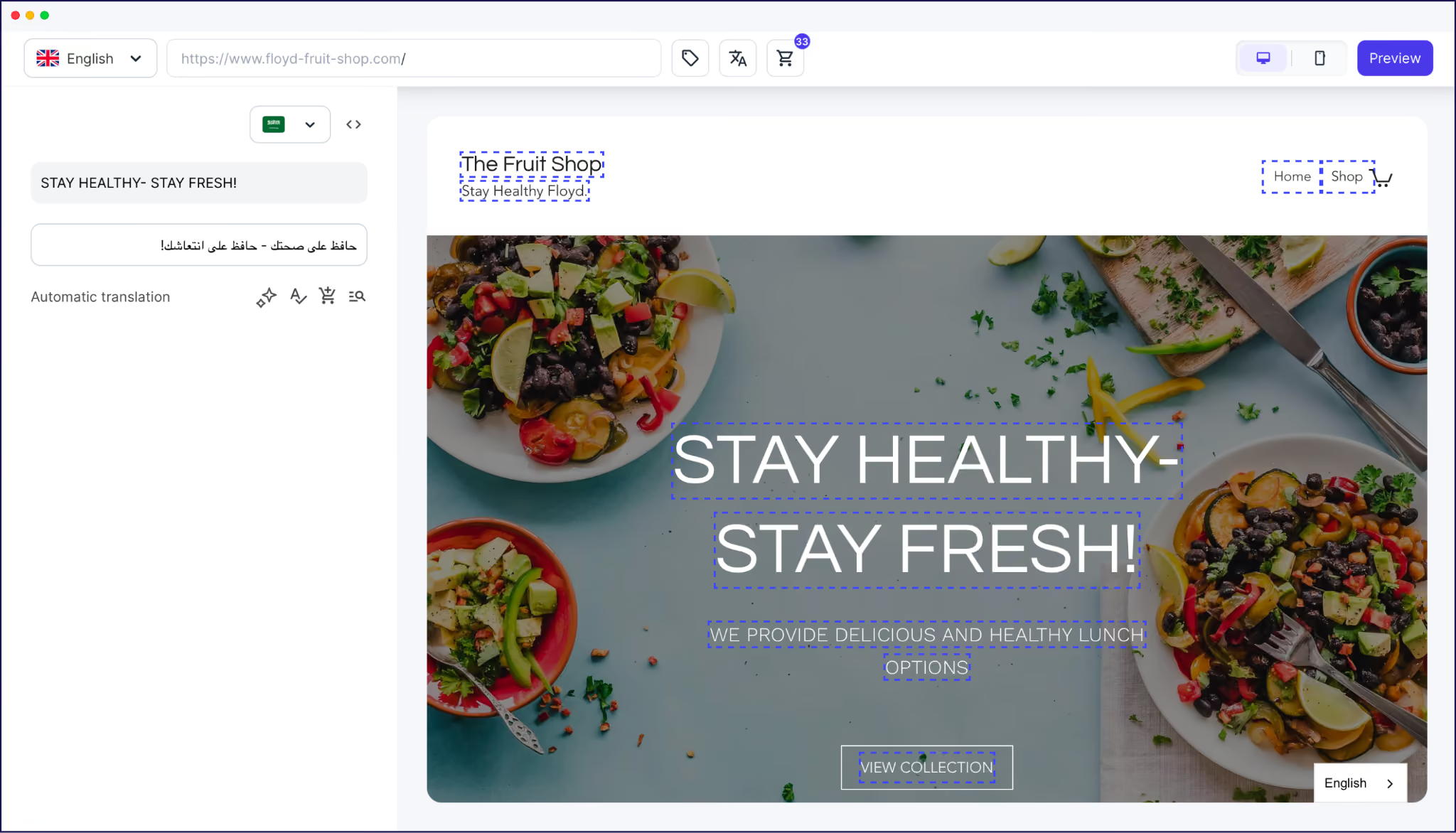
Finally, for stores where terminology consistency matters, Weglot's AI Translation Model learns from your glossary rules, manual edits, and custom instructions. Product-specific terminology and brand voicing apply across your entire catalog rather than only on individual pages, to give you on-brand translations from the get-go.
Setting up Weglot on a WooCommerce store takes a few minutes and requires no developer involvement.
Weglot scans your entire WooCommerce store, generates a first AI translation layer across every selected language, and pushes it live.
Note, if you’re currently a WPML user, you can also follow along with our dedicated WPML migration guide.
You'll also spot a language switcher on the front end, which will assist visitors in choosing the correct language. However, its position and appearance are configurable under Weglot > Settings > Language Switcher.

From your Weglot Dashboard, you now have a few different paths to take:
There's plenty more that Weglot offers, and the Help Center can show you through its resources, documentation, and even the Weglot Academy.
The complexity of using WPML with WooCommerce stems from the different requirements of content translation and ecommerce management, rather than from any limitation of either product.
WPML's architecture layers are manageable in isolation, but adds overheads at every step. It's a maintenance commitment that grows harder to sustain as your catalog expands.
If you add new products often, run variable attributes across multiple markets, or want translated versions of your store to stay current without ongoing manual oversight, these overheads could impact your multilingual business strategy.
However, Weglot makes going multilingual much easier thanks to its automatic and complete content detection, along with a translation workflow that stays current.
Start your 14-day free Weglot trial and see your WooCommerce store in a new language in minutes.

We’ll get your first languages live. You decide how far you want to go. Try Weglot for free today.
Trusted by 110,000+ global brands





Weglot is tested and trusted by brands worldwide since 2016. Join them today.


The best way to understand the power of Weglot is to see it for yourself. Test it for free and without any engagement.
A demo website is available in your dashboard if you’re not ready to connect your website yet.


No. Translating a WooCommerce store requires the WPML WooCommerce Multilingual and Multicurrency add-on alongside the core WPML and String Translation plugins. You need additional add-ons for media translation, Advanced Custom Fields, and SEO plugin integration.
Typically, this stems from how attributes were created in WooCommerce: global and product-level attributes are handled differently by WPML. Inconsistencies that build up across a catalog are difficult to unwind and usually require standardizing attributes, or in some cases, rebuilding affected products.
Not necessarily, but the reality is nuanced. There's a negligible impact for small stores, but the additional query load from WPML's translation mapping can hinder larger ones. This is where server-level optimization (such as object caching) is optimal.
Yes! You can export your WPML translations in various formats, install Weglot, run a URL scan, and import. Weglot matches previous translations immediately, and your glossary transfers the same way.
Checkout pages, cart pages, and transactional email templates are all detected and translated through the same automatic process as product and category pages. There's no separate workflow or manual trigger required.


.avif)