Try Weglot for free




WPML is a historical WordPress translation plugin that users like for its versatility, multilingual SEO capabilities, and low-cost annual pricing.
It can work well for small projects, but the demands WPML places on your WordPress back-end can make scaling difficult.
If you’re struggling to scale your site with WPML, it might be time to switch.
In this article, you’ll learn what makes Weglot the right choice for your site, how to quickly migrate your translations, and what to do once you’ve migrated.
WPML and Weglot share some capabilities, which is part of what makes migration straightforward. Both offer AI-powered translations, centralized translation management, and the ability to outsource to professional translators.
But Weglot also has several powerful features that few other WordPress translation plugins can match. Here are the benefits users can expect to see when using Weglot as a WPML alternative:
Many businesses have already migrated from WPML to Weglot, like WordPress agency Baltazare. As Guillaume Vergano, founder of Baltazare, explains:
“Like many WordPress agencies, we first started using the WPML plugin to create multilingual sites, but we quickly needed a less complex, easier-to-use, and more efficient solution.”
Baltazare has already created more than 20 multilingual WordPress sites with Weglot, with many more in the works.
There’s no automated way to migrate from WPML to Weglot (yet), but the process is quick and simple.
Here's a quick rundown in video form:
And here’s a step-by-step process that even non-technical users can follow to migrate their multilingual WordPress site.
Don’t let your existing work go to waste by exporting your WPML translations. Customers on Weglot’s Advanced plan or higher can use the translation import feature to upload them again after migration.
Head to WPML’s Translation Management module and use the XLIFF export option to export translations for each language.
Next, remove WPML from WordPress to avoid both plugins managing your multilingual URL structure simultaneously.
Here are the steps to follow:
You can now install and configure Weglot on your site.
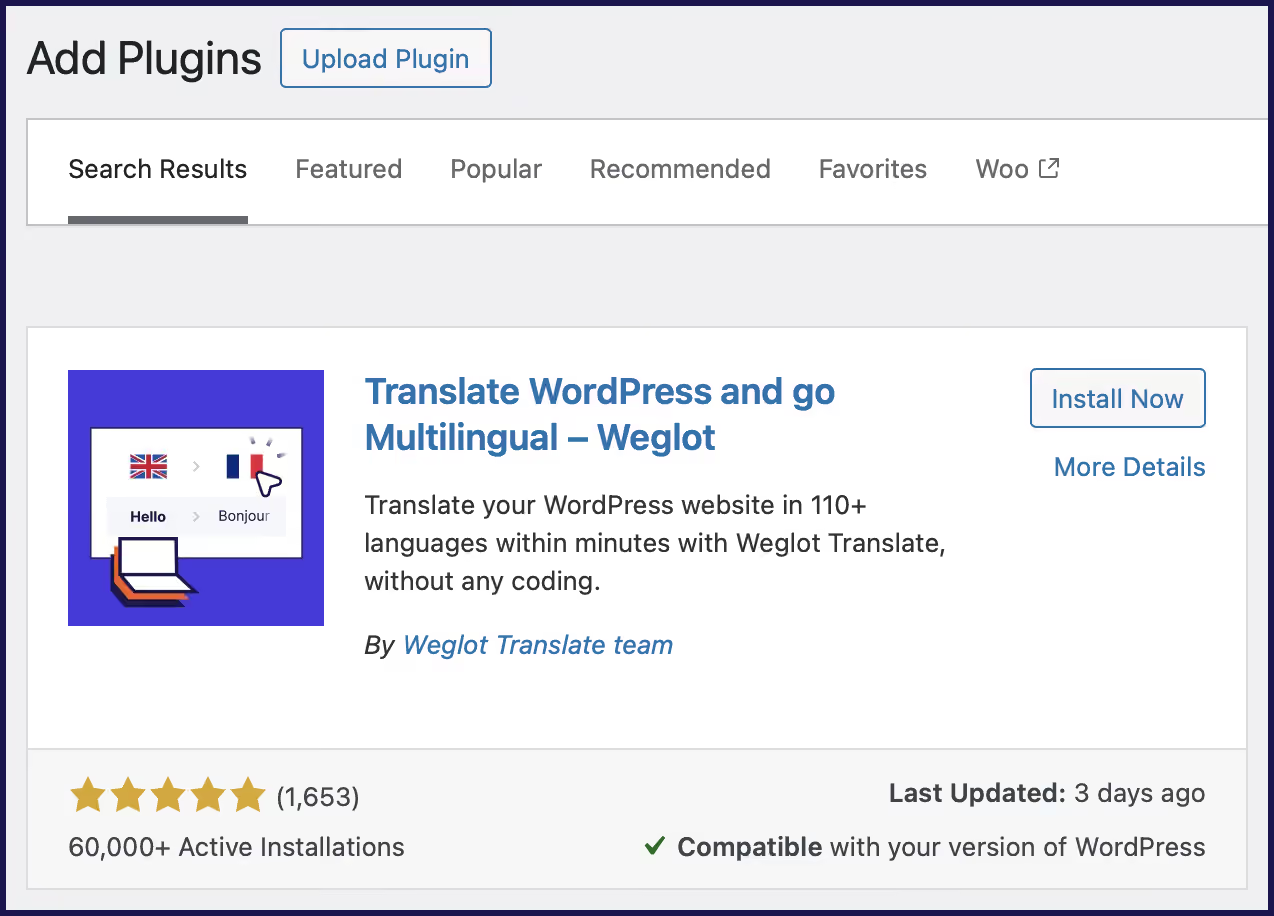
Start by finding the plugin on WordPress, installing it, and activating it. It looks like the image below:
Next, create a Weglot account.
Create and copy your API key provided to you, then add it to Weglot’s settings panel in your WordPress admin.
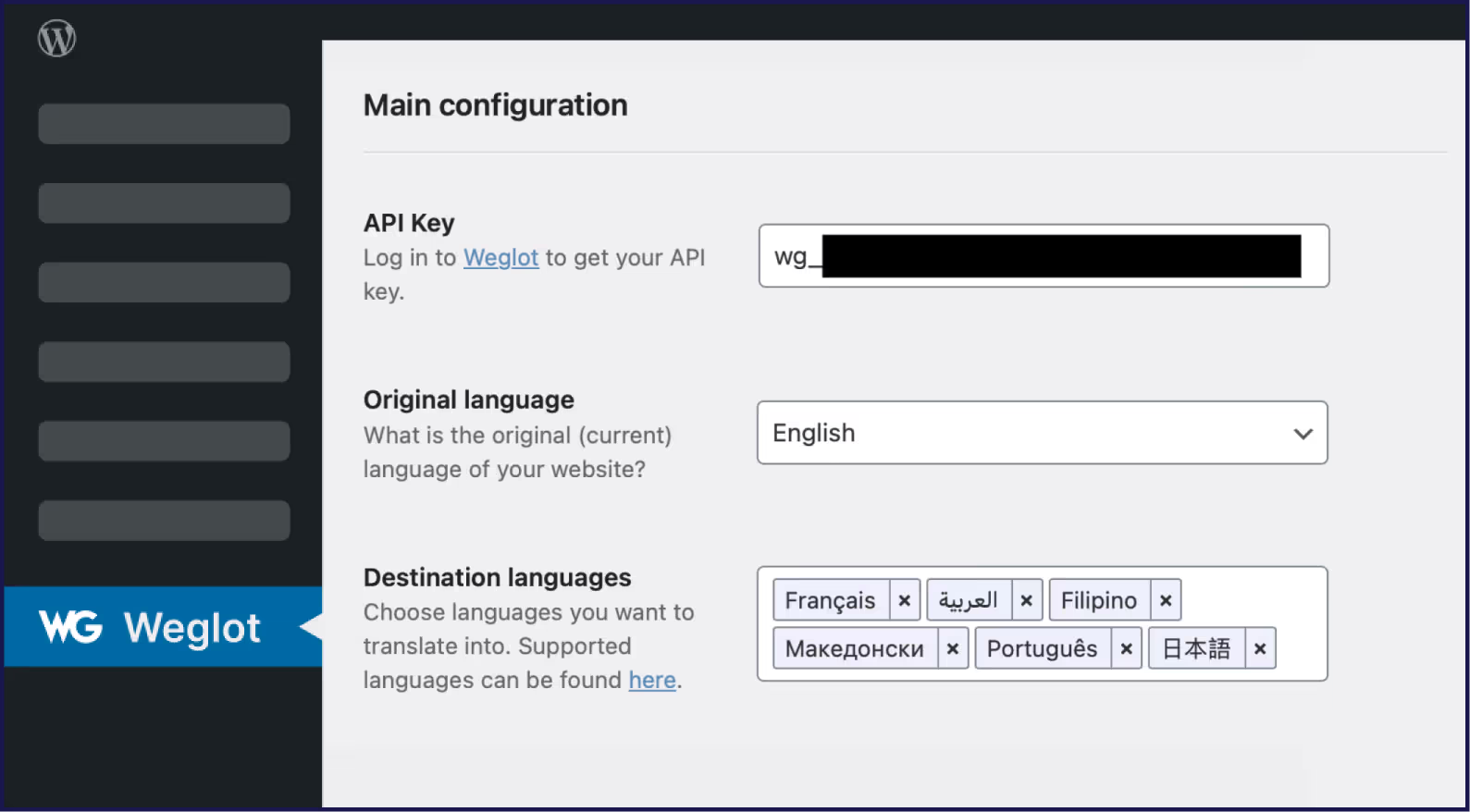
Select your site’s original language (the one it’s currently written in) and the destination languages (the ones you want to translate to).
Finally, choose either a subdirectory (yoursite.com/fr) or a subdomain (fr.yoursite.com) URL structure. While subdirectories tend to be better for multilingual SEO because they consolidate link authority, choose the format you were using in WPML.
Once installed and configured, Weglot will start translating your content using AI.
While Weglot will do this automatically, you can also import your existing WPML translations. Here’s how to do it:
If you notice Weglot missed a page for any reason, use the URL scan feature found on the Translations > URLs page.
You can request Weglot to scan your website and manually enter any URLs it missed.
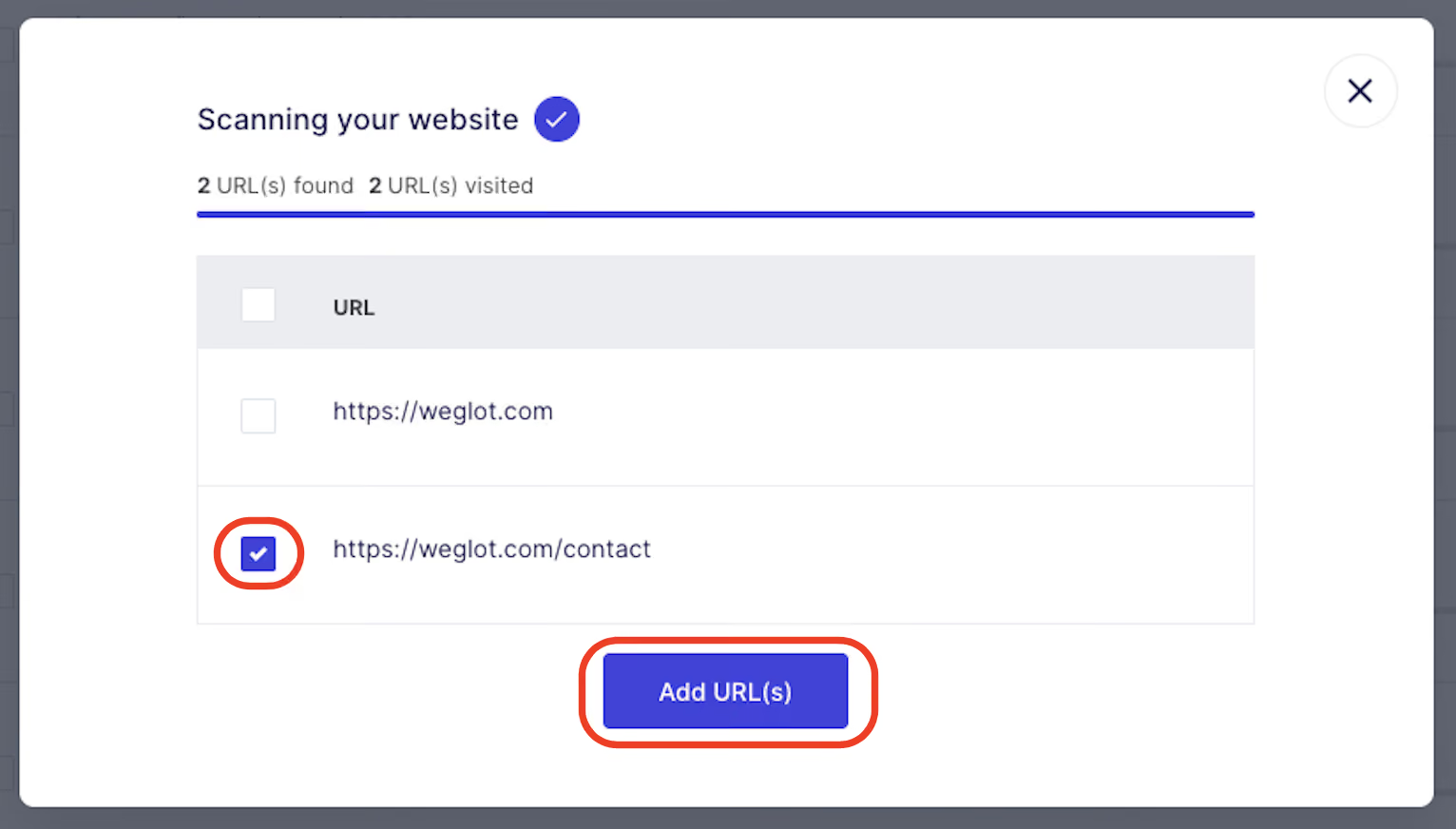
This feature is particularly useful for translating pages several layers deep from your homepage.
You can review and refine translations using Weglot’s visual editor and translation list, or invite team members or professional translators through the dashboard.
Here’s what the in-context Visual Editor looks like:
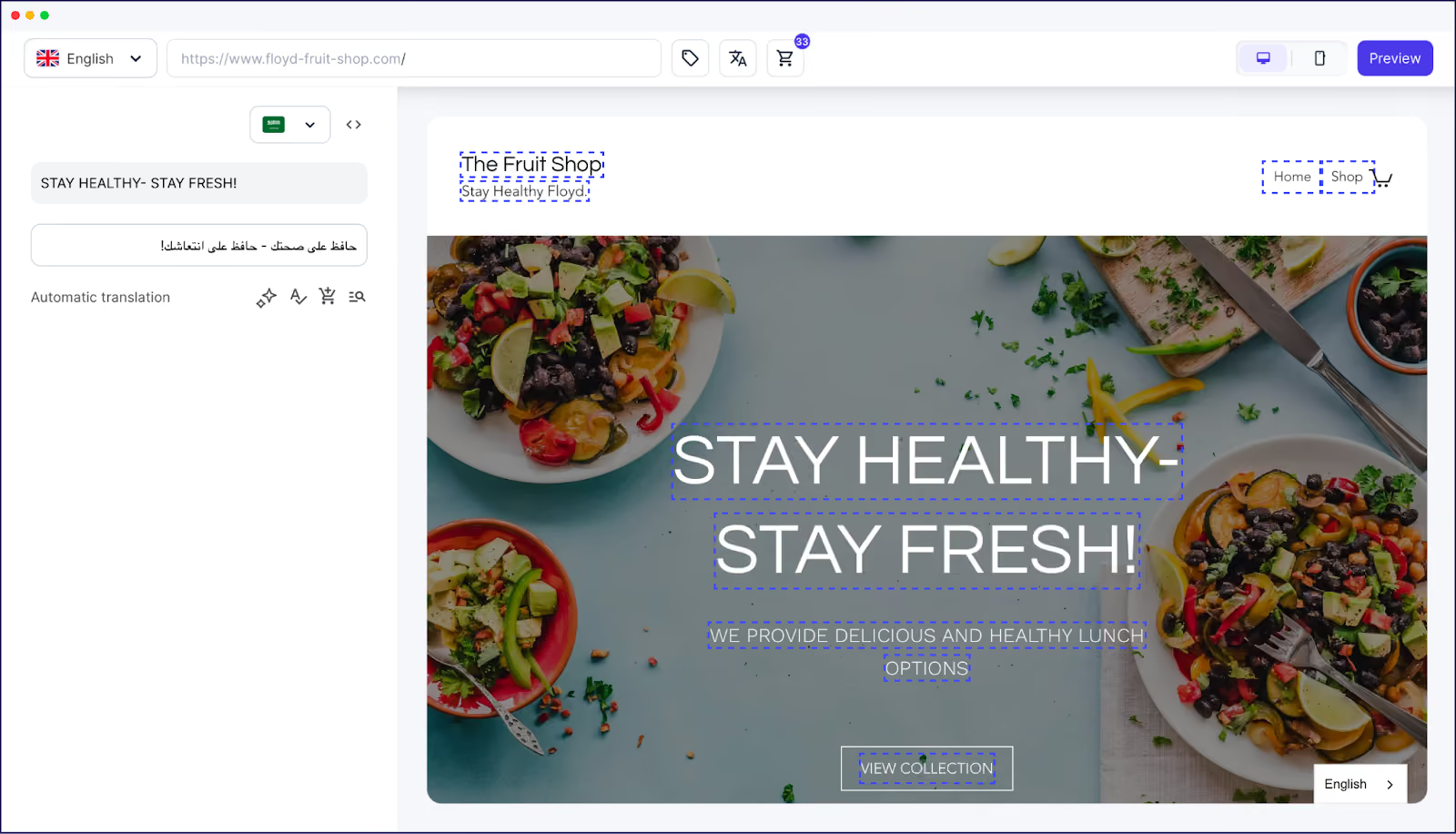
If you’re importing your WPML XLIFF translations, do so before a manual review, as it will pre-populate your existing translations and significantly reduce editing time.
If you used a glossary in WPML to govern the way specific words or phrases were translated, you can import your terms into Weglot, too.
Doing so will ensure brand terms, product names, and other important phrases are translated consistently going forward.
Navigate to your project in the Weglot dashboard, then Glossary > Actions > Import. Download the Weglot glossary template, add your terms, and re-upload it.
Whether you’re changing themes, hosting providers, or plugins, any major upheaval to your site can impact its performance.
Use the following checklist to ensure the migration to Weglot was successful, and your site continues to function as normal.
Migrating to Weglot shouldn’t impact your site’s performance. But if something looks wrong, Weglot’s support team is on hand to help customers throughout the migration process.
After a successful migration, you can look forward to Weglot improving the speed and quality of your translations.
Here are three ways we recommend you start using the software.
Compared to WPML’s ‘Translate Everything Automatically’ mode, which requires a multi-step configuration process, automatic content detection on Weglot is as simple as clicking a button.

Weglot’s content detection technology automatically translates all content, from posts to ecommerce products to popups, as soon as you hit publish.
Because Weglot is compatible with every CMS, this includes any content you add to your site via an external source, such as a lead gen form or an email response.
Automatic content detection and translation means you can rapidly launch products in multiple markets.
For example, French cosmetics brand Polaar uses Weglot to launch new products in local markets without putting pressure on internal teams or third-party translators. It also reassures them that even small modifications to a product page are reflected across all languages.
Use Weglot’s AI-powered website translation to improve the translations you imported from WPML.
Weglot connects to leading translation providers like DeepL, Google Translate, and Microsoft Translator, using the best model for your specific language pair to ensure maximum accuracy.
Refine these translations even further with Weglot’s AI Language Model. Powered by OpenAI and Gemini, the model learns from your guidelines, tone of voice, target audience, glossary terms, and custom rules to deliver brand-aligned translations.
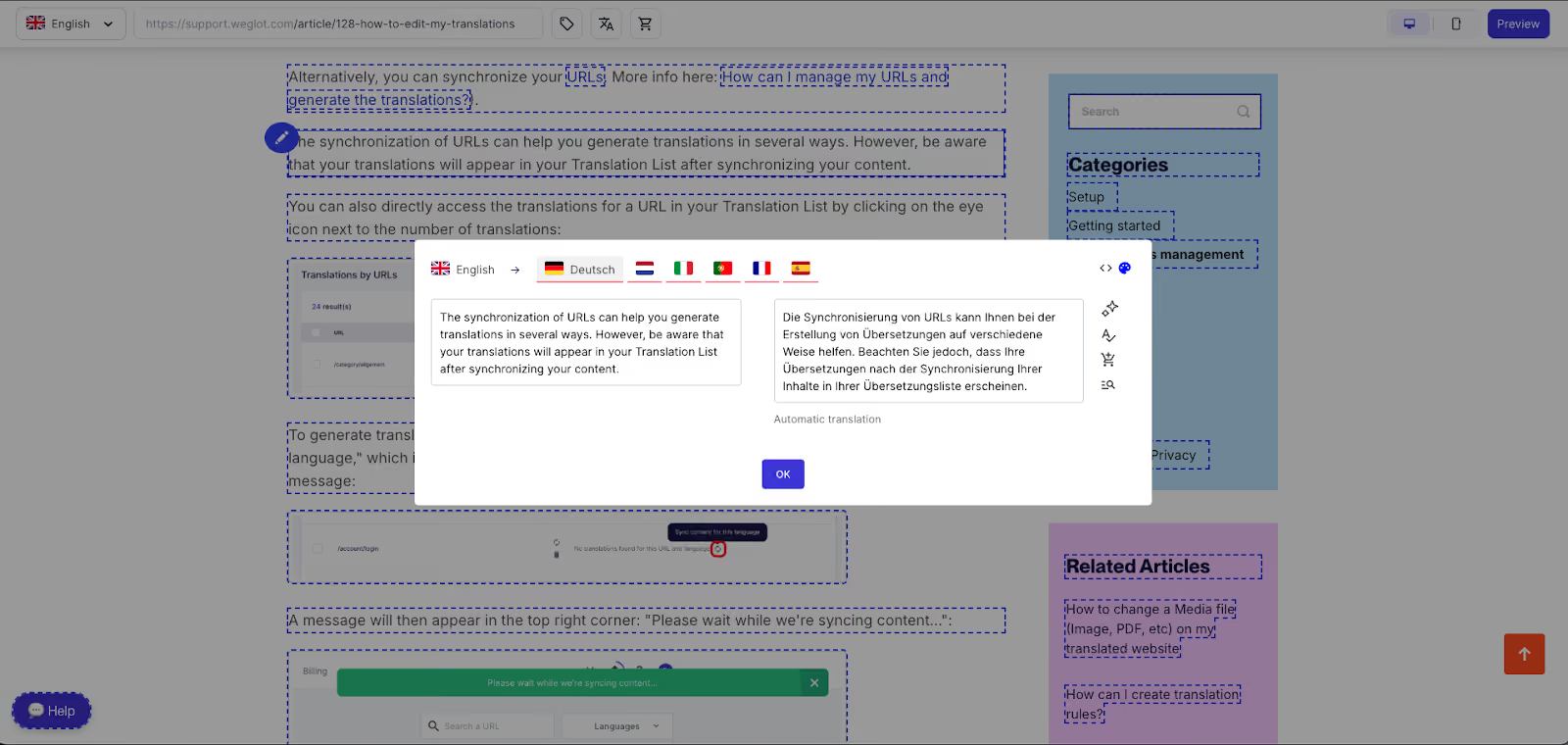
If you need to dive in and edit translations further by hand, Weglot’s Visual Editor lets you make in-context edits while browsing your site.
You can make the tweak yourself or ask AI to suggest an improvement by clicking the icon with two stars shown in the image below:
For pages like your privacy policy, terms and conditions, and other legal content where you might be more comfortable with a human-reviewed translation, Weglot lets you outsource the work to Textmaster, a leading professional translation platform.
Once your translated content comes back, Weglot automatically adds it to your site.
However you review or edit translations, you can manage everything in Weglot’s dashboard:
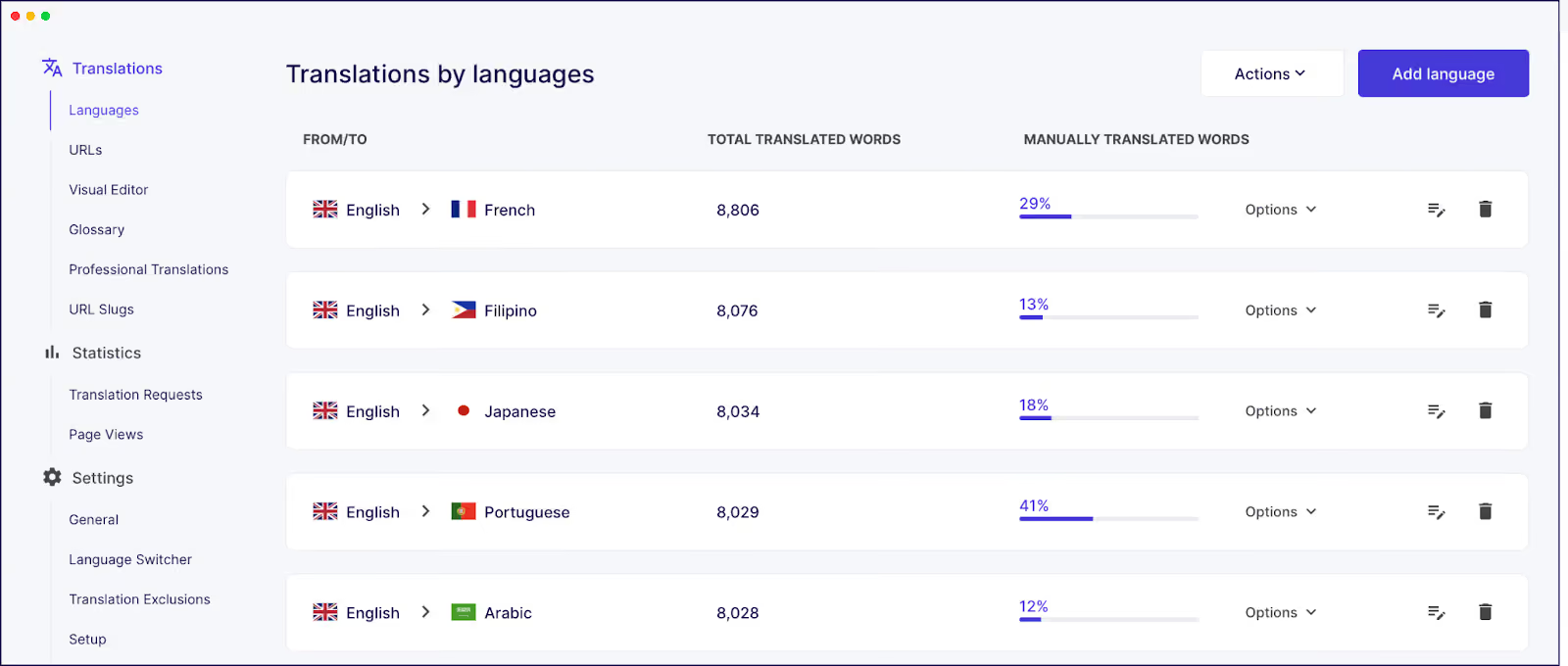
The seamless editing workflow means anyone can edit your translations, even if they don’t have access to your WordPress dashboard.
For example, Napta, a resource management platform, hires freelance SEO experts to tweak their translations. Napta starts by writing and optimizing content in the original language and letting Weglot translate it.
SEO experts can then further optimize the content in context to boost local traffic. The results have been impressive, with Napta experiencing a 4x increase in German traffic.
Weglot gives you the tools to build a complete localization strategy that personalizes your content for international audiences.
The plugin automatically translates all your customer-facing content and media files, including conversion points such as lead-generation forms, pop-ups, and email confirmations, without you having to juggle multiple plugins.
Weglot automatically adds a language switcher to your site, so visitors can easily navigate between languages without extra setup. Alternatively, you can enable auto-redirection so customers always see the correct version of your site based on their browser language.
For example, Scandinavian home scenting brand Volant uses Weglot to grow its presence across European markets. By localizing its website and speaking to customers in their native language, the team saw a +39% increase in international revenue.
For Volant, translating content wasn't just about accessibility. It helped them tell their story more effectively and connect with customers in each market.
If WPML’s complexity is slowing down your site and stopping you from scaling to new markets, consider switching to Weglot.
Customers who have already made the move say that Weglot is easier to use, more reliable and better performing. No wonder over 60,000 WordPress sites and agencies trust us to translate their websites.
Ready to see firsthand how easy it is to migrate from WPML to Weglot? Try the 14-day free trial today.

We’ll get your first languages live. You decide how far you want to go. Try Weglot for free today.
Trusted by 110,000+ global brands





Weglot is tested and trusted by brands worldwide since 2016. Join them today.


The best way to understand the power of Weglot is to see it for yourself. Test it for free and without any engagement.
A demo website is available in your dashboard if you’re not ready to connect your website yet.