Try Weglot for free




Thinking about translating your website using Claude MCP? It's totally doable. It might even be the best route for your business.
With Claude's language skills, connections to your website via MCP, and the right instructions, you can build a genuinely capable, largely automated translation workflow.
But translating a whole website well takes more than swapping words. There's SEO to protect, a brand voice to maintain, layouts that can break when text gets longer, media to swap, and quality to check across every language.
So, let's be honest about all of it. We'll walk through the ideal Claude MCP translation workflow step by step, so you can build it yourself if you want to. By the end, you'll know exactly what that setup takes to run and maintain – and everything you'd be taking on yourself instead of using a dedicated website translation tool.
When Claude MCP translates a website, it's 3 things working together:
That combination is what lets you dodge the copy-paste marathons you might get when translating a site with ChatGPT – or even just with Claude's general chat window.
On MCP compatibility: Claude can plug into tools that offer an MCP server (e.g., Webflow has one), or work directly with your site's code files (repo) when a platform doesn't. MCP moves fast, so check Claude's connector directory for the latest on what and how it connects.
One thing to keep in mind, however, is that while MCP gives Claude a standardized way to interact with your CMS, it doesn't guarantee full localization capabilities. What Claude can actually create, edit, publish, or localize depends on the tools exposed by your CMS's MCP server.
Genuinely good, with a caveat.
Claude handles nuance, idiom, and brand tone impressively well. It topped the industry's 2024 WMT translation benchmark, and it's stayed near the front of the field since.
But that doesn't mean every translation will be equally strong. Performance still varies by language pair and translation direction, so test the languages that matter to you and have a native speaker confirm if it's good as-is, workable, or not worth pursuing.
Then there's scale. With MCP handling the connection, you can apply that quality across your entire live website, page after page. That scope is what makes Claude viable for a real site and not just the odd paragraph.
So yes. Translating with Claude is both possible and viable. The rest of this guide is about doing it well, to the standard any visitor would expect from a proper business website.
Still on the Claude route and happy with your decision? Here's the version we'd recommend, made as simple as possible. Follow it in order. As the steps stack up, you'll also get a clear picture of everything a quality translation setup involves.
Start by forming the brief that'll guide everything Claude does.
Create a markdown file (e.g., translation-brief.md) and write your core instructions in it: which languages you're translating into and your key rules, such as preserving your HTML and keeping product and brand names in the original language.
This file is your master prompt. You'll add business context, tone, translation rules, and SEO requirements to it over the next few steps.
Here's a solid, easily adaptable starting prompt to drop at the top:
Treat this as a starting point. Swap in your own languages and rules. For example, you could add "always translate multilingual SEO in French as 'SEO multilingue'". Then, add more detail as you work through the next steps. In our experience, the teams that get the best results are the ones that front-load this detail. Claude is only ever as good as the brief you give it.
How you connect to Claude depends on where your website content lives.
If your platform already has a connector or MCP server, start there. Webflow, for example, offers its own MCP server, so Claude can work with your site through that connection instead of you manually moving text in and out.
Check Claude's connector directory to see what's available for your setup.
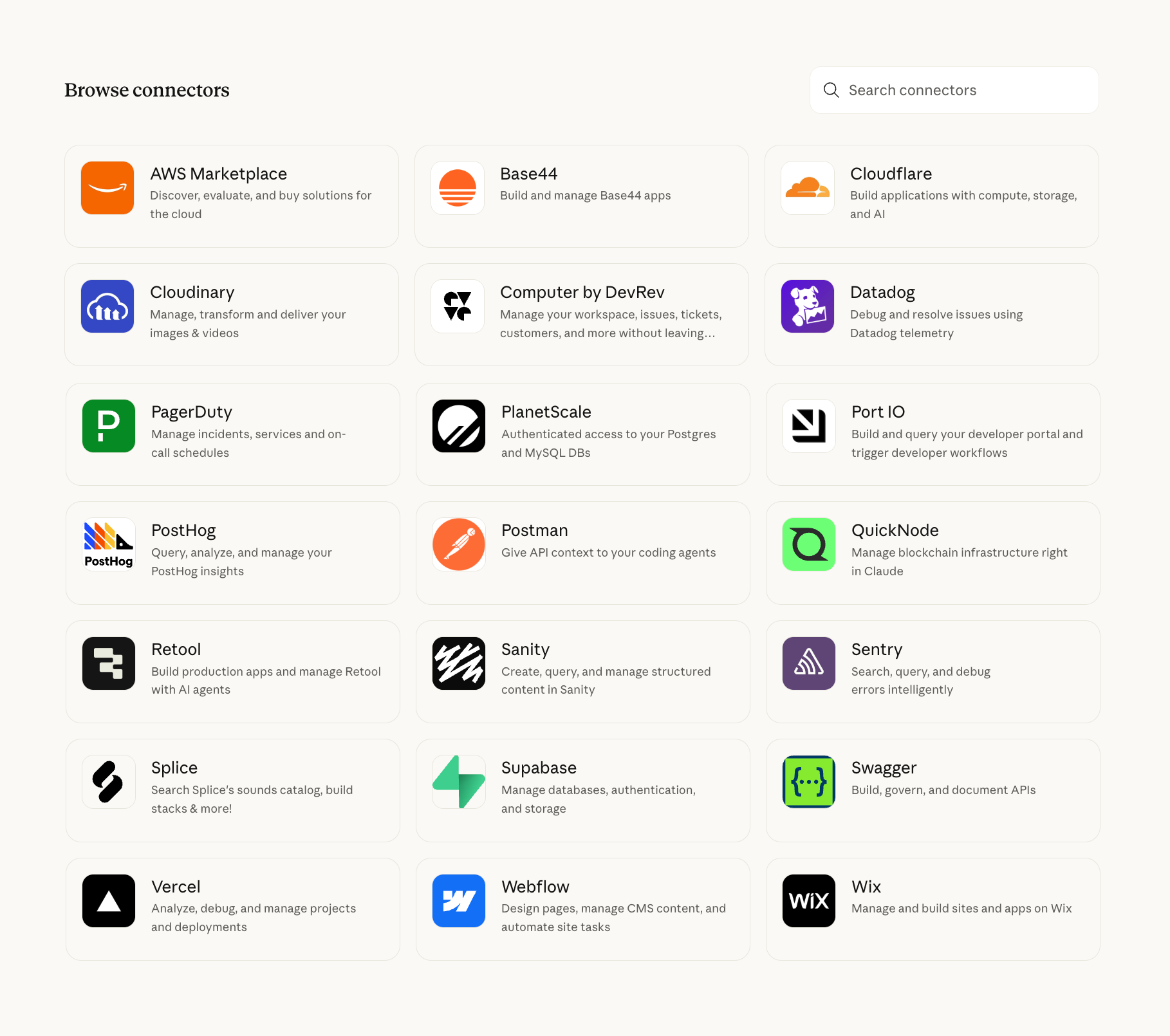
If your site lives in a code repository instead, Claude Code is the way to go. It'll work directly with those files without an MCP connection to the CMS itself.
A custom CMS or less common stack generally takes more setup. This is where the technical lift begins, so if you're a marketer or site admin who doesn't code often, you might want to bring in a developer. This is where many "just connect Claude to your site" guides tend to skip.
And before you translate anything, decide where the translations will live. Claude can produce French, German, and Spanish versions of your content, but your stack still needs somewhere to store each one, a way to route visitors to it, and a way to publish it.
On a CMS like Webflow, that means setting up locales first. On a code repository, it might mean a folder or route per language (/fr/, /de/) or a set of translation files your framework reads from. Whichever you choose decides how your language switcher works, what each page's URL looks like in each language, and what publishes what. Get this in place before Step 6, otherwise you'll have a folder of excellent translations with nowhere to put them.
Add business context to your brief, covering:
For example, a line like "We are a premium skincare brand selling to women 30+ in the US and France. We sell a small range of serums, cleansers, and moisturizers" gives Claude the frame it needs.
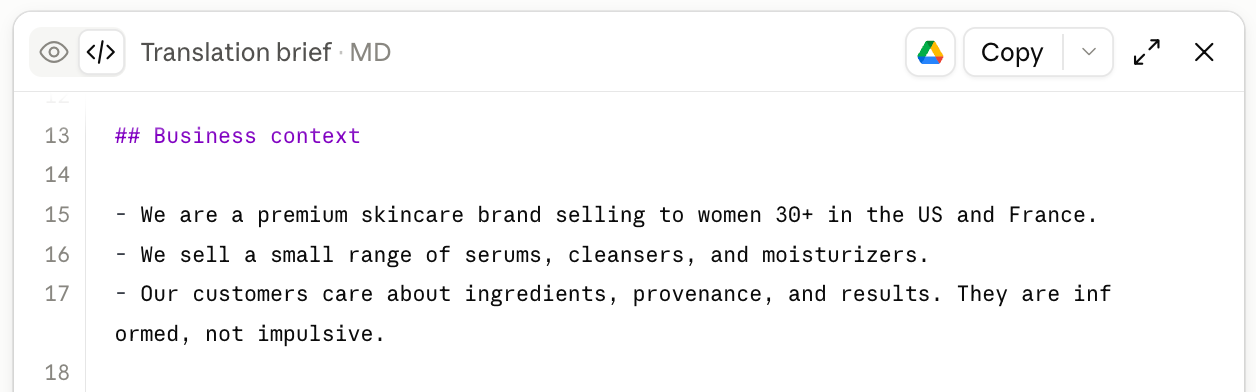
With that guidance in particular, a luxury brand keeps sounding like one in every language, but the same applies if you're running a budget, mid-range, technical, or playful brand.
Context tells Claude who you are, while tone tells it how you sound.
Give your brief a tone of voice, so your brand keeps its personality across languages.
The quickest way is to paste in 2 or 3 paragraphs that best represent your approved brand voice and tell Claude to match it.
For our running example of a premium skincare brand, the ToV guidelines might use language like "high-end", "confident", and "reassuring".
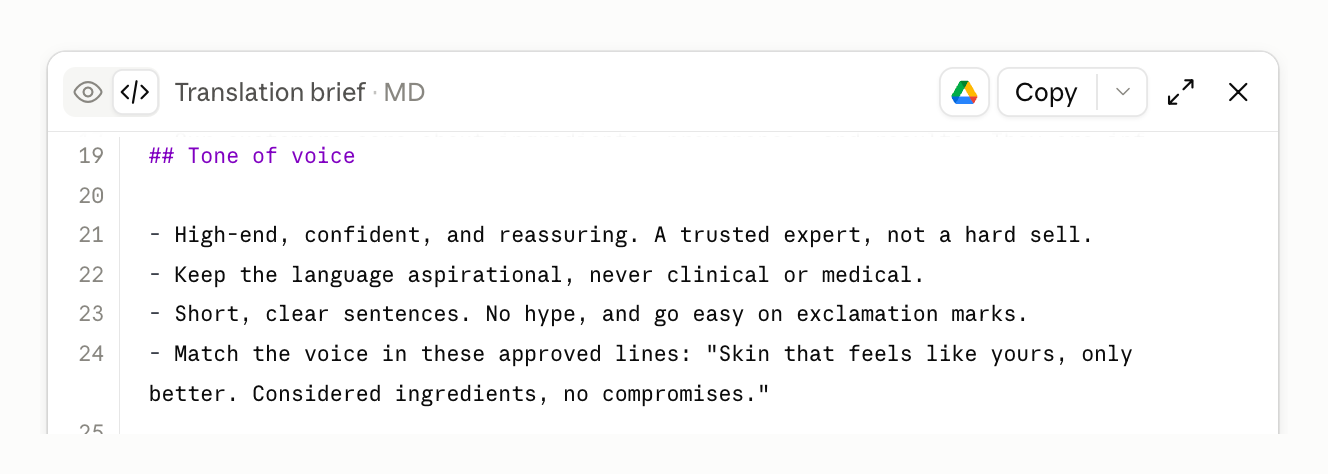
This step is what keeps your translated site sounding like you rather than like a generic version of whatever market you're entering.
We explore the value of protecting brand identity during expansion in our guide to entering the US; its lessons apply wherever you're targeting.
"I don't have to forget about who we are. We have to embrace that."
– Alix de Sagazan, Co-founder @ AB Tasty
Add your length, layout, and formatting rules to the brief, so Claude applies them on every run. "Guardrails", in true 2026 marketer speak.
A headline that takes up one line in English can wrap to 2 or 3 lines in German*, for example. So, set limits: give CTAs a character cap, and decide how localized URL slugs should be created and what should happen to any URLs that are already live.
Here's what it could look like:
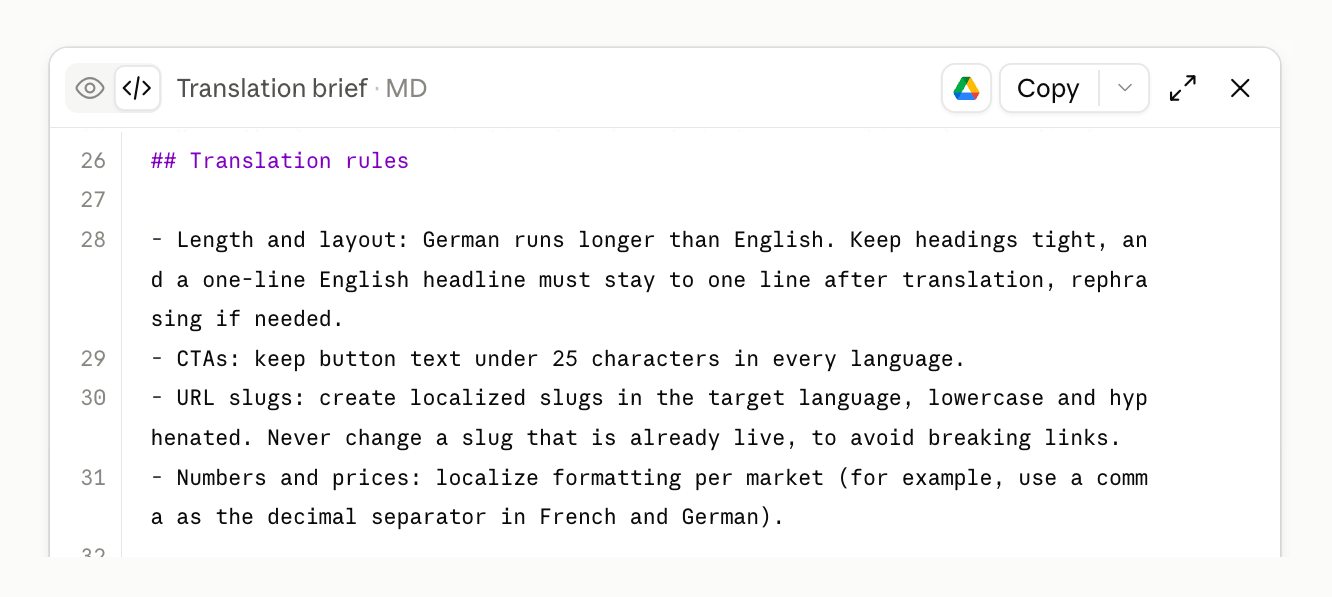
Keep checking the rules still hold as your content grows. This layer is part of what separates a translated site from a localized one.
*English-to-German is especially prone to text expansion. An ecommerce heading like "Shop skincare" could become "Hautpflege entdecken" – same idea, 7 extra characters, noticeably more space.
Add your search requirements to the brief, then verify them in your CMS or code.
That means:
The last point is the GEO layer. The clearer and more complete your localized pages are, the better chance they have of appearing in search results in that language.
For the full picture on traditional search, read our guide to multilingual SEO and GEO. There's more AI search-specific advice in our multilingual GEO guide.
With your brief updated and your stack connected, you're ready to translate. Point Claude at your content and the brief with a short instruction, for example:
"Translate the pages in this folder into French, German, and Spanish, following the instructions in translation-brief.md."
All the details live in that file, so the run instruction – which you'll reuse every time you translate – stays short.
Media is where the workflow starts spreading across more tools, and where the DIY route starts running out of road for some.
If an image has text baked into it, you need a localized version for each market and a way to swap the right asset into the right language version.
Claude can help if you add the right image or digital asset management (DAM) tool to the workflow. And have the tokens to spare (more on cost later).
Video and audio add extra steps, too. Let's say you need localized subtitles: it'll mean generating a transcript or subtitle file, translating the text, then reattaching it to the new language version.
So the issue isn't that Claude can't handle your media. It can. But now you're stacking tools and connectors: image-tooling, DAM, and transcription services. That extra cost and configuration can eat into the simplicity that made the AI route appealing in the first place.
Set up 2 layers of review before anything goes live: an automated check on every page, and a human check on the pages that deserve it.
The automated layer is a second, independent AI review. Use a fresh Claude instance or a different model that didn't produce the original translation, so it's checking the work with fresh "eyes" rather than marking its own homework. Give the reviewer your source text, translation, brief, and access to the page or code, then give it 2 jobs:
This layer catches the mechanical problems well. But what it can't tell you is whether the French reads like a French brand wrote it (it might come off Canadian French, but you wouldn't know it). AI reviewing AI will confirm a translation is accurate; it won't confirm that it's persuasive, that a joke lands, that you're using the correct dialect, or that your legal wording holds up in a German court.
That's what your human layer is for. You don't need it to cover every page if you're tight on resources; reserve native-speaker review for content where localization mistakes will cost you: your homepage and top landing pages, pricing and checkout, legal and compliance copy, and any major campaign. Everything else can go through the automated check, with a native speaker spot-checking a sample now and then.
While you're testing, run the automated review manually. Once the workflow is stable, automate it after each translation pass, and record the human review as a status in your change log (Step 10) so nothing high-stakes goes live unread.
Translating your site once is the easy part. Keeping 3 language versions in step with a source site that changes every week is where a DIY workflow shows you're an engineer-in-the-making or it totally falls apart.
Before you scale, your setup needs an answer to each of these by yourself (Claude can't answer them for you):
Detection comes first. Someone, or something, has to notice that the pricing page changed last Thursday; that can be a "translate what I touched" habit, a CMS webhook, or a script comparing published content against the last translated version. Then decide what a change triggers: one edited sentence shouldn't retranslate the whole page, or you're paying to redo work and inviting new inconsistencies. Track changes at the section or string level where you can.
Protecting approved translations is where things can get a bit chaotic. If a native speaker polished your French homepage last month and the English source gets a small edit, a naive re-run overwrites their work. You need a store of approved translations the workflow reuses instead of regenerating (translation memory, in localization terms), plus a rule for when a source change is big enough to override it.
Deleted, moved, and renamed pages need their localized versions, URLs, and hreflang tags to follow, or you end up with orphaned translations and 404s in 3 languages. And settle the source-of-truth question up front: the original-language site, usually. But once a translated page has been hand-edited, does it become the source for that language? Write the answer into your brief.
Add all of that up and you have a sync layer: a way to flag changed content, a store of approved translations, and a rule set for what triggers a re-run. On a repo, git history gets you part of the way. On a CMS, you're building or connecting something. Either way, it's a system you own and debug.
This is also the step that changes the question. Translation quality isn't the hard part anymore; Claude does a good enough job. Keeping a multilingual website synchronized through months of updates is.
Before you scale the workflow, create a shared change log for every page and language you translate. At the very least, track the page, language, status, date, and reviewer or approver.
Claude can help you do the work, but the chat itself isn't a shared project history.
As soon as multiple pages, languages, and team members are involved – even just a second person – you need somewhere to see what's been translated, what changed, and what's been approved.
A spreadsheet or shared doc is fine to start with, as long as everyone on the project commits to keeping it up to date as part of their workload.
Run the full workflow on one test or staging page before letting it loose on your whole site. This limits the rework if something goes wrong.
Check how everything renders. Fix anything that breaks, and tighten your brief until the output is solid.
Once you're happy with it, package the reusable instructions and review process into a Claude skill: a saved set of instructions Claude can use again whenever you need to translate new or updated content. You can literally ask Claude to "package this workflow into a skill" – it's good like that.
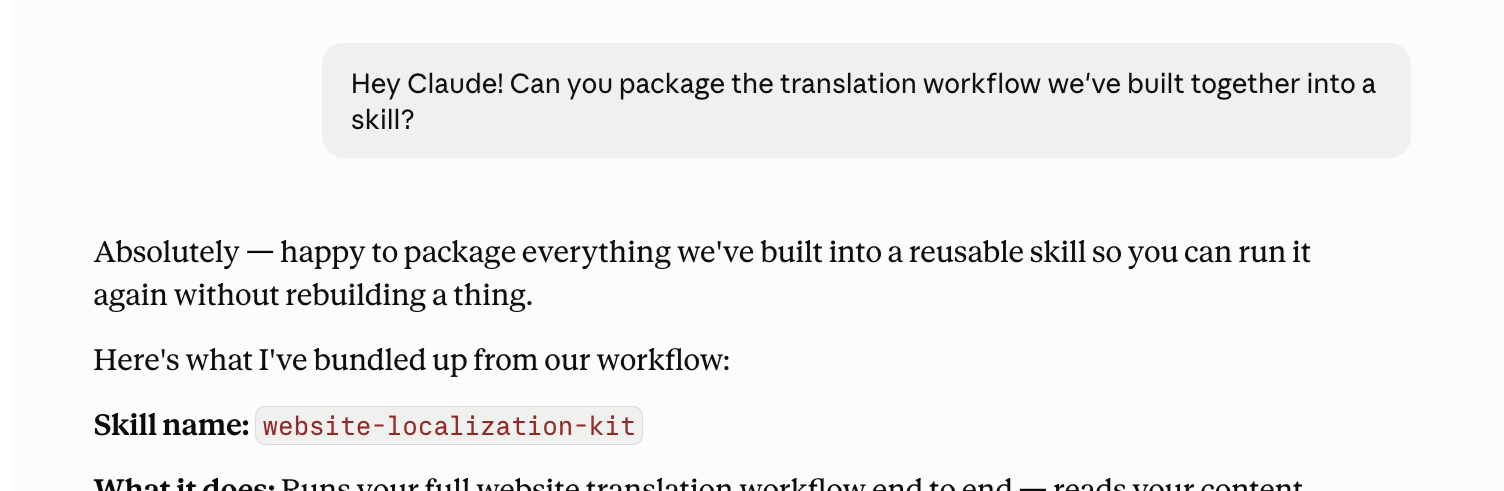
One page proves the workflow works. The skill makes it repeatable, and your change log keeps the history. Voilà!
We said up top this was an honest guide. Well, here are a few more truths you ought to know.
Keeping everything above working takes real setup, real maintenance, real cost, and real ownership.
And you're not doing it once. A 40-page site translated into 3 languages is already 120 translated pages to create and check before the next product launch, pricing change, or campaign launch. Every update starts another pass through at least part of the workflow.
Here's what that looks like.
Building the workflow takes work. Keeping it working does too. It breaks, it needs troubleshooting, and it has to evolve every time your site or stack changes.
A new page template, a platform update, a redesign – each can send you back into your brief and connections to put things right. And then there's more admin on your plate, because that change log from Step 9 won't update itself.
And when something does break, there's no support team to contact. Claude can help you work out what went wrong, but tracking down the cause across your brief, connectors, and CMS – and fixing it – is on you (or the developer you brought in back in Step 2).
Every translation runs on tokens, and with a full brief, tone samples, and a review pass, each page uses a lot of them. But most people fail to properly estimate how much they'll actually use, and underestimate everything around it.
A fairer equation looks like this:
DIY cost = model usage + CMS, MCP, and tooling + human review + maintenance time + developer time
Take a 50-page website going into 3 languages. That's 150 translated pages, plus 150 review passes. At current API rates, the tokens for a full run come to a handful of dollars, and even generous retries won't push that far. The rest of the equation is where the money goes.
Tooling covers your CMS plan (Webflow's localization is a paid add-on, for example), any DAM or transcription service from Step 7, and whatever you use to track changes. Human review is a native speaker checking your 20 highest-value pages per language, at freelance rates, before every major update.
Maintenance is the hours you or a teammate spend re-running the workflow, updating the brief, and fixing what broke after a platform update. Developer time covers the initial connection in Step 2, the sync layer in Step 9, and whatever breaks after that.
But that's not accounting for content updates. Adding new products? More tokens. Tweaking some legal copy? More again.
Your costs can also change when your usage doesn't. Growth Unhinged reported that Pylon's Anthropic bill was set to jump 3.5×, from $400,000 to $1.4 million a year. The company wasn't using Claude any more than before. It had grown past 150 seats, which moved it onto Anthropic's Enterprise plan, where every token is billed at full price.
That's an extreme example, and your translation project bill would likely not hit $1.4 million, but the point stands: the more your site changes, the faster the cost rises.
Claude itself can be cheap. But operating the system you build around it, and scaling it with how often your site changes will impact the cost the most, rather than how good the model is.
The more tools you add, the more places your content goes and the more checks you're responsible for.
Your model provider, CMS connector, DAM, transcription service, and every other tool you add come with their own permissions and data policies. You'll need to check what each service stores, who can access it, and whether your content can be used for training.
Quality assurance sits with you, too. Tricky if you can't speak the languages, and expensive if you outsource reviews.
Think of all these "catches" like vibe-coding your own CRM. You absolutely can now, and it'll probably feel like a cost-saving win. But the moment it exists, you own it. It's on you to keep the data clean, track what changed, fix what breaks, and update it as things move on.
A home-built translation pipeline is the same deal: you're building it once, but you're also signing up to run it.
MCP itself isn't a visual review layer. Some CMS implementations expose visual tooling (Webflow's MCP can capture element snapshots, but only with the Designer open and its Bridge App connected), so you generally still need a separate way to review translated pages in context. Plan for that from the start.
The work happens through instructions and text, so when a translation changes, you still need to open a separate site preview to see how it renders.
How does that German headline sit inside the button? Does the French wrap onto a second line and push your layout out of shape? What happens on mobile, in a narrower layout, or in another browser?
A list of text strings leaves you guessing and hoping it looks right once it's live. If not, you're going back a step and trying again.
Let's be clear: this isn't Claude versus a dashboard. MCP and command-line workflows are powerful. They're growing fast, and plenty of teams like working that way.
Reviewing translations visually, right there on the page, is just one thing an MCP on its own doesn't give you. That brings us neatly to the tools that do.
Everything we just walked through, Weglot already does for you. The same jobs, without the big pipeline, all its intricate moving parts, and the burden of post-project ownership.
Here's what that looks like:
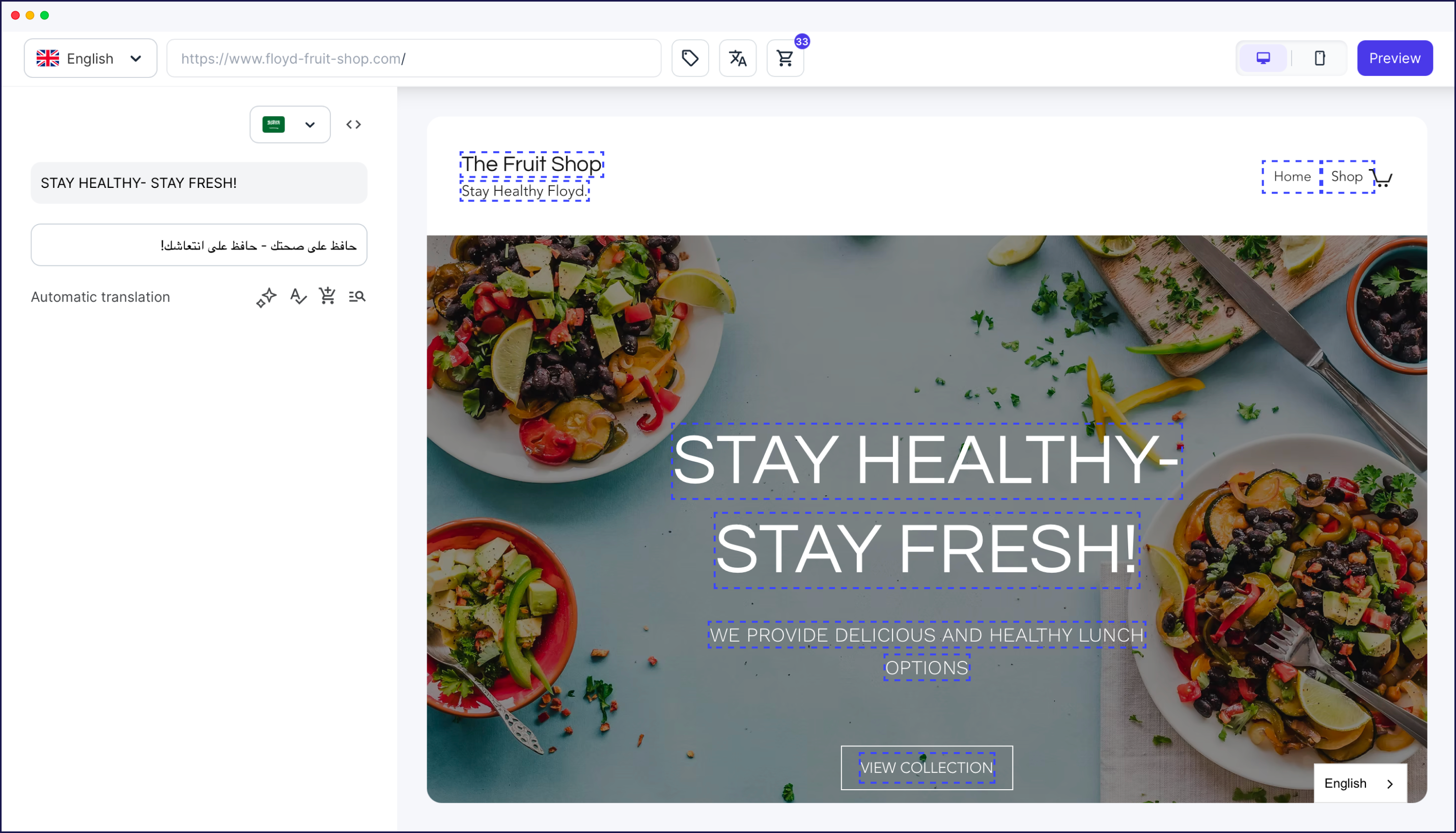
None of this is a thin wrapper around a chatbot. Weglot starts with leading translation engines – DeepL, Google, and Microsoft, choosing between them by language pair – then adds the custom AI Translation Model, powered by OpenAI and Gemini. The SEO, brand, layout, and quality guardrails are built into the product.
If you like working in Claude or the command line, keep at it. Weglot doesn't take that away. It's just the other route. We just find that most teams still want to see translations on the page and manage them in one place, so they can get on with marketing or running their business.
You can ask the teams behind these ecommerce sites: The Bradery, translating 500+ products a day; Ron Dorff, now earning 70% of its revenue internationally; or REVIEWS.io, which cut its need for developer support entirely. There are plenty more in Weglot's customer stories.
Claude MCP and Weglot can both get you to a multilingual website. The better fit depends on what you want to walk away with.
That's the real build-versus-buy decision to make. Claude gives you enormous flexibility. Weglot packages the SEO guardrails, brand consistency, media handling, visual review, and ongoing sync work you'd otherwise have to keep running by hand.
If you want to take the DIY route, absolutely. You've got the full map now, and you know what it takes to build and run. If you'd rather skip the pipeline and get there in minutes, start a 14-day free trial with Weglot.
Whichever path you take, your next market's waiting. Bon voyage!

We’ll get your first languages live. You decide how far you want to go. Try Weglot for free today.
Trusted by 110,000+ global brands





Weglot is tested and trusted by brands worldwide since 2016. Join them today.


0 visits from translated pages in the last 90 days.


.avif)