

Try Weglot for free


Craft’s powerful, flexible CMS is a popular choice for content-heavy sites run by enterprises, ecommerce companies, and international brands.
While Craft’s multisite feature gives you the framework to manage multilingual content across several sites, you’ll need to take care of the translatable content yourself.
In this article, you’ll learn how to make your Craft CMS site multilingual in minutes, why an AI-based approach is best, and what to do after translations go live.
There are 2 fundamentally different approaches to making a Craft site multilingual: human translation and AI translation.
Here’s what you need to know about each method.
Your Craft installation includes built-in multisite functionality, which, when paired with human translators, lets you make your site multilingual without third-party plugins.
Each site can have its own base URL, site template, language setting, and content while sharing the same control panel, publishing team, and codebase. Editors and translators can log into Craft’s central dashboard and manually translate each page section by section.
This works well for businesses with small, static sites and a dedicated translation team or the budget to hire individual translators. It gives you complete control and ensures nothing goes live without human review.
But it’s a slow process that doesn’t scale. When translation workflows depend entirely on humans, it’s difficult to enter new markets quickly.
In Craft 3, it also creates operational and logistical overhead because the content management system treats each multisite setup as a separate entity. You can’t make a single change and expect it to propagate across every region. In other words, someone has to manage every individual site manually. If you have multiple sites, that can get tedious very quickly.
ON24, a San Francisco-based leader in webinars, virtual events, and content experiences, ran into exactly these problems when expanding internationally. Its manual translation process was time-consuming and clunky, with the team constantly copy-pasting strings, checking for untranslated content, and manually uploading every change.
It was only by using an AI-powered website translation tool like Weglot that ON24 could translate its English site to 4 languages and see user increases as high as 89% in some markets.
Craft integrates with AI-powered translation plugins like Weglot to launch localized versions of your website in seconds. These tools automatically detect your content and translate it using AI models like DeepL, Google Translate, and Microsoft Translator.
With AI, launching a site in new markets only takes a few clicks. That’s how Volant, a sustainable home-scenting brand, entered 11 markets without manually duplicating its stores.
In less than a month, Volant translated 100,000 words of content into 9 languages across 11 markets. The brand saw significant traffic growth across France, Germany, and Italy, with international visitors increasing 2x and international revenue growing by 39%.
The right AI plugin can even eliminate the ongoing maintenance burden that holds back most manual translation projects. When you publish a new blog post or update a product description in Craft, the plugin will automatically detect and translate the content change across every version of your site.
Here’s a side-by-side comparison of the 2 options to help you choose the best approach:
AI plugins like Weglot stand out because they let you expand internationally without increasing operational complexity or headcount.
Most AI plugins also work at the front-end layer, so there’s no need to worry about the complexity of Craft’s multisite setup.
Of course, you don’t need to choose. A hybrid translation strategy combines both approaches, using AI to provide high-quality translations and human reviewers to refine the nuances.
Weglot is an AI-powered website translation tool with native integrations for major platforms like Craft and WordPress. It automatically translates your entire site using leading translation models such as DeepL, Google Translate, and Microsoft Translator, and includes a built-in AI Language Model running on OpenAI and Gemini that learns and improves as you edit content.
Translating your Craft site with an AI plugin like Weglot is quick and easy. Follow these steps to create a multi-language site in minutes.
Before you begin translating, decide which language to add and how to structure your multilingual site.
You don’t have to choose between one language and another. Weglot supports 110+ languages, so you can launch sites in every customer’s preferred language. As you’ll learn, it’s also easy to experiment with new markets when you’re up and running.
While you can add more languages later, you shouldn’t change your URL structure or other core site settings. Doing so can impact search rankings and break links to your translated pages.
There are 2 main URL options, which users will automatically see based on their browser language:
It’s quick and easy to connect your Craft site to Weglot’s AI translation plugin.
Start by creating an account on the Weglot site, choosing your languages, and selecting CraftCMS as your website technology.
Here’s what it looks like:

Next, head to the Craft plugin store and search for Weglot. It will look like the image below:

Finalize the installation by adding your Weglot API key to the plugin, your original language, and your destination languages.
Weglot will take it from there.
As soon as you activate Weglot, it will detect all your site’s content and automatically generate a first layer of AI translation.
Weglot uses DeepL, Google Translate, and Microsoft Translator to deliver the highest possible quality, automatically selecting the best model for your language pair.
Unlike other translation plugins, Weglot translates all the content visitors see, including:
Weglot also handles the technical aspects of multilingual sites. It adds a dropdown language switcher to your site, displays translated content under SEO-friendly URLs (in line with your URL choice), adds hreflang tags, translates metadata, and creates multilingual sitemaps.
Weglot makes it easy to refine translations with its Visual Editor.
It generates a live preview of your site (see below), which you can use to:
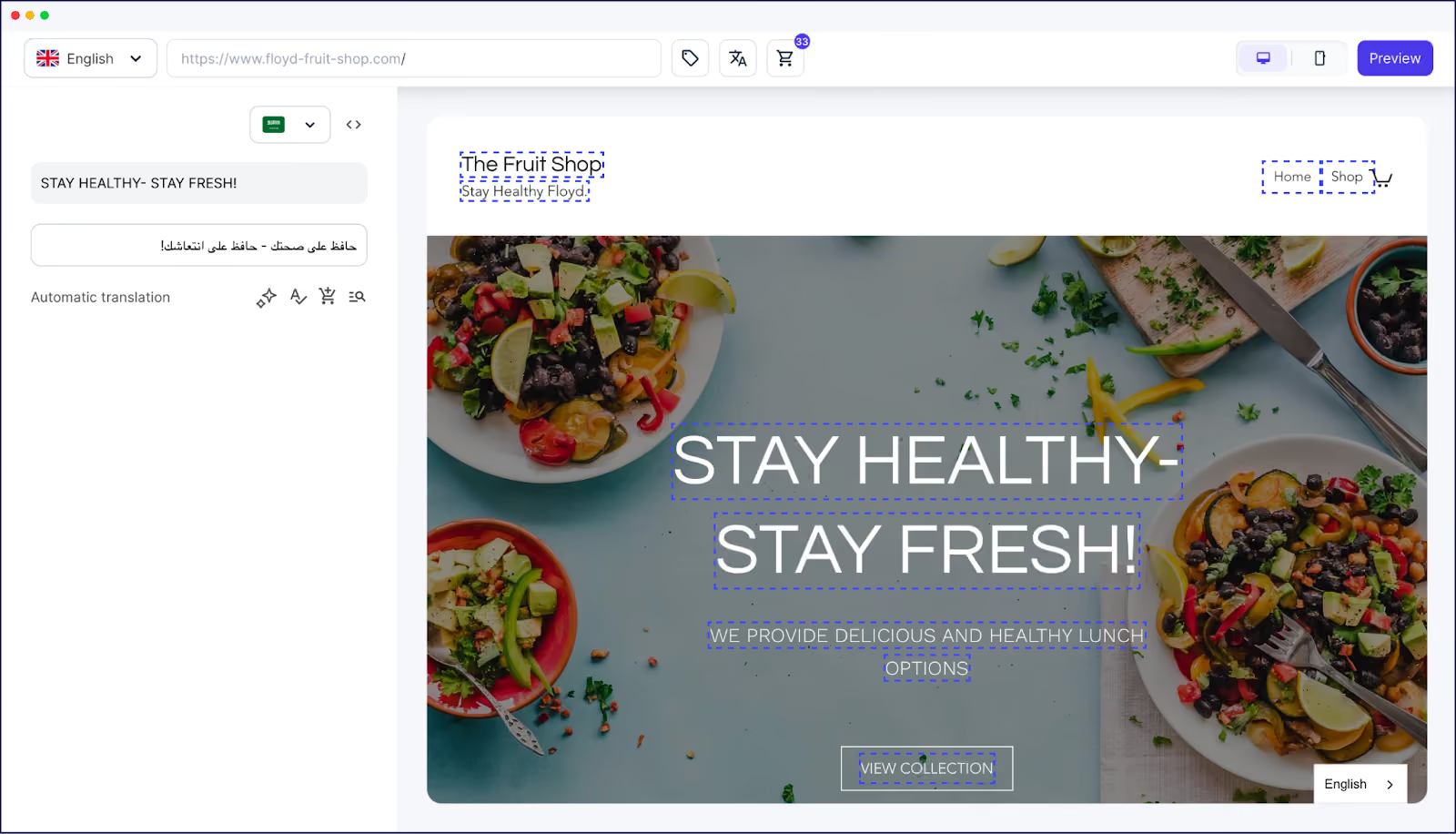
Alternatively, you can view all your translations in Weglot’s Translations List. You still edit content the same way – it just looks different:
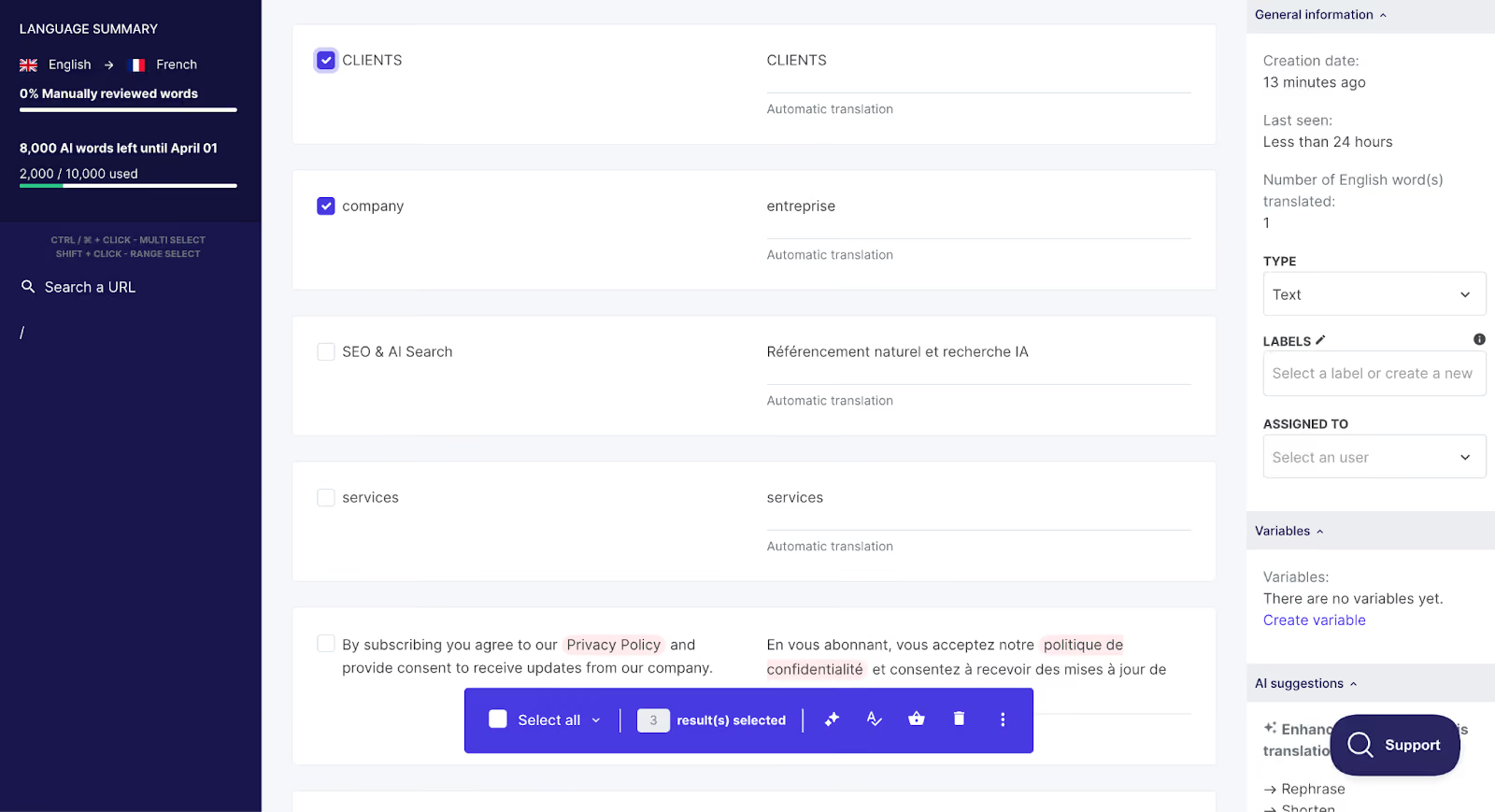
Review your most important pages first, like your homepage, product pages, service pages, and landing pages.
You can also take this opportunity to explore ways to incorporate localization strategies into the customer experience beyond simply changing the page’s text. This includes:
One of the biggest advantages of using an AI plugin over the native Craft multisite approach is what happens after your multilingual websites launch.
While a manual approach to translation requires you to separately translate every new blog post, product description, and landing page you add across different domains, Weglot translates them automatically. There’s no workflow to manage, no translator to brief, and no content to upload.
Weglot’s automatic translation feature handles content updates the same way. If you go back and edit an existing page, it detects the change and updates all translated versions accordingly. That way, visitors always see the most accurate and up-to-date information.
Translating your Craft CMS site is just the first step to launching in a new market. Here’s how to make sure those new pages work as hard as your core language.
AI delivers incredibly accurate translations that need little to no editing. But for brand-specific copy and terminology, you may want to review AI translations to ensure they reflect your voice while optimizing the user experience.
Use Weglot’s glossary to ensure that it translates (or never translates) your brand, product names, and straplines consistently across your site.

Weglot’s AI Language Model takes brand alignment even further. Powered by OpenAI and Gemini, it learns from your brand guidelines, glossary, manual edits, and any custom instructions you define to improve the quality of AI translations over time.
TextCortex, a company that builds AI agents, uses Weglot’s AI Language Model, glossary, and tone-of-voice settings to handle specialized AI and technical terminology. Weglot lets it maintain translation quality and brand consistency across different languages while also improving visibility in AI search engines. It’s so effective that 77.81% of TextCortex’s traffic now lands on localized pages.
Weglot handles the technical foundations of multilingual SEO automatically. But you can go further by optimizing multilingual content to rank higher in specific markets.
Start by analyzing competitors in your new markets to identify relevant local keywords. Then use Weglot’s Visual Editor to incorporate them into each page’s copy.
You can also translate each page’s metadata in Weglot’s Dashboard:
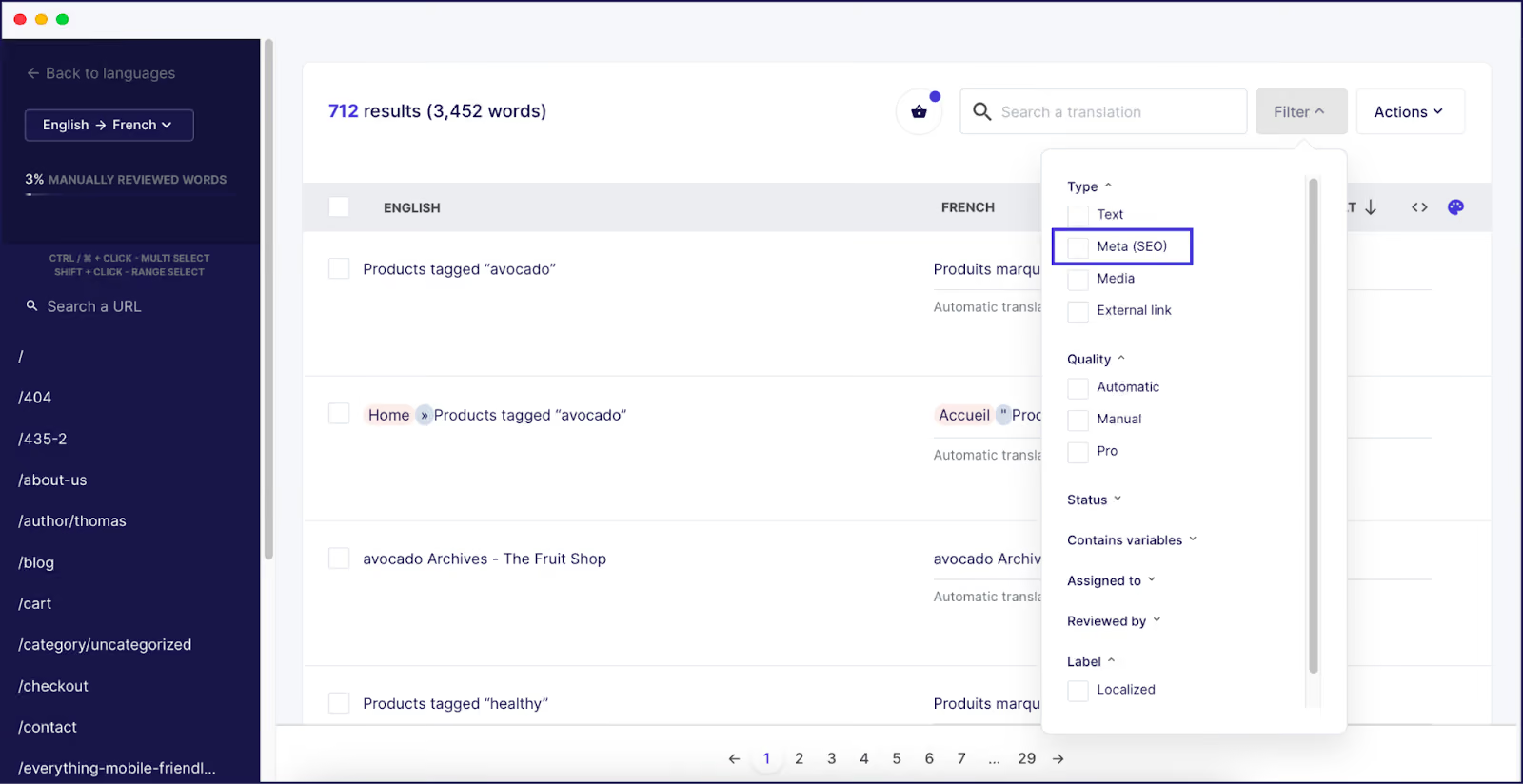
Alternatively, you can hire SEO experts to optimize your translated content.
Napta, a SaaS resource management platform, hired freelance SEO experts to review and optimize it Weglot-translated content for market-specific keywords. The result was a 4x increase in German traffic.
Track your site performance in Google Analytics and Google Search Console to see whether your efforts are having an impact. Pay particular attention to:
Use a tool like Ahrefs or Semrush to track search rankings across multiple geographies, identify content gaps, and see how your international traffic grows over time.
AI translation lets you expand to new markets faster and more cost-effectively than traditional approaches.
With a manual workflow, entering a new market means significant upfront investments and long timelines. You have to be very confident in the opportunity to take the risk.
With Weglot, adding a new language takes a few clicks from your dashboard. So instead of conducting market research first, you can launch a localized site in seconds and let real conversion data determine whether the market is worth pursuing.
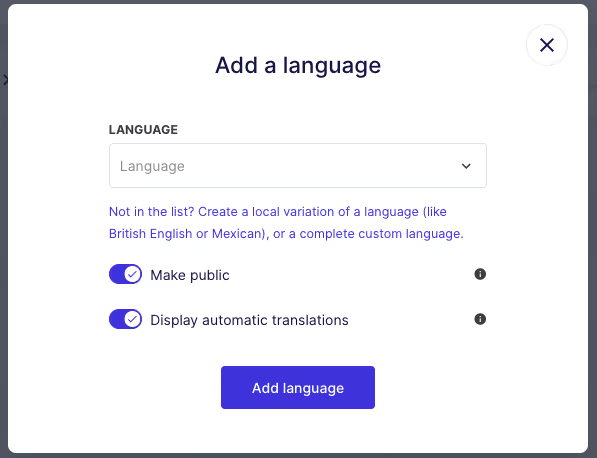
French retail brand The Bradery took this approach when expanding across Europe. In addition to launching sites in Spain and the UK, the team used Weglot to test demand in the Dutch and Italian markets with minimal effort and almost no upfront cost.
For Craft CMS users, this shift is particularly meaningful.
Brands often choose Craft for complex and content-rich projects, the kind that generate enough content to make multilingual SEO a real opportunity. Being able to add a new language and acquire organic traffic without manual work lets you build a presence in new markets in parallel with your core operations, rather than as a separate project competing for resources.
The right AI plugin can translate your entire Craft website in seconds.
Weglot handles the heavy lifting, from accurate translations to technical SEO, so that you can launch quickly and seamlessly in dozens of markets at once.
Want to see how easy it is to translate your Craft site with Weglot? Get started for free with a 14-day trial.

We’ll get your first languages live. You decide how far you want to go. Try Weglot for free today.
Trusted by 110,000+ global brands





Weglot is tested and trusted by brands worldwide since 2016. Join them today.


Translated versions of this page received 0 visits in the last 90 days

The best way to understand the power of Weglot is to see it for yourself. Test it for free and without any engagement.
A demo website is available in your dashboard if you’re not ready to connect your website yet.


