

Try Weglot for free





If Google Translate can help you decode a restaurant menu in Paris or reply to an email from your Chinese supplier, then surely you can use it to translate an entire website, right?
Yes, you can technically use Google Translate – but if you’re the website visitor and you want to understand what you’re reading. But if you own that site, giving only that option to a potential customer can be damaging. While Google Translate is free, fast, and accessible from your browser, it’s rarely the best way to launch a multilingual site.
In this article, you’ll learn how Google Translate works, why it falls short for commercial websites, and how to quickly and accurately translate your site using AI.
“You could put 800,000 words into Google Translate – but good luck putting that back on your site.”
– Elizabeth Pokorny, Head of Brand and Content
Yes, you can use Google Translate to translate your business website into another language. But it’s an incredibly time-consuming process that doesn’t guarantee good results.
Here’s what the translation workflow would look like:
Now imagine doing that for every page on your website and repeating the entire process every time you publish a new blog post, add a product, or change a landing page.
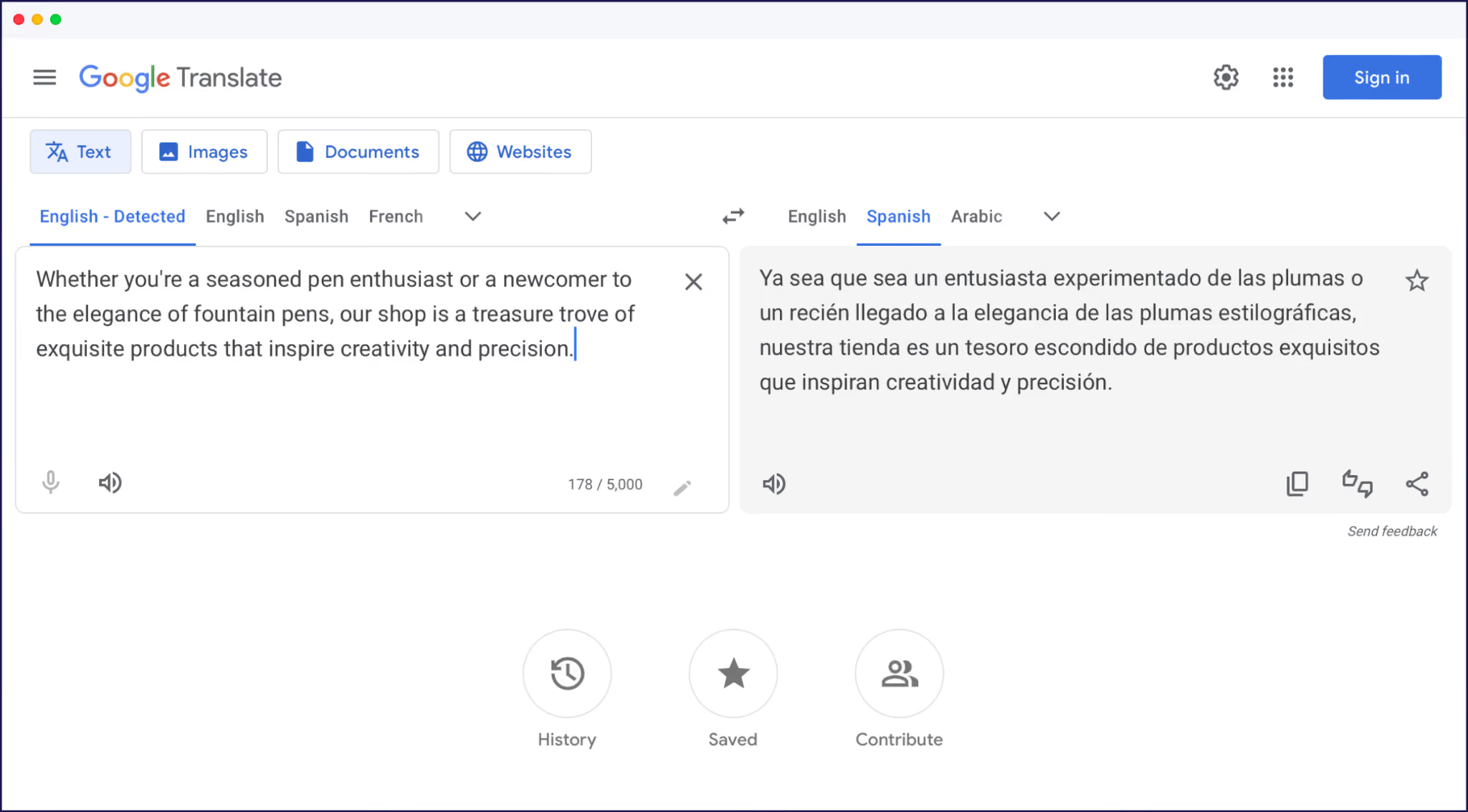
Even with all that manual effort, you may not be able to translate all your site’s content.
Plus, some of your site’s copy may be dynamic content from plugins, checkout flows, and other third-party applications.
You can’t easily translate this content with Google Translate, which means you’ll end up with a partially translated site and a confusing customer experience.
Manual copy-pasting isn’t the only way you can translate a website using Google Translate. Here are several other methods you may have heard of:
While Google Translate can play a part in translating your website, only the last option actually delivers an accurate, hands-off solution.
Let’s look at some of the other reasons why you shouldn’t use Google Translate on its own.
Beyond the time-intensive manual process, there are several other issues worth knowing about Google Translate.
Google Translate does an excellent job at translating some language pairs, but not all.
As you can see in the image below from our study with Nimdzi Insights on the state of machine translation, there are better alternatives to Google Translate for specific languages like French, Italian, and Spanish.

Google also translates your website without any awareness of your brand, industry, or the context of a phrase. It can result in technically correct translations, but they may read as flat, overly literal, or just slightly off to native speakers.
This issue is addressable only if you can refine or edit Google Translate’s output. But you’re stuck with the translation it provides, with no way to revise a clunky phrase or request an alternative.
The only way to ensure Google Translate’s accuracy is to pay for professional translators to review the output, further increasing costs and timescales. That also adds an additional workflow step, as you’ll need to send these translations for review each time you update content or create a new page.
Google Translate is a translation tool, not an SEO tool. It doesn’t help you generate the signals that search engines or LLMs need to find, index, or cite your newly translated content, such as hreflang tags.
You’ll need to manually add these attributes, create new subdirectories or subdomains for each localized version of your site, and translate metadata for each page.
These tasks aren’t necessarily straightforward for non-technical marketers and even some developers. But completing them is vital if you want to acquire international search traffic from Google.
Without proper multilingual SEO, you’re translating your site for people who already know you exist, while keeping it hidden from everyone else.
Did you know Google may already be translating your website content itself and serving it under its own proxy URLs?
When we researched how new Google AI Overviews handle translated content, we found examples of Google translating a site’s content and displaying it under an address it controls.
If this happens to your brand, then:
Our research suggests Google prioritizes content in the query language. But it starts translating content when it can’t find enough localized content.
If you fail to translate your site accurately, you could be competing against Google and yourself in the SERPs.
If Google Translate isn’t suitable for commercial websites, what is? The answer is a dedicated website translation tool.
Rather than just converting text from one language to another without context, a website translation tool handles the entire workflow, from content detection to editing and SEO.
Here’s how the 2 solutions compare:
A dedicated website translation tool compares favorably with other common translation techniques, such as using freelance translators.
When SaaS resource management solution Napta wanted to expand into the European market, it quickly realized that human translators would be hard to manage and that displaying the content would require significant technical work.
Weglot’s AI-powered website translation tool was a fast, simple, and pain-free alternative. By connecting with Napta’s CMS, Webflow, it handled all the technical aspects of multilingual SEO – saving the company over 100 hours.
Weglot’s AI translation tool supports over 110 languages, all the way from Arabic and Afrikaans to Vietnamese and Zulu.
Alongside major global languages such as French, German, Spanish, Portuguese, and Russian, Weglot’s list of 110+ languages features a diverse mix of regional and less commonly supported languages – from Ukrainian, Czech, Filipino, Serbian, and Swedish, to Chichewa, Corsican, Irish, Swahili, Uzbek, Samoan, and Yoruba.
Unlike Google Translate, Weglot automatically translates your content, handles your multilingual SEO, and lets you visually edit the output live on your site.
Here’s what translating your multilingual site with Weglot looks like.
It’s fast to get started with Weglot. New users can start a 14-day free trial with just an email and a password, and no credit card needed.
Simply create a Weglot account, choose your original language, and the languages you want to add.
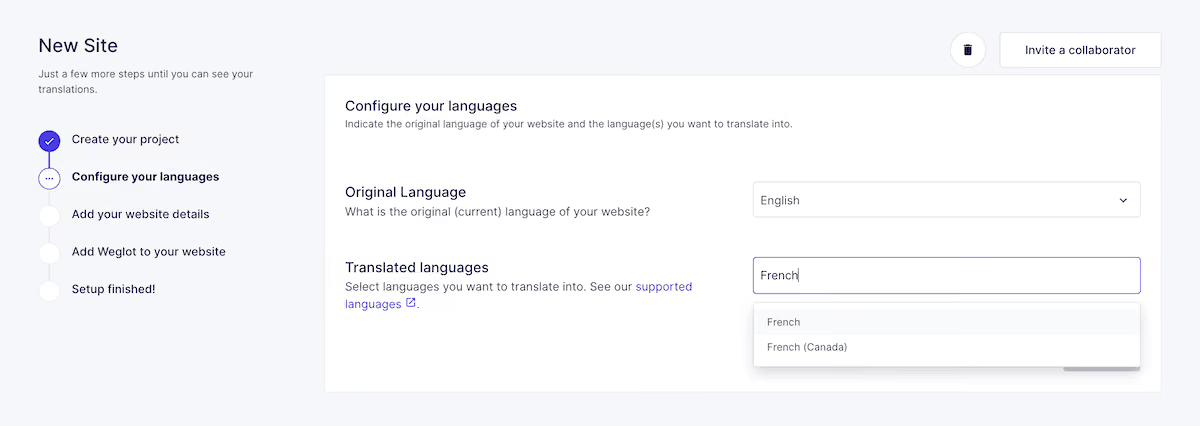
Next, you’ll need to add Weglot to your website.
Weglot integrates with every major CMS, including WordPress, Shopify, Webflow, and Wix. Alternatively, add Weglot to your site by pasting a small snippet of code in your site’s HTML.
Here’s how you connect Weglot to a WordPress website in less than 5 minutes, for example:
You don’t need a developer to integrate Weglot with any CMS, and it will take under 10 minutes to complete.
Once it’s connected, Weglot automatically scans your entire site and translates all of the content. That includes:
Weglot will use 1 of the 3 leading translation engines, DeepL, Microsoft Translator, and Google Translate, automatically picking the best one for your language pair.
Instead of being stuck with one model, you always get the best one for your language.
Once automatic translation is complete, you can set the translations to private mode if you want to edit them further. If not, your site is ready for international customers.
You’ll find a language switcher on the front end of your site. It works similarly to Google’s retired widget, letting users seamlessly switch between versions of your site.

Automatic translation is exactly how review platform REVIEWS.io accelerated its entry into Germany.
With Weglot, the team translated its blog into German without manually duplicating anything, and new posts were automatically translated as they were published. Significant growth followed, with German traffic up 120% and conversion rate up 20%.
Weglot automatically manages the technical side of multilingual SEO, following Google’s best practices.
Specifically, Weglot:
The above significantly increases the likelihood that new audiences will find your site in localized search results.
Local SEO platform GMBapi.com is a great example of what you can achieve when you take care of the technical aspects of multilingual SEO.
By adding 9 new languages with Weglot, 80% of all web traffic now comes from international visitors. The team has also noticed lower bounce rates and higher click-through rates on key pages thanks to language-specific forms and localized URLs.
Using Weglot means you’ll have publication-ready, quality translations immediately. But you can still jump in and edit your content as often as you like.
Weglot’s Visual Editor lets you see and edit your translations on a live preview of your site.
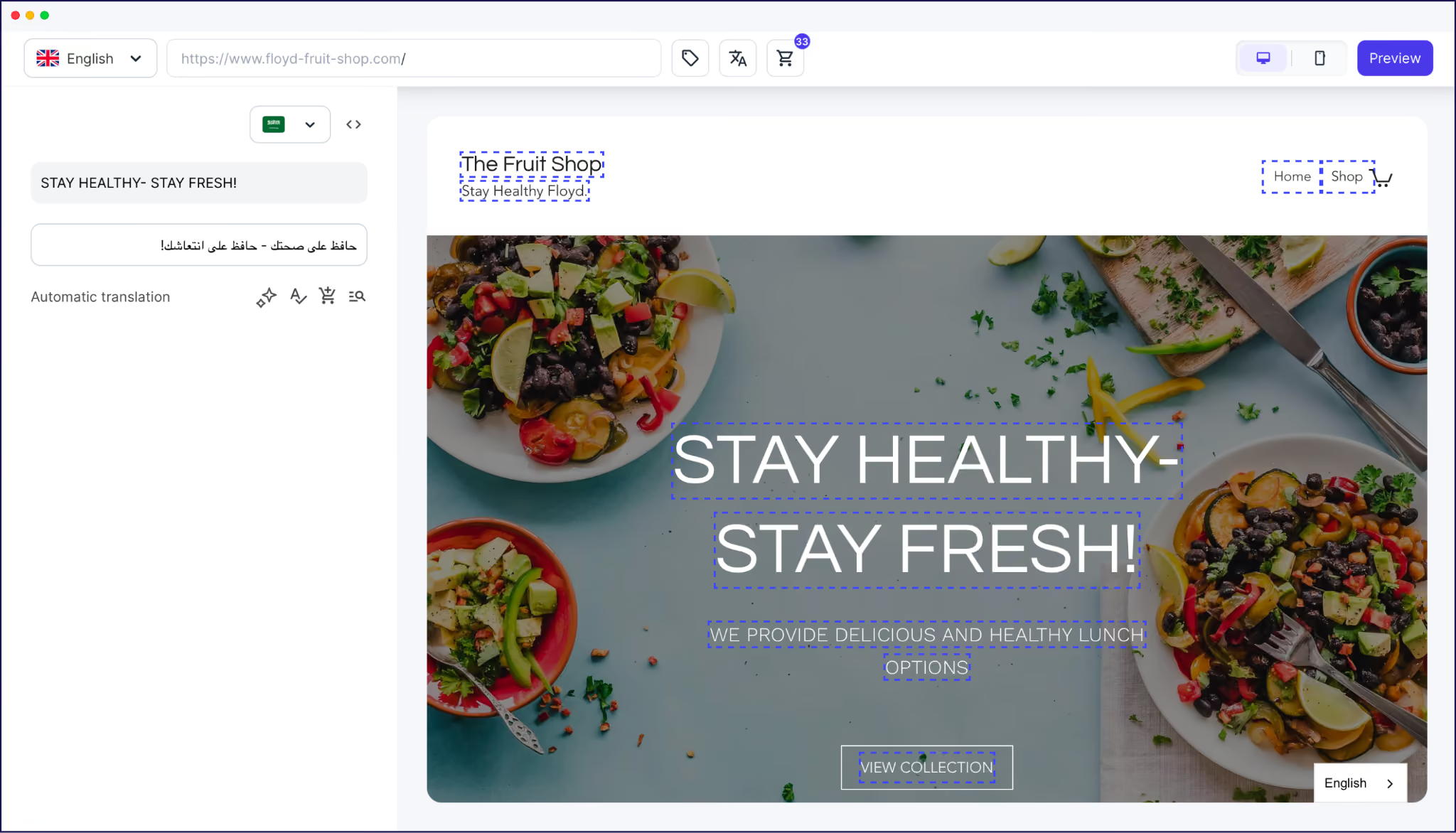
It can also help you spot design-related issues. For example, a headline that’s short and punchy in English might be too long in German and break your site’s layout. The same could be true for a CTA button or product name.
When you do want to refine a translation, there are 3 ways:
Weglot connects you to professional translators directly from your Dashboard. Translators work from AI-drafted translations, rather than starting from scratch, which helps keep turnarounds fast and costs predictable.
The Visual Editor is one of the features that customer conversation management platform Respond.io loves most about Weglot.
The team can easily make changes through the editor, ensuring translations are faithful to the original copy’s intended meaning and context.
Weglot’s AI Translation Model is an additional layer on top of AI translation that provides your site with on-brand translation from day one. It’s the polar opposite of Google Translate, where the translation provided is what you get, unless you add an additional layer of human review. .
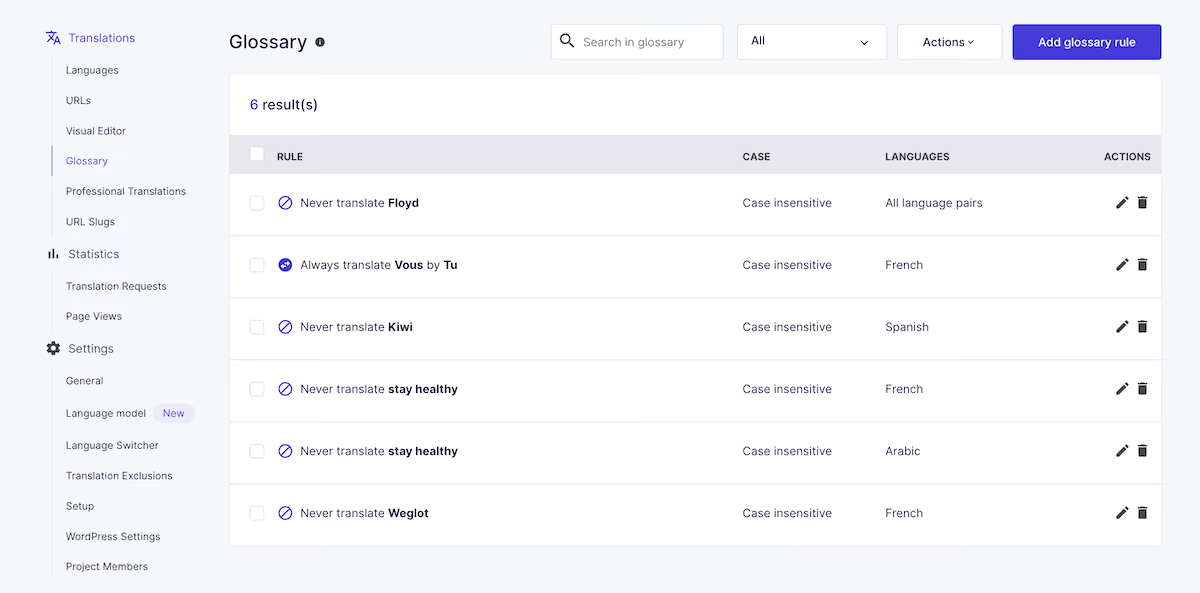
Weglot’s Glossary also lets you define how specific terms behave across every language.
For instance, you can set a phrase to always translate a particular way or never translate at all. It’s ideal for keeping product names, brand phrases, and straplines consistent across all of your localized websites.
Here’s what the Glossary looks like in Weglot:
Weglot’s AI Translation Model, powered by OpenAI and Gemini, gives you on-brand, accurate translation through the content and custom rules you feed it. Provide your brand guidelines, glossary, custom rules and instructions for hands-off translation quality at another level.
This lets the model improve future translation quality in the following ways:
Weglot’s ability to deliver on-brand, contextually relevant translations is key to helping website builder Tilda maintain a consistent international presence while reacting quickly to new marketing opportunities.
{{quote-cta-banner}}
It also makes Tilda’s multilingual efforts scalable. As the company and content volume grow, Tilda can continue to deliver a consistent experience without scaling internal resources or building a dedicated translation team.
With Weglot’s continuous translation feature, every new piece of content you publish, whether it’s a blog post, a product page, or an edited landing page, is automatically detected and translated in real time.
You publish once in your native language, and Weglot keeps your site updated in a way that’s not possible with Google Translate.
On the other hand, with Google Translate’s manual approach, every new post you publish means repeating the copy-paste routine across every language. That’s a cost that grows with every page and language you add.
This feature is essential for an ecommerce brand like The Bradery, which launches over 500 product pages every single day.
Using Weglot, The Bradery automatically translates all pages into English and Spanish without involving the team.
“It takes us about 10 minutes twice a week to double-check everything is running how we want it. Everything else is done by Weglot.”
Try translating that volume of content by hand in Google Translate, and you’d never do anything else.
Google Translate is an effective one-off tool for simple translations. But just like ChatGPT and other AI chatbots, it becomes a time and click-intensive manual method when used for a commercial website.
A dedicated AI translation tool like Weglot is a better alternative. It delivers high-quality translations automatically, handles multilingual SEO, and gives you full editing control.
Ready to see how quickly your own site can go multilingual? Start a 14-day free trial of Weglot today.

We’ll get your first languages live. You decide how far you want to go. Try Weglot for free today.
Trusted by 70,000+ global brands








Weglot is tested and trusted by brands worldwide since 2016. Join them today.


The best way to understand the power of Weglot is to see it for yourself. Test it for free and without any engagement.
A demo website is available in your dashboard if you’re not ready to connect your website yet.


The price you pay for Google Cloud Translation depends on the amount of content you translate, and the edition and model you use.
For example, if you use the NMT model on Cloud Translation Advanced (v3), Google gives you 500,000 characters free each month. Beyond that, Google charges $20 per million characters.
You can no longer integrate Google Translate into a commercial website using the Google Translate widget. The only way to add the technology to your website is through the Cloud Translation API, which requires developer integration.
Alternatively, add an AI translation service like Weglot to your site that uses Google Translate as one of its engines.
If you use the Google Chrome browser, either on your laptop or Android device, Google can automatically translate web pages on websites you visit. But that translation happens in your browser, isn’t permanent, and is invisible to search engines.
For a properly translated, indexable site that audiences can find, you’ll need a dedicated website translation tool.

.avif)
.avif)
