Try Weglot for free


The assumption that brand-accurate translations require native speakers is just one of the many reasons you might be delaying going multilingual. With the breadth of tools available to help shift the responsibility from you to automated systems, you might not need to know the language to get ahead.
This post will take a long look at how to protect your brand voice across languages using Weglot. While you'll also learn how to add a human review to your workflow, if preferred, brand-accurate translation might be easier to achieve than you first thought.
Many studies show localization is the best way to win new customers, as most shoppers won't purchase from non-native stores (9 out of 10 surveyed in Nimdzi’s study). Going multilingual is a clear win from a commercial standpoint. However, the challenge is doing it in a way that still sounds like your brand.
Tone, register, and terminology are all contextual. What makes your copy sound like itself in your original language depends on word choices, sentence rhythm, level of formality, and the vocabulary your team develops.
However, none of that transfers automatically when a translation engine converts your text into another language:
The traditional answer is to hire a native speaker for each target market. But, a native speaker per market means a sustained cost per language, a dependency on individual availability, and a bottleneck every time new content goes live (or gets updated).
The concern that AI translation makes brands sound generic is also worth addressing, because it was a fair observation of first-generation machine translation. Those tools translated typically with no awareness of context, brand identity, or previous decisions. However, this doesn't apply to a well-configured modern translation workflow.
There's plenty of opportunity to be creative with your brand's copy, but when it comes to accuracy, having some solid ground rules is vital. Weglot has your back in four ways that protect your brand voice, even before you bring AI tech into the mix.
The glossary is where you define how specific terms should behave across every language. For each entry, you set one of two rules:
If you take the name of your product or company and add it to the glossary with a 'never translate' rule, it stays that way across every language version of your site. For phrases that have an approved translation in another language (maybe a tagline or slogan), you define the pairing once, and the glossary enforces it from that point forward.
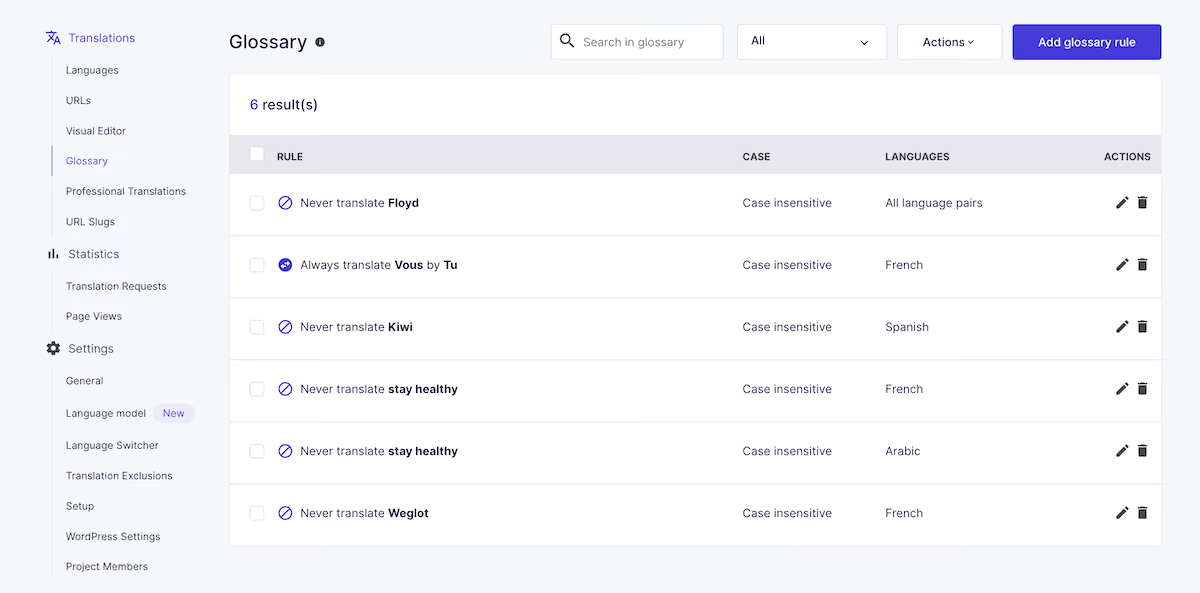
The result is consistency across your entire site's network. The same terminology will appear on your home page, product pages, checkout flow, error messages, and everywhere else, regardless of when each was translated or which engine processed it.
Translation exclusions operate at the level of URLs and content blocks rather than individual terms. Under Settings > Translation Exclusions, you can exclude entire pages from translation, protect sections of your layout using a CSS selector, or prevent specific content blocks from being picked up at all.

This is useful when a region-specific landing page should remain in its original language. It's also ideal for when a part of your site contains content that isn't appropriate to translate, such as a live feed or a legally prescribed notice.
The Visual Editor gives you an in-context review environment for pages that carry the most brand weight. Instead of working through translations in a list, you see them on a live preview of your site layout, which makes it possible to catch issues that only appear when translated text lands in a specific design.
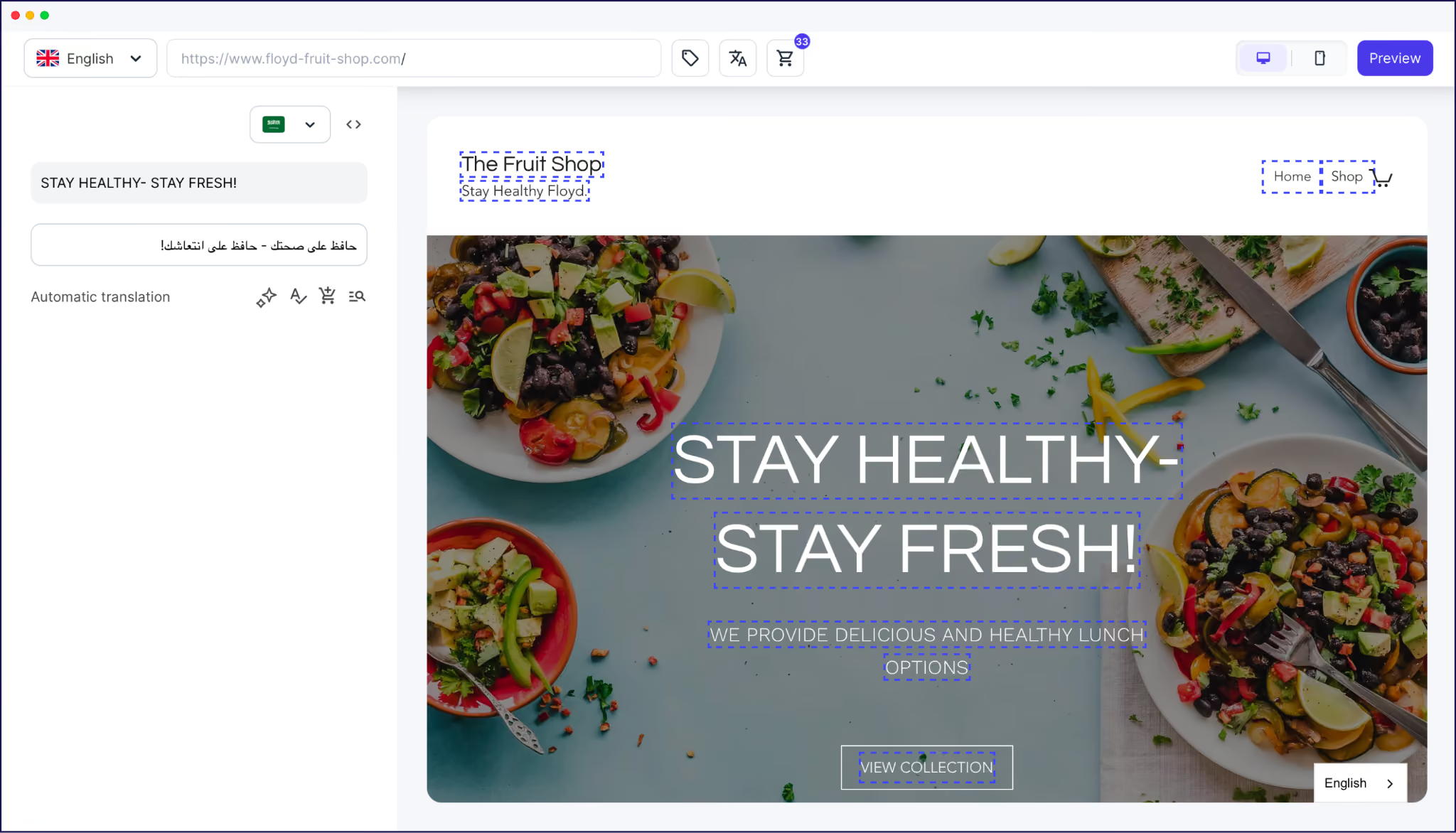
For instance, a headline that carries personality in English may look off in French. However, it might not be because the translation is wrong, but that the sentence structure takes a different form. This is something you'll only see on the page.
The Visual Editor also lets you filter translations by quality, so you can focus specifically on AI-generated strings, manually edited strings, or professionally translated content, depending on what stage of review you're at.
"We take advantage of AI translation in our 37 languages and our global team makes quick fixes if needed. It changed our way of working and we love it!"
– Eric Espinoza, IBM
The AI Translation Model builds on translation accuracy to give you a full, brand-aligned translation solution. It's a custom model using tech from OpenAI and Gemini, which you configure with your brand's context, guidelines, and custom rules, and then apply across your site.
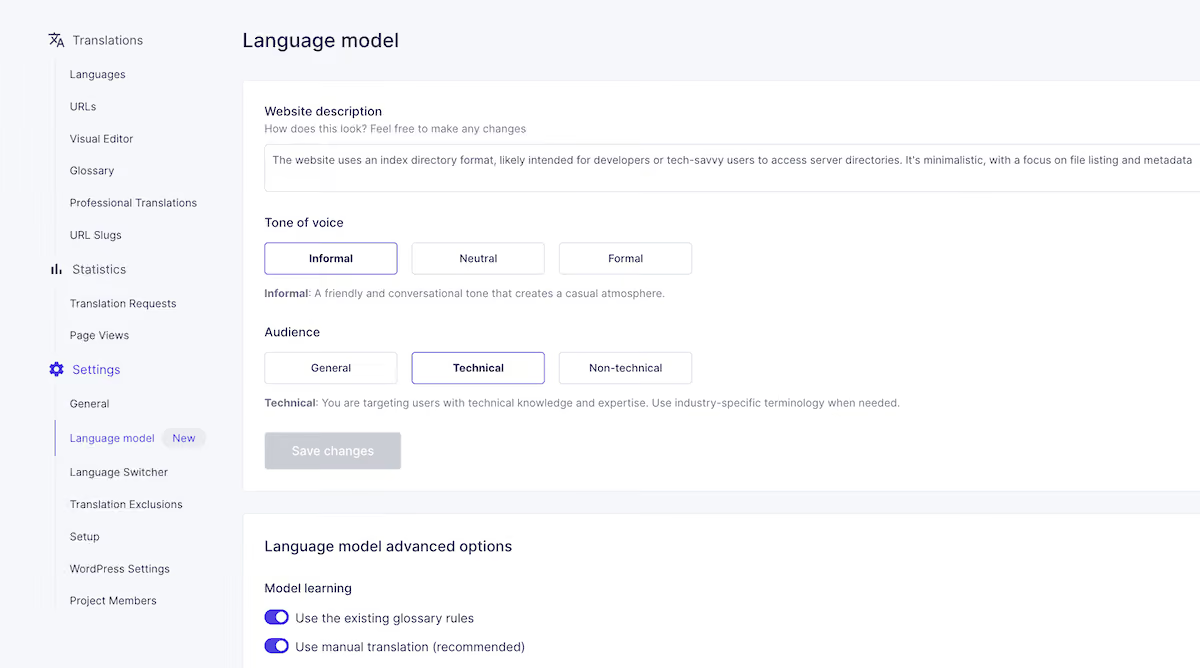
The model learns from a combination of inputs:
On this last point, you can tell the model to use a formal register in French but an informal one in German, for instance. Or, you could keep a specific product name untranslatable across all languages and adjust the technical level of translations by market.
Setting up the model takes a few minutes. The first time you visit your project, Weglot prompts you to configure your instance that pre-fills a brand description drawn from your website's content. You refine that description, write your custom instructions, and choose whether to incorporate your existing glossary rules and manual translation history.

After setup, the model is accessible at any time from the Settings > Language Model page. The most effective approach is to configure it before you start reviewing translations rather than after, so the first batch of output already reflects your brand.
To apply the model to existing translations, head to your Translation List. Next to each translation, an icon lets you generate an improved version using the model's configured context.
You can do this string-by-string, or select translations in bulk: check a string, click Select all, choose whether to target all translations in the project, and click Improve with AI. A confirmation message will show how many credits the operation will use before you commit.
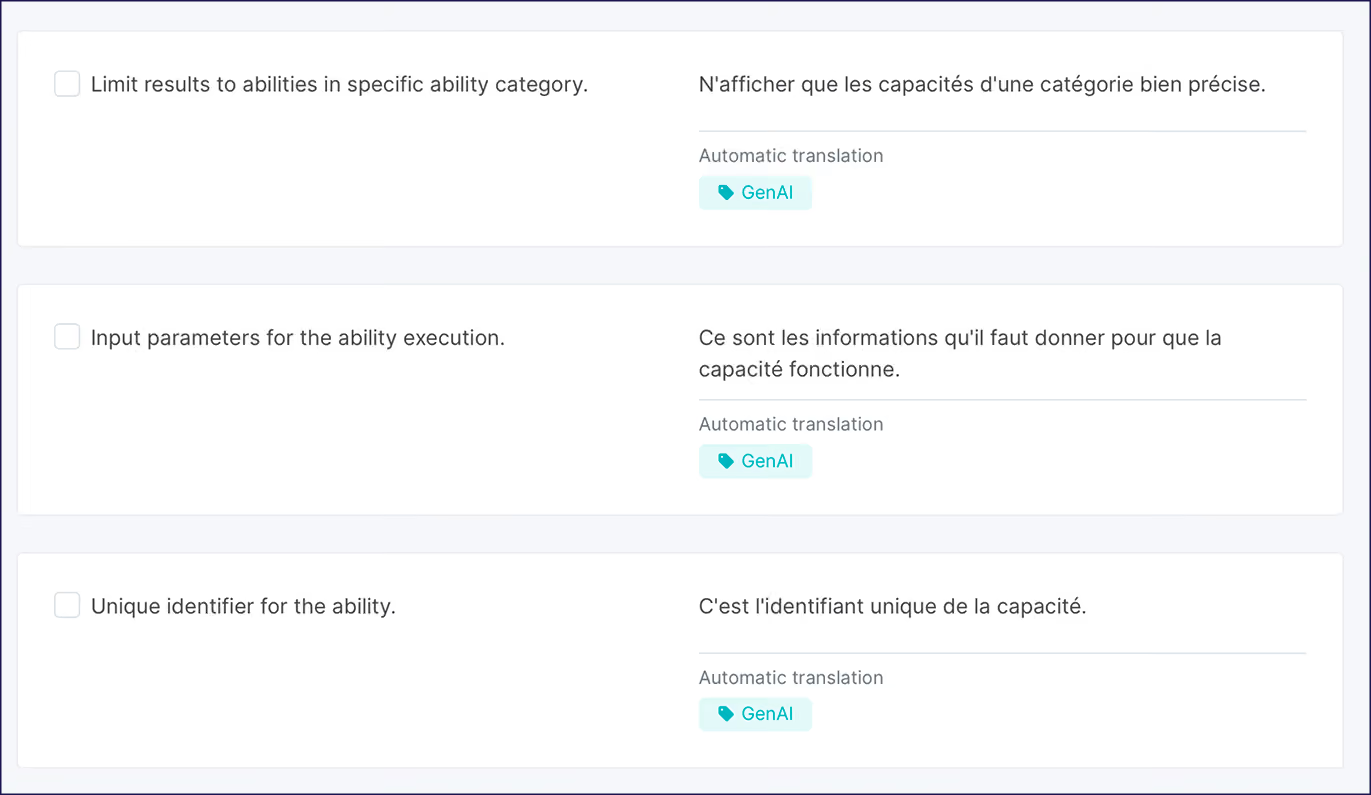
Language Model translations get a GenAI label, which you can filter by to review everything the model has touched, compare it against the base machine translation, and make further manual edits where needed.
A configured AI Translation Model lets you handle most of your site's translation volume with an enhanced level of brand awareness. However, a quality control workflow is still what turns the output into a site you're willing to put your brand behind.
It doesn't have to take up a lot of time either. The Bradery is a Weglot customer and ecommerce business that processes more than 500 new product descriptions each day. Its maintenance process is relatively rapid:
"It takes us about ten minutes twice a week to double-check everything is running how we want it. Everything else is done by Weglot."
Of course, not all content carries the same brand weight. A tiered approach is a good way to prioritize any key content and lets you direct your efforts to where it matters most:
For the review itself, you'll likely live in the Translation List most of all. Here, you can filter by URL to work through a specific page, filter by the GenAI label to focus on model-generated strings, or use the search function to locate specific terms.
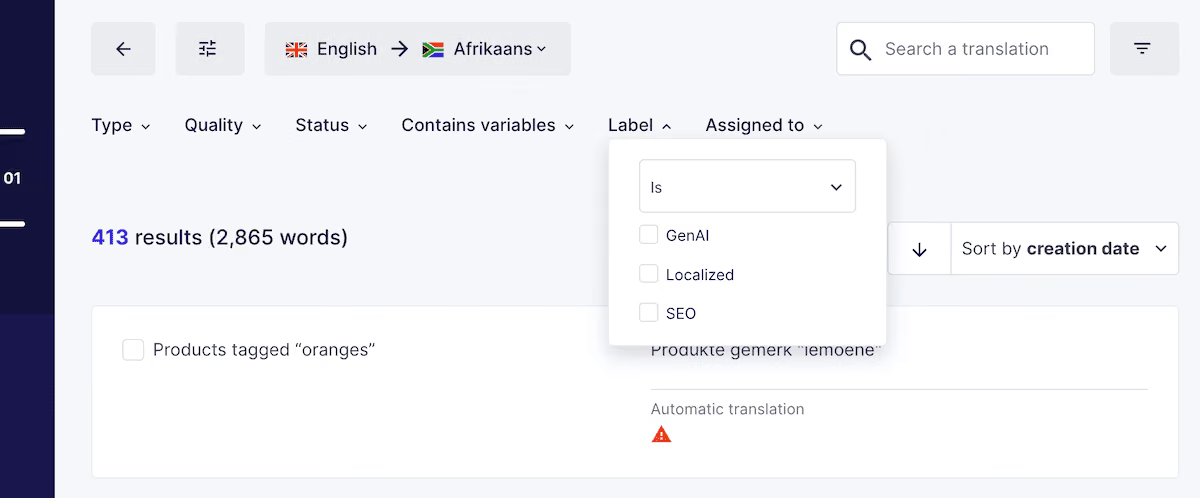
Each string will show you the original text and the translated version side-by-side, with the option to edit, accept, or send the string to a professional translator from the same view.
And, of course, with Weglot, you’ll always have 100% of control over your translations. So, if required, you can easily add and assign translations to translators through your dashboard.
With Weglot, getting brand-accurate translations into production doesn't require a translator for every market. Instead, it requires an approach that reflects how your brand communicates.
The functionality of Weglot can ensure you produce quality translations without going over budget or assigning too many team members to the task, thanks to our AI Translation Model trained on your brand's context. Combine this with a quality review workflow, and it all lets you deliver accurate translations while also focusing on your other business-critical tasks.
Start your 14-day free Weglot trial and see how far the configuration takes you before you need to bring in a professional reviewer.

We’ll get your first languages live. You decide how far you want to go. Try Weglot for free today.
Trusted by 70,000+ global brands





Weglot is tested and trusted by brands worldwide since 2016. Join them today.


The best way to understand the power of Weglot is to see it for yourself. Test it for free and without any engagement.
A demo website is available in your dashboard if you’re not ready to connect your website yet.


Once you configure it, the Translate Model applies from the first translation. Weglot generates an initial brand description at setup, which you refine with custom instructions before any translations run. Your existing glossary rules are incorporated at the same time, so the model starts with meaningful context rather than learning from scratch.
Yes! Custom instructions let you specify different behaviors on a per-language basis within a single model. You can also choose to apply the AI Translation Model to specific strings or pages rather than your full site.
You could refine your custom instructions for more specificity, then regenerate the string in the Translation List. For content that still needs a human pass, you can order professional translation or add your translators for those strings directly from the dashboard without leaving Weglot.
The glossary enforces your approved terminology across all translations, regardless of who edits what. The Translation List also labels manual edits, which makes it straightforward to spot any tone or terminology deviations.
Yes! Each plan includes monthly credits (one credit equals one word) running into the millions on higher tiers. Credits renew on the first of each month and your remaining balance is visible at the top of your Translation List.