Try Weglot for free


Like pretty much everything else in life, managing translations has become increasingly complex for brands.
By its very nature, producing effective digital content is a race against time. Ensuring your website stays relevant by keeping up with trends and meeting the needs of diverse audiences requires a specific solution, best found in a Translation Management System (TMS).
For clarity, a TMS is software designed to automate localization through API-driven workflows and quality assurance systems. Such platforms should offer advanced capabilities such as automated content detection, version control, and integration with development workflows.
Modern TMS solutions adopt a hybrid approach to translations, combining AI for a ‘first-pass’ while allowing for granular human editing control, ensuring accuracy and context preservation.
Technical implementation features include content deployment via Content Delivery Networks (CDNs), automatic language detection, and dynamic content serving. These enable businesses to manage multilingual content and provide an excellent User Experience (UX) across diverse markets.
A TMS is essential for businesses facing frequently updated content, large-scale projects, or those undergoing significant growth and global expansion. When shopping around for a solution, keep the following benefits in mind:
When selecting a TMS, focus on advanced differentiators that can impact operational efficiency and cost-effectiveness.
Selecting a TMS isn't about finding the "best" platform, but about finding the best fit for your specific business context and growth trajectory.
1. Start by assessing your technical environment. Inventory your current tech stack: which CMS powers your website, what marketing platforms do you use, and how technical is your team? Some platforms require developer resources for setup and maintenance, while others offer plug-and-play integrations that non-technical teams can implement in minutes. If you're running WordPress, Shopify, or another popular CMS, prioritize platforms with native integrations that eliminate custom development work.
2. Match the platform to your team structure and size. Consider who will manage translations day-to-day. Developer-heavy teams may appreciate API-first platforms with CLI tools and GitHub integration. Marketing teams typically need visual editing interfaces and intuitive dashboards. Also verify minimum user requirements – some platforms cater exclusively to larger organizations with ten or more users, making them impractical for smaller teams regardless of feature quality.
3. Evaluate implementation timelines against business urgency. If you're launching in new markets within weeks, platforms requiring months of technical setup won't meet your needs. Look for solutions that offer quick deployment without sacrificing quality. Some modern TMS platforms can have you translating content within minutes rather than months. Balance speed with your long-term scalability requirements.
4. Calculate total cost of ownership, not just platform fees. Monthly subscription costs tell only part of the story. Factor in translator fees (or savings from quality machine translation), developer time for implementation and maintenance, and ongoing management overhead. A platform with higher subscription costs but superior automation may deliver better ROI than a cheaper option requiring constant manual intervention.
5. Test with your actual content during trial periods. Every platform claims ease of use, but only hands-on testing reveals how it handles your specific content types, volume, and workflow complexity. Upload real pages, invite team members to collaborate, and evaluate whether the interface matches how your team actually works. Pay attention to friction points – if the trial feels cumbersome, the production experience won't improve.
The right TMS should feel like a natural extension of your existing workflows, rather than a system that forces you to adapt how you work according to is features and limitations.
Implementing a TMS is only half the battle. To maximize your localization ROI and ensure seamless multilingual operations, consider these proven best practices:
1. Start with strategy, not software. Before evaluating platforms, define your target markets, content priorities, and localization goals. A clear strategy ensures your TMS choice supports business objectives rather than forcing you to adapt to platform limitations. Map out which content types require immediate translation, who needs access, and how translations will be reviewed.
2. Establish a single source of truth. Create centralized glossaries and translation memories from day one. Consistent terminology across all markets strengthens brand recognition and dramatically reduces translation costs over time. When your TMS automatically applies approved terms, you eliminate repetitive manual corrections and maintain brand voice across languages.
3. Build quality into your workflow. Not all content requires the same level of oversight. Marketing copy and customer-facing materials benefit from multi-stage human review, while UI strings may only need spot-checking after machine translation. Configure automated quality checks to catch formatting errors and missing translations, but reserve human review for content where cultural nuance matters most.
4. Plan for continuous localization. Configure automated content detection and API integrations so new content flows directly into translation workflows without manual intervention. Reactive translation creates bottlenecks that slow market entry; proactive systems scale effortlessly as your content volume grows.
5. Measure what matters. Track metrics beyond word count and translation speed. Monitor time-to-market for localized content, conversion rates by language, and translator productivity. These insights demonstrate localization ROI to stakeholders and reveal optimization opportunities—perhaps certain markets need faster turnaround, or specific content types would benefit from additional review stages.
The following five platforms stand out for their core capabilities, automation features, and integration options, each tailored to meet different business needs and scale with growing translation demands.
In the history of TMS, it’s interesting to note that, although most platforms evolved from technical translation software, they’ve diverged in modern times, giving some of the below stricter use cases. Keep this in mind when matching a TMS to your own business needs.

Weglot is praised for its ease-of-use, It has a user-friendly visual editing interface and automatic content detection system. Businesses looking to translate their websites quickly can do so in around 10 minutes—that’s one swift setup!
A hybrid translation approach combines AI-driven translations with human editing, providing site owners with the best of both worlds – AI for speed, and human refinement for accuracy and localized language. Weglot uses AI translation, LLMs, and machine translation, enabling an AI localization workflow for the most accurate output.
A centralized translation management dashboard allows users to manage all translations from a single location, while extensive integrations with various Content Management Systems (CMS) and apps demonstrate the platform’s versatility.

Weglot also excels in multilingual SEO, automatically generating hreflang tags and optimizing metadata for search engines. With cloud infrastructure and API access, Weglot is rated 4.7 on G2, reflecting its reliability and user satisfaction. A free plan is available, with starter plans beginning at €15 per month, plus there’s a 10-day free trial.! Scalable plans allow the platform to grow in line with your needs, making Weglot a great solution for startups, SMEs, and enterprises alike.

Lokalise is tailored for agile teams, ideal for businesses in ecommerce, technology, and gaming. It excels in automating localization processes, offering features like a translation memory, API integrations, and visual context tools. The tool integrates with GitHub, Slack, and major code repositories to ease the translation process for development teams. However, it has a minimum requirement of ten users, making it more suitable for larger organizations.
The tool supports real-time collaboration among developers and translators, although a developer-centric interface may not be suitable for all. Lokalise is rated 4.7 on G2, reflecting high user satisfaction, and pricing starts at $120 per month for small teams, with plans scaling up to custom pricing for larger enterprises.

Phrase adopts a developer-centric approach with its API-first architecture and CLI tools, catering to technical teams managing software localization projects. It supports various technical formats such as Android XML and Angular Translate, providing the tools needed for software localization.
The platform includes features like a translation memory, customizable workflows, and integrations with popular platforms such as GitHub and Slack. It’s rated highly by users, with a score of 4.5 on G2.. Pricing starts at $135 per month for the Starter plan, with higher tiers available for larger teams needing advanced features.

Smartling is an enterprise-grade translation management system that offers advanced features such as predictive quality scoring and workflow automation. It integrates with various CMS and marketing platforms, making it ideal for medium to large businesses needing extensive localization capabilities.
The software provides visual context tools and advanced translation memory technology to maintain high quality across translations. Smartling has a user rating of 4.5 on G2, and pricing is usage-based, with flexible options and volume-based discounts.

Transifex is a cloud-based platform well-suited for continuous localization across diverse teams and projects.
It provides features such as automated content management and integration with version control systems like GitHub and Bitbucket. Users also gain translation memory capabilities, reusing favored translations for site-wide consistency.
With a 4.2 average rating on G2, Transifex has a sturdy rating, although some users have complained about the lack of collaboration management when working on multi-partner projects.
Pricing begins at $120 per month for the Starter plan, with options scaling up based on word count and team size.
So, how to get setup with a TMS? Here, we’ll take a look at Weglot, the most versatile, affordable, and scalable solution on the market. With 110,000+ users and 110+ languages, setting up your localization workflows is easy.

Weglot automatically detects content, ensuring that new pages or content updates are translated in real-time. You can also assign translations to teammates or translators, ensuring accuracy.
Integration with existing systems is straightforward as it’s compatible with any website, with connections to popular CMS and third-party translation providers.
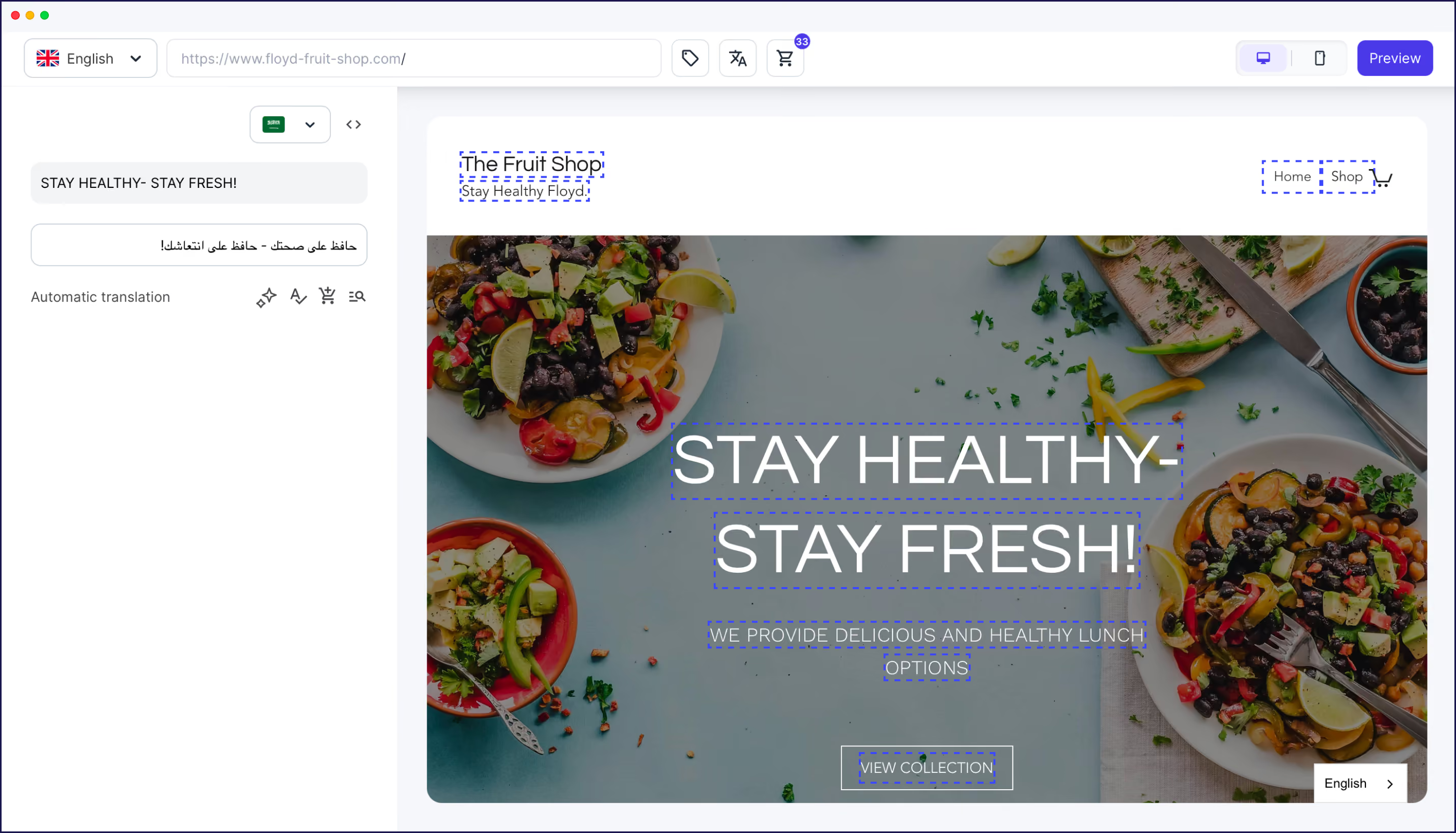
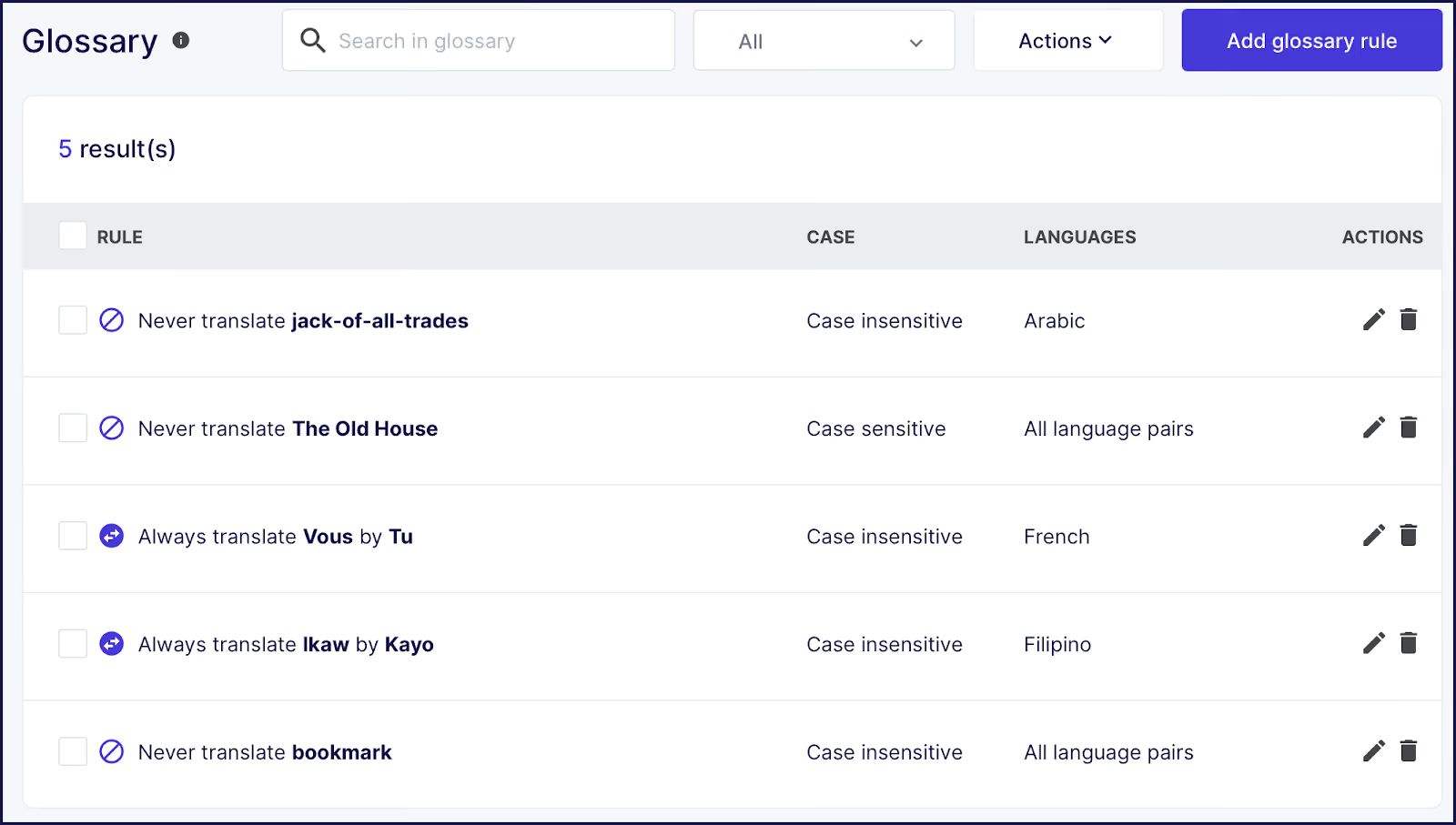
For quality control, Weglot gives you full editing control, with a Visual Editor allowing you to find translations in the context of your site, image translation, and glossary rules to set and forget key terms across your site.
This enterprise-grade automation at scale allows companies managing over 1 million words across 10+ languages to streamline their localization efforts with ease. By offering a complete localization solution in one platform, Weglot addresses all website translation needs while improving efficiencies and team collaboration.
Weglot offers a scalable website translation software for all companies. With quality assurance, and SEO tools that boost localization and help to extend your global reach.
Weglot can get you up and running in just 10 minutes, compared to months with a traditional TMS. With specific word count thresholds for scaling, you can maximize ROI through automated workflows and reduced manual processes.
Test drive our scalable features with a free Weglot trial, and unlock the potential of efficient localization for your website!

We’ll get your first languages live. You decide how far you want to go. Try Weglot for free today.
Trusted by 70,000+ global brands





Weglot is tested and trusted by brands worldwide since 2016. Join them today.


The best way to understand the power of Weglot is to see it for yourself. Test it for free and without any engagement.
A demo website is available in your dashboard if you’re not ready to connect your website yet.