

Try Weglot for free


For WordPress site owners, translation can feel like a forced choice between speed, quality, and cost. But what if you could launch globally and still control every nuance?
The real choice isn’t between automatic translation or human translators. Smart businesses use both strategically, starting with machine translation for instant translations, then refining high-value pages based on actual traffic data.
This guide reveals how and where to find the perfect blend of both methods – high translation accuracy, yet delivered at speed. We’ll detail the content areas best suited to one method over the other, and compare leading plugins from performance to cost.
Automatic translation is machine-powered conversion that delivers instant results across multiple languages. Manual translation involves human translators who ensure cultural accuracy and brand voice consistency.
Instead of picking one over the other for your entire site, choose the best option for each content type. That way, your translation projects are directly in line with company goals. Most WordPress sites need a hybrid solution driven by content priorities. Take a look at this concept through a business lens:
Neural machine translation (or AI translation, as it’s also commonly referred to) is highly effective for straightforward, factual content. Product specifications, FAQ pages, and technical documentation often require no further editing.
As we’ve seen, legal pages, privacy policies, and terms of service carry legal risk if misinterpreted. Marketing copy rich in emotional triggers, humor, or cultural nuance also benefits from a professional touch. Automated translations are fine for a starting point, but mark these for manual review.
Blog content often sits between these extremes. Technical tutorials translate well automatically, but cultural commentary and opinion pieces need a review. Use analytics to prioritise which posts generate conversions, and mark these for manual review as well.
Get the balance right between automatic and manual translations and you’ll minimize timescales whilst maximizing your conversions.
Translating WordPress manually – without any plugins – means building every language version from scratch (if you want to save yourself some serious time consider using a plugin – covered in the next section).
First, duplicate each page for every target language. Create a custom language switcher using PHP or JavaScript so visitors can toggle languages. Assign each language version its own navigation menus, adjusting links and structure as needed.
For SEO, manually add hreflang tags in your theme’s header.php file to signal to search engines which page matches which language. If you opt for the multisite path, each language lives as a separate WordPress installation. You’ll juggle multiple dashboards, synchronize updates, and keep every site in lockstep.
Technical SEO tasks fall entirely on you. You’ll need to create XML sitemaps per language, define canonical URLs, set up redirects, and maintain clean URL structures. Expect to budget 40-60 hours for initial setup – if you’re already au fait with the process – and more for ongoing updates.
Manual translation offers true data control, which is sometimes required by regulation or enterprise needs. However, the workload can be greatly reduced by simply adding a plugin.
‘Hybrid translation’ is a sequential workflow that launches your site fast with automatic translation, then fine‑tunes content through manual edits based on page value and traffic data. Here’s how a rollout looks.

Install the Weglot plugin, connect your API key, and choose your target languages.
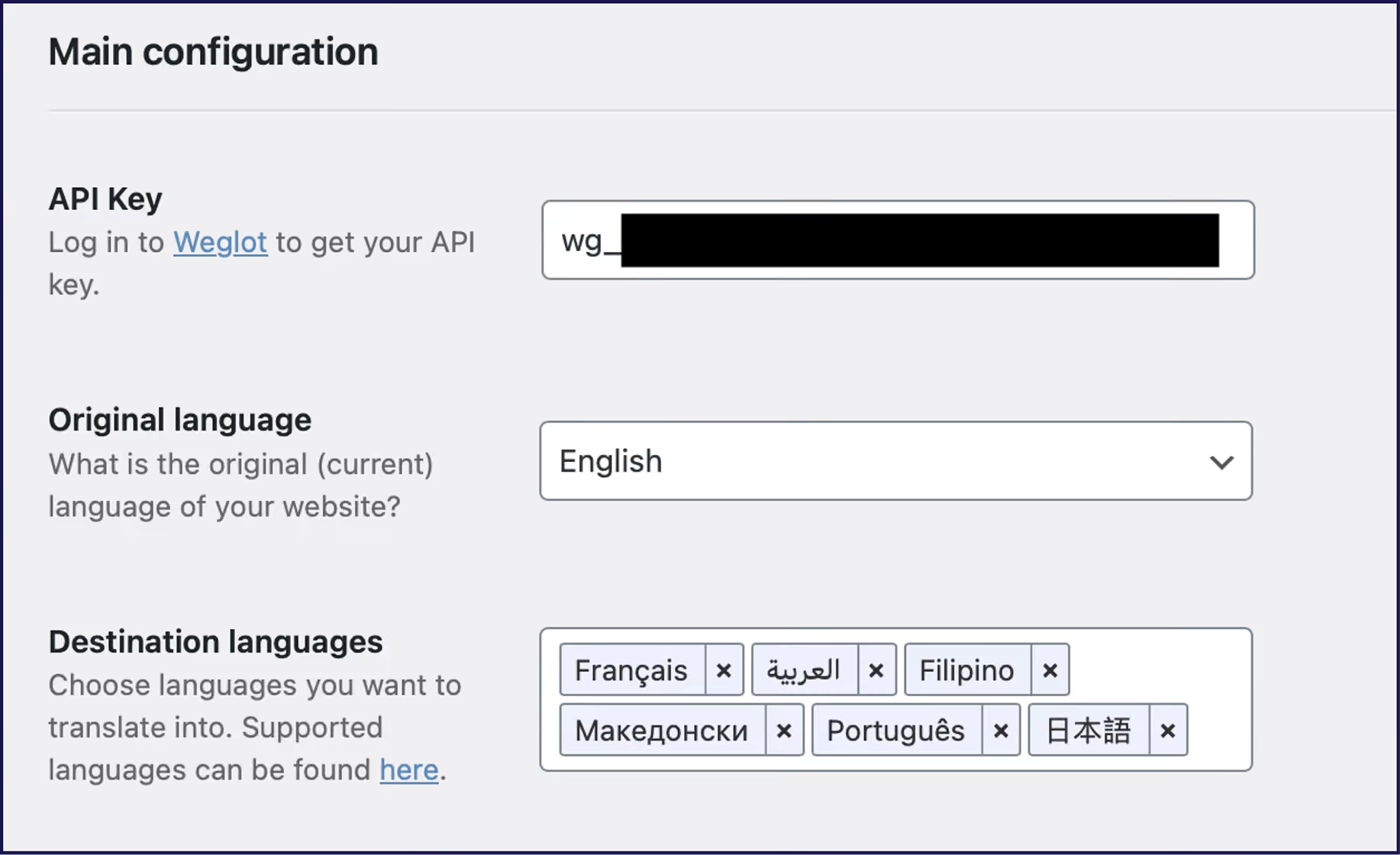
Within five minutes, your entire WordPress site will appear in multiple languages, complete with translated URLs, SEO tags, and a working language switcher. Every visible string, from navigation menus to WooCommerce checkout messages, is already live.

Users on a paid plan can further improve their AI translation with our AI Language Model. This model delivers hands-off translation quality powered by OpenAI and Gemini, ensuring accuracy even with branded terms or nuanced content. The user can train the custom model to understand brand identity, past translation edits, tone of voice, glossary terms, and custom instructions for a more ‘human’ output.
Or, you can use Weglot’s Visual Editor to manually refine translations on the frontend. Click any element on the live site to adjust text, swap images for local markets, and preview how language length affects layouts. Your marketing team can make changes independently, without waiting on development resources or needing backend WordPress access.

For further time saved and greater accuracy, you can lock in brand language and translation preferences via Weglot’s glossary. Add sneakers > zapatillas once, and Weglot applies it everywhere, improving future machine output automatically.
For high‑stakes content like landing pages or legal text, you can order expert, professional translation directly through the dashboard. Select your pages, click Order professional translation, and receive polished, human‑verified content within 24 to 48 hours, pre‑formatted and live, without copy‑pasting.
The hybrid method gives you global reach in hours and total strategic control over your translations.
Now you know how easy it is to translate your site using Weglot – how do some of the leading market competitors compare? The strongest workflow to translate a WordPress site is a hybrid one, but you’ll need to consider price, complexity, and setup times – let’s take a look at how popular plugins WPML and TranslatePress handle things.

WPML (€99-199/year) has been built for large, complex multilingual sites that need granular control, deep theme/plugin integration, and workflow management. It’s ideal for agencies or enterprise installs where accuracy and permissioning matter. However, WPML’s interface is more complex than other solutions, and setup is more time-consuming.
TranslatePress (€99-349) excels for users who crave a visual, frontend editing experience. It’s best for marketers, freelancers, or small business owners prioritizing content quality and ease of use.

Weglot (€150-790+) is a go-to for sites of all sizes, avoiding performance issues by hosting your translations in the cloud. It’s the ideal WordPress translation plugin for content-driven businesses, with excellent integrations and time-saving automations.
That modest-looking 50‑post blog can balloon into 35,000 translatable words once WordPress counts menus, widgets, form fields, and metadata. Knowing this upfront helps you pick the right plugin/pricing tier from day one, and avoid any unpleasant surprises.
Base prices don’t tell the whole story. Exceed your word count with WPML or TranslatePress, and you’ll have to pay for more. Do the same with Weglot and you’ll move up a pricing tier. Calculate your content velocity – how many new words you add monthly – and compare this to our table before committing to any purchase.
To help control word growth in Weglot, you can go to Settings > Exclusions and add rules like /tag/*, /author/*, or /2020/* to skip archives and low‑value pages. This can cut word counts by up to 40% without affecting key content, and free up your automated allowance for the most important pages.
WPML delivers strong multilingual SEO. It automatically creates language-specific URLs, translates meta titles, descriptions, and alt text, and embeds hreflang tags without manual editing.

TranslatePress covers all major SEO requirements with its SEO Pack Add-On. It translates URL slugs, meta data, and image alt tags, adding hreflang tags automatically. You can edit SEO metadata visually within its interface, and it supports multilingual XML sitemaps via third-party SEO plugins.
Weglot takes SEO automation further, with server-side rendering that fully embeds translated content and metadata in the HTML served to search engines. Weglot generates language-specific URLs via subdirectories or subdomains, auto-inserts hreflang tags, and translates all SEO-relevant elements (meta tags, slugs, structured data) out of the box.

Performance-wise, WPML and TranslatePress store translations in your WordPress database. This allows complete control, but as translation tables expand, site performance can suffer, especially on larger sites with hundreds of pages or products.
Weglot avoids this by connecting to its remote API. All translations are processed and served from the cloud, which keeps WordPress lightweight and fast, even at scale.
A further consideration comes in the form of website localization properties. ‘Localization’ is the process of ensuring cultural translation across your content and images. Direct translations are sometimes unsuitable, and different cultures react differently to images, colors, and layouts.
Both TranslatePress and Weglot include a visual editor for frontend changes, allowing you to click, edit, and localize any page element in line with the needs of your audience.
For best results, start now, learn fast, and optimize with data!
For a cloud-based platform offering the perfect hybrid translation solution, try Weglot’s 14-day free trial today.

We’ll get your first languages live. You decide how far you want to go. Try Weglot for free today.
Trusted by 70,000+ global brands





Weglot is tested and trusted by brands worldwide since 2016. Join them today.


The best way to understand the power of Weglot is to see it for yourself. Test it for free and without any engagement.
A demo website is available in your dashboard if you’re not ready to connect your website yet.
