Try Weglot for free




AI has changed what it takes to launch a multilingual website. Now, given the right tools, any business can reach international audiences fast without rebuilding pages from the ground up.
But translating a business website well involves more than just swapping text.
You need to consider how content is detected and displayed across languages, how your brand will stay consistent, and how to protect search engine visibility.
This guide shows how to translate any business with AI, so you can grow traffic, brand awareness, and sales with minimal manual effort.
AI can handle much of the heavy lifting that website translation used to take, from actually converting large volumes of text between languages to correcting errors.
Lots of site owners and marketers we speak to are still skeptical of AI’s abilities, and we understand it, but the tech has come so far that its main benefits are becoming impossible to ignore.
Effective AI translation delivers:
These wins make AI translation an attractive alternative to hiring a human translator or agency, especially for larger or fast-moving websites.
Those traditional translation methods often take longer, require significant budget, and can be difficult to scale as you create more content.
AI is faster, or in most cases, immediate. It handles the bulk of translation work quickly, freeing up time for higher-value tasks like refining messaging, adapting content for local audiences, and building stronger international strategies.
That said, each approach suits different needs depending on scale, speed, and content type.
We explore cases for both in our full comparison guide, but here’s the short of it:
And the best part? You can get the best of both worlds by combining them. With hybrid translation, AI does the heavy lifting and human reviewers polish the finest details to guarantee accuracy.
In fact, 62% of enterprises use AI translation as more firms look to prioritise speed.
AI translation is more of an approach than a precise tool type, as there are a few very different methods you can use. Again, all have their place and the right choice depends on your needs.
The three big options are generative AI, machine translation with AI, and end-to-end AI website translation and management.
Here’s how they work and compare:
Sometimes, AI translation methods even combine to improve outputs.
For example, Weglot incorporates machine translation engines (DeepL, Google, etc.) to deliver highly accurate initial translations and generative AI (OpenAI and Gemini) as part of its custom AI Language Model to match brand tone, context, and style.
Once you’ve settled on the best AI translation approach for your business website, you’re ready to go multilingual.
Whether you’ve picked GenAI, machine translation, or a more comprehensive tool like Weglot, the general process involves the same 3 high-level steps: prepare, translate, localize.
Here’s what to do.
You’ll save rework later by checking off the following tasks before you translate any content with AI:
Completing these smaller prep tasks should have you feeling confident about moving to the next step: actually translating content.
Learn everything you need to know about the differences in our full guide: Translation vs. Localization: What’s the Difference? And Do You Need Both?
This step goes slightly differently depending on your chosen method.
With standalone generative AI, you’ll need to manually copy and paste each page’s content between your CMS and the app, and keep prompting until you’re happy with the output.
Of course, repeatedly checking that output requires a fluent speaker of each target language.
Machine translation platforms let you avoid the copy-paste-prompt slog by connecting to your website through an API, but typically require some manual setup to sync content.
An AI website translation tool makes this step far easier, especially if you have lots of dynamic content to translate.
Weglot is an end-to-end website translation tool that automatically detects, translates, and displays your website content in multiple languages. More than 111,000 brands use it to support their international growth strategies, often due to its speed and simplicity.
For example, all Weglot needs is your language choices and domain URL, and for you to paste a code snippet into your CMS or site builder (which automatically adds a language switcher to every page).
Here’s what that main setup screen looks like:
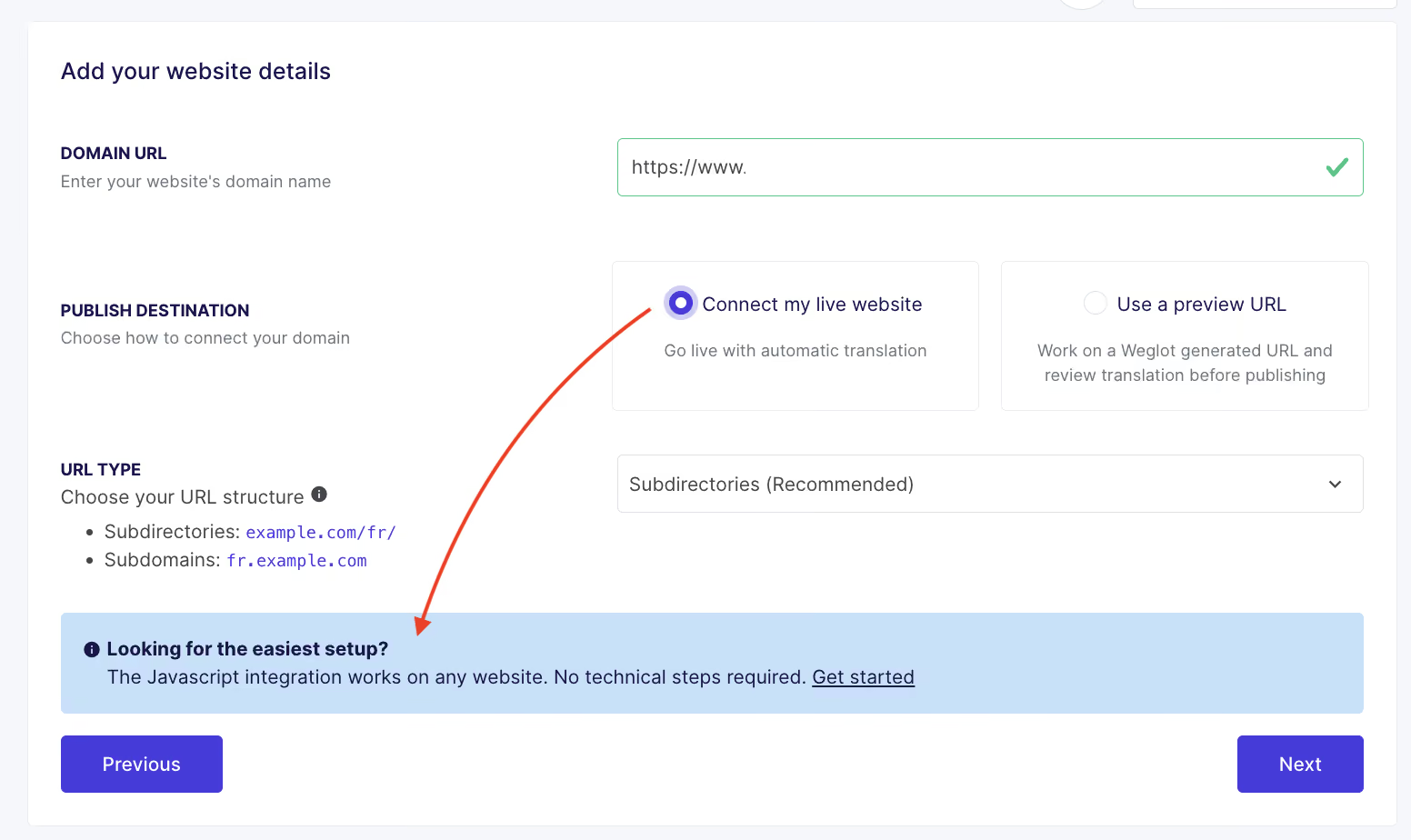
From there, all the technical setup is handled. Your translated site is automatically displayed under SEO-friendly URLs, with hreflang tags added too, ensuring people find your brand whatever language they search in.
And, any content additions or edits will reflect in the new translated versions. No manual effort needed.
Adapt content beyond text to suit different markets while keeping branding consistent across versions.
In particular, pay attention to:
Consistently providing clear, relevant content is how you’ll keep new traffic engaged and ultimately persuade visitors to hit “buy” or “get in touch”.
In fact, 75% of the marketers DeepL questioned said localized content significantly boosts customer engagement and 96% reported positive ROI from their localization efforts.
After translating and optimizing your business website for new markets, you should see traffic and engagement increase. Now, the focus shifts to maintaining performance and visibility.
Here are four easy ways to ensure your multilingual website keeps delivering value for your business.
Ensure every update to your website is reflected across all languages so that visitors always see the latest, most accurate information about your brand and products.
Integrations and automations handle new translations behind the scenes, saving you the manual hassle of editing multiple versions of the same content.
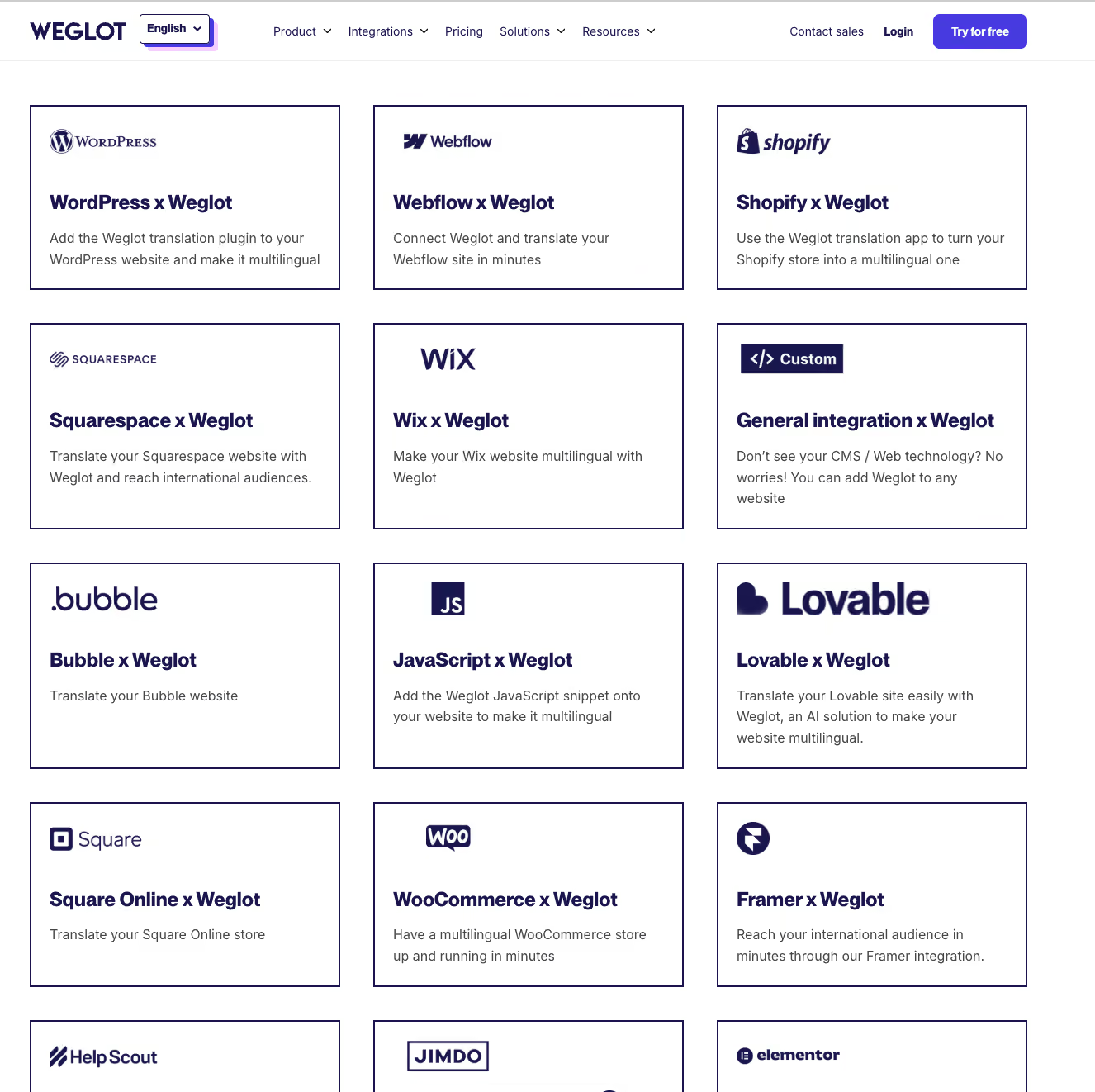
Weglot integrates with all popular website technologies (and custom-built sites) to handle updates on autopilot:
As with new translations, you can manually review or edit updated content at any time to ensure quality and consistency.
Define how your brand should present in every language by setting your own rules and guidelines.
Use glossaries to control how key terms are translated – or whether they’re translated at all – and apply style guides to keep tone and messaging consistent.
Advanced AI website translation tools can also learn from your edits over time, improving translation quality automatically to save you even more time.
Weglot’s AI Language Model is customizable to your audience and objectives and, with your permission, will self-learn from existing glossary rules and all manual translations.
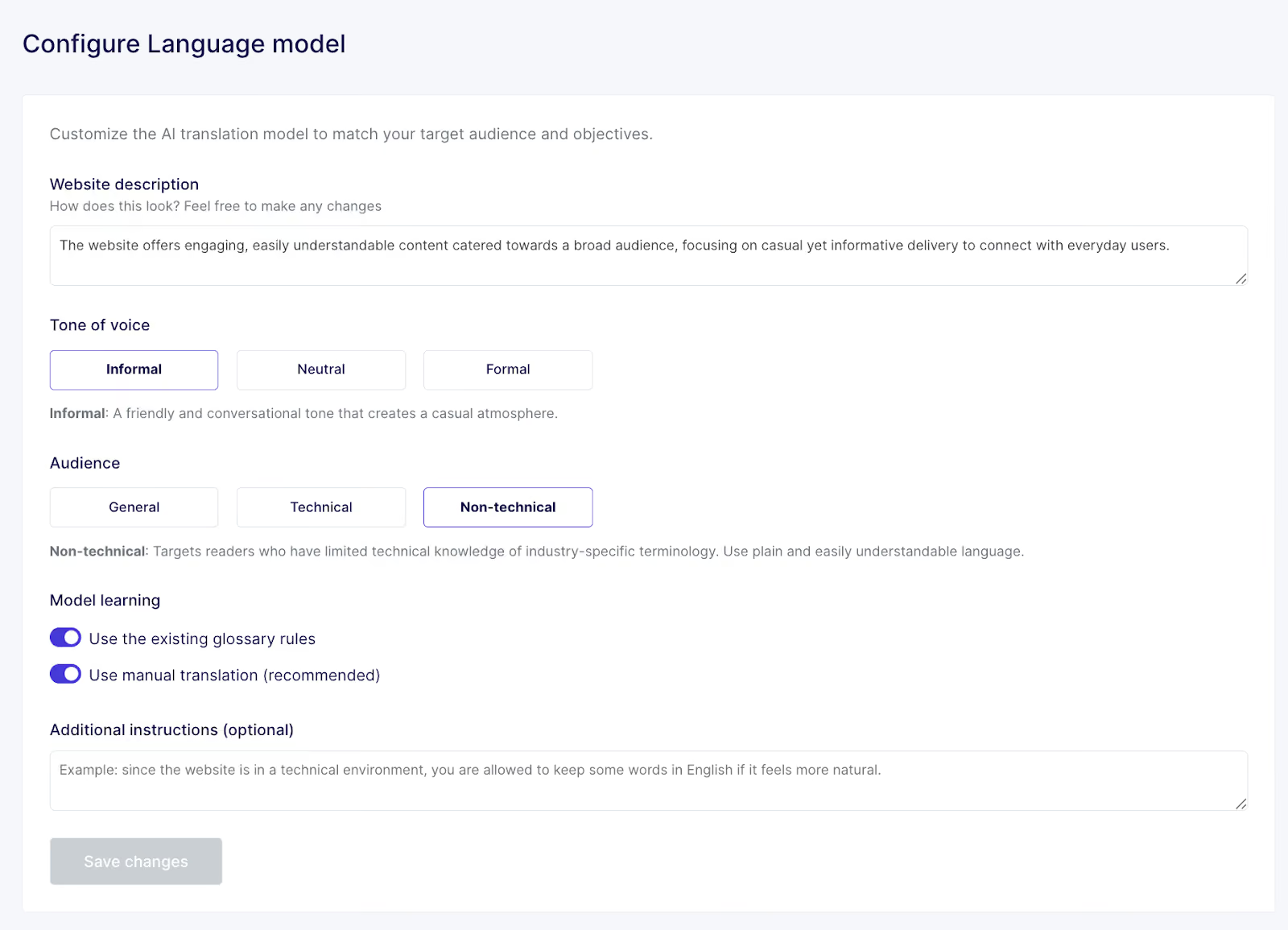
You can reconfigure the AI Language Model to account for changes to your target audience or brand messaging.
And you can update the glossary from which the AI learns at any time, just as French skincare brand Polaar did as part of a translation project that saved >100 hours and doubled US traffic.
The company’s E-Store Manager Sophie von Kirchman said:
“The ability to add specific terms related to our brand to the glossary feature was very useful and avoids us having to do repeat work.”
“We’ve seen undeniable time-saving through Weglot’s instant translation. If a modification is made on a product page, we know that it’s automatically translated and live on our multilingual pages.”
International SEO (also known as multilingual or global SEO) is essential for helping new visitors from different markets find your website.
Very simply put, there are two sides:
Start by identifying relevant keywords, analyzing local competitors, and understanding which search engines matter (because Google isn’t the default in all markets).
That research shows what types of content to prioritize and how to align with local search behavior (i.e., which platforms you’ll need to satisfy).
Then, if you’re using Weglot, you can sit back because the rest is already taken care of.
The tool generates language-specific URLs, adds hreflang tags automatically, and ensures translated pages are always indexable, so you can focus on strategy rather than setup. This is the kind of stuff that standalone machine translation and AI apps like ChatGPT can’t do.
Measure how your multilingual site performs in each market to understand translation ROI and learn what drives results.
Track key metrics like traffic, rankings, conversions, and revenue by language to see where translation is delivering value. And where it isn’t.
Most site builders and CMSs have performance analytics built in. Or you can use a third-party tool like Google Analytics (pictured below) or Google Search Console for extra data to guide improvements.
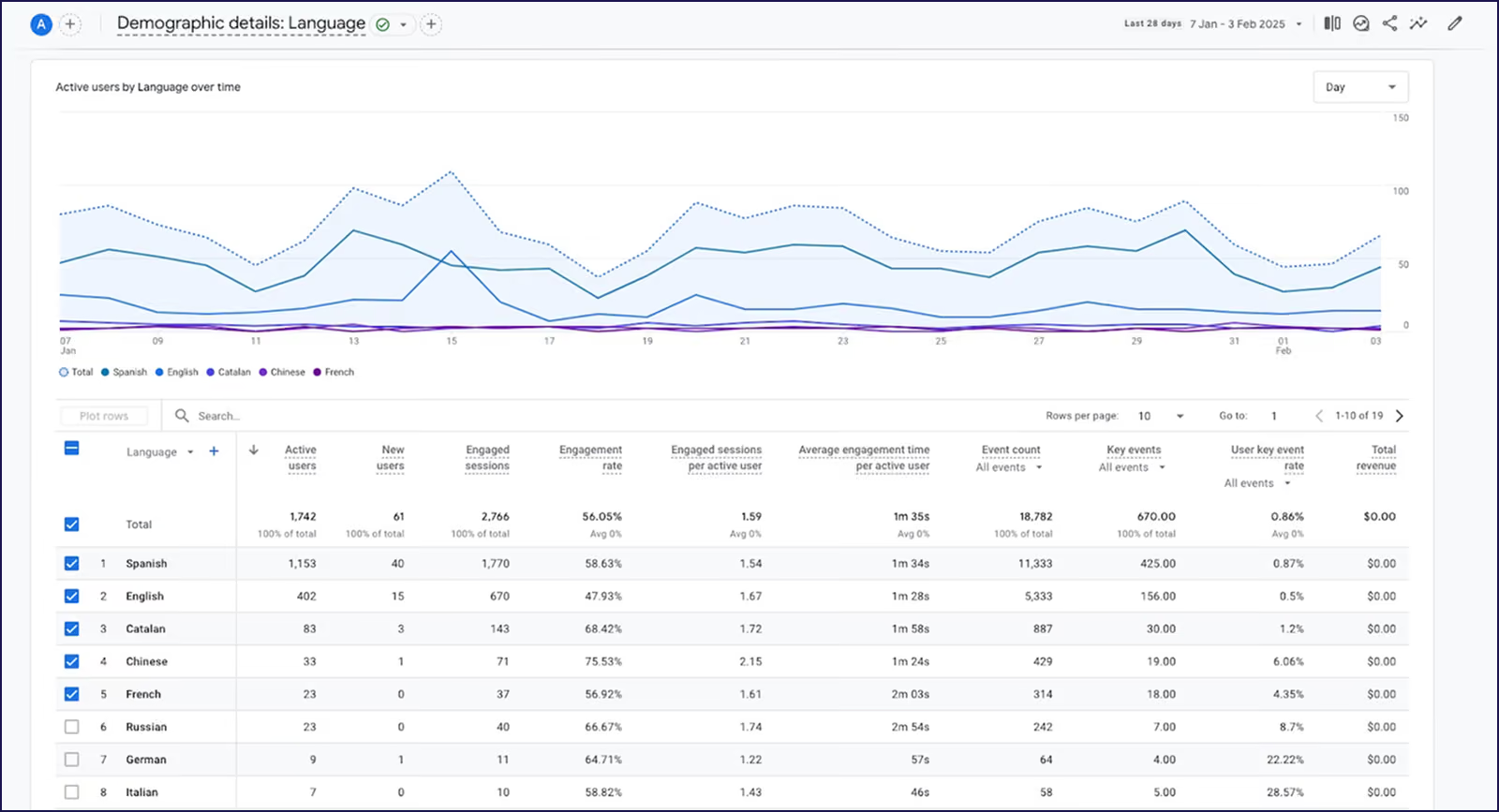
Let’s say you translated your site into Simplified Chinese with Weglot, visibility on Baidu (China’s dominant search engine) rocketed, and now new business is surging.
That’s a strong sign to create more Chinese content to keep increasing revenue. You may even feel inspired to explore opportunities in other Asian markets.
The barrier to international expansion is lower than ever, unlocking exciting opportunities for your business.
With (the right) AI handling the heavy lifting, your website can finally keep up with your ambitions – launching faster, scaling further, and adapting as you grow.
Ready to see firsthand how Weglot makes going multilingual a breeze? Jump straight in and get started for free with our 14-day free trial.

We’ll get your first languages live. You decide how far you want to go. Try Weglot for free today.
Trusted by 70,000+ global brands





Weglot is tested and trusted by brands worldwide since 2016. Join them today.


The best way to understand the power of Weglot is to see it for yourself. Test it for free and without any engagement.
A demo website is available in your dashboard if you’re not ready to connect your website yet.


The best AI tools can accurately translate your business website, preserving your messaging and content quality.
Unlike general-purpose translation tools, Weglot delivers highly accurate, context-aware AI translations specifically optimized for website content.
Not always. Weglot can provide linguistically and functionally accurate translations on the first attempt, allowing you to launch a multilingual site in under 10 minutes without expert help.
That said, the tool’s intuitive Visual Editor allows team members or hired translators to make precise adjustments in context.
Yes! That’s the beauty of AI website translation tools like Weglot – it simplifies and speeds up the process without requiring technical skill.
Weglot’s 14-day free trial includes up to 10,000 translated words and 1 translated language.
Once that trial ends, you can:
See what’s included at all pricing levels.