Try Weglot for free





qTranslate was once one of WordPress' most popular free translation plugins. However, it's had sporadic maintenance since 2018. There's a community-maintained fork—qTranslate-XT—but it operates without official WordPress support. If you need to translate a WordPress site, you may want an actively maintained tool with responsive support. Still, given its place in WordPress' history and its core functionality, some users do turn to it.
"When we encounter users still running older solutions, our first concern is always sustainability. These sites often face compatibility issues with modern WordPress, and the lack of reliable support can often create a risk for businesses".
— Christophe, VP of Support.
This post will examine what qTranslate-XT offers, highlight its significant limitations, and give you a stable alternative in Weglot.
At its core, qTranslate-XT is a functional multilingual WordPress plugin that uses somewhat of a unique approach to content management. The plugin stores all language versions within the same database entry using embedded language tags. For example, a post titled "Welcome" in English and "Bienvenue" in French has a distinct tag within the database:
[:en]Welcome[:fr]Bienvenue[:].
The plugin supports flexible URL structures for different languages. Query parameters create URLs such as example.com/page?lang=en that keep all languages on the same path. Typical subdirectories and subdomains generate URLs that create separate paths for each language and give each language its own subdomain, respectively.
However, all translation management happens directly within the WordPress editor using language switching buttons. When editing a post, you click the related language button to toggle between versions. Each language gets its own editing area with instant switching that happens locally in the browser without server requests.
The plugin includes built-in modules for extensions such as WooCommerce, Advanced Custom Fields, and slug translation. These integrations can give you greater functionality such as product catalogs and custom content structures.
The elephant in the room is that qTranslate-XT has undergone multiple transformations, each marked by developer abandonment. The original qTranslate received its last update in 2015 before its developer disappeared. A successor (qTranslate-X) spent a couple of years as an active plugin (and still has a live GitHub repo) before that developer also abandoned the project.
The current version—qTranslate-XT—represents a community effort that at least has a few years under its belt. The maintainers describe the plugin as a "bridge project" while the future direction remains unclear. However, the team operates through GitHub rather than the WordPress Plugin Directory. This is a definite barrier for most typical WordPress users.
The installation process requires downloading files from GitHub, uploading them manually to the WordPress plugins folder, and configuring updates through GitHub Updater. Unlike standard WordPress plugins, you cannot install or update qTranslate-XT through the WordPress dashboard.
In addition to the idiosyncratic installation and update process, there are other key limitations. For example, Block Editor receives"partial” support and the official recommendation is to install the Classic Editor to maintain usual features. This means you may find that some Blocks translate correctly while others could display raw language tags. Some Block types might not even work with the translation system.
In real terms, here's where qTranslate-XT falls way short:
The exit strategy arguably represents the most troubling limitation. The documentation warns that "there is no procedure for a full uninstall". Deactivating the plugin exposes language tags such as [:en]Welcome[:] to visitors across every page. Not only that, the plugin doesn't offer translation services of any kind. This is more of a plugin to help you enter and maintain translated content.
In complete contrast to qTranslate-XT, Weglot operates as a translation layer between your site and visitors rather than embedding tags in your database.
So, when someone accesses your site in French, Weglot serves the French translation without modifying your original content. Your English posts remain exactly as you wrote them in the WordPress database. This architecture eliminates data migration risks.
What's more, deactivating Weglot will leave your original content intact with no raw tags visible to visitors. Your site simply displays in its original language until you implement a different solution.
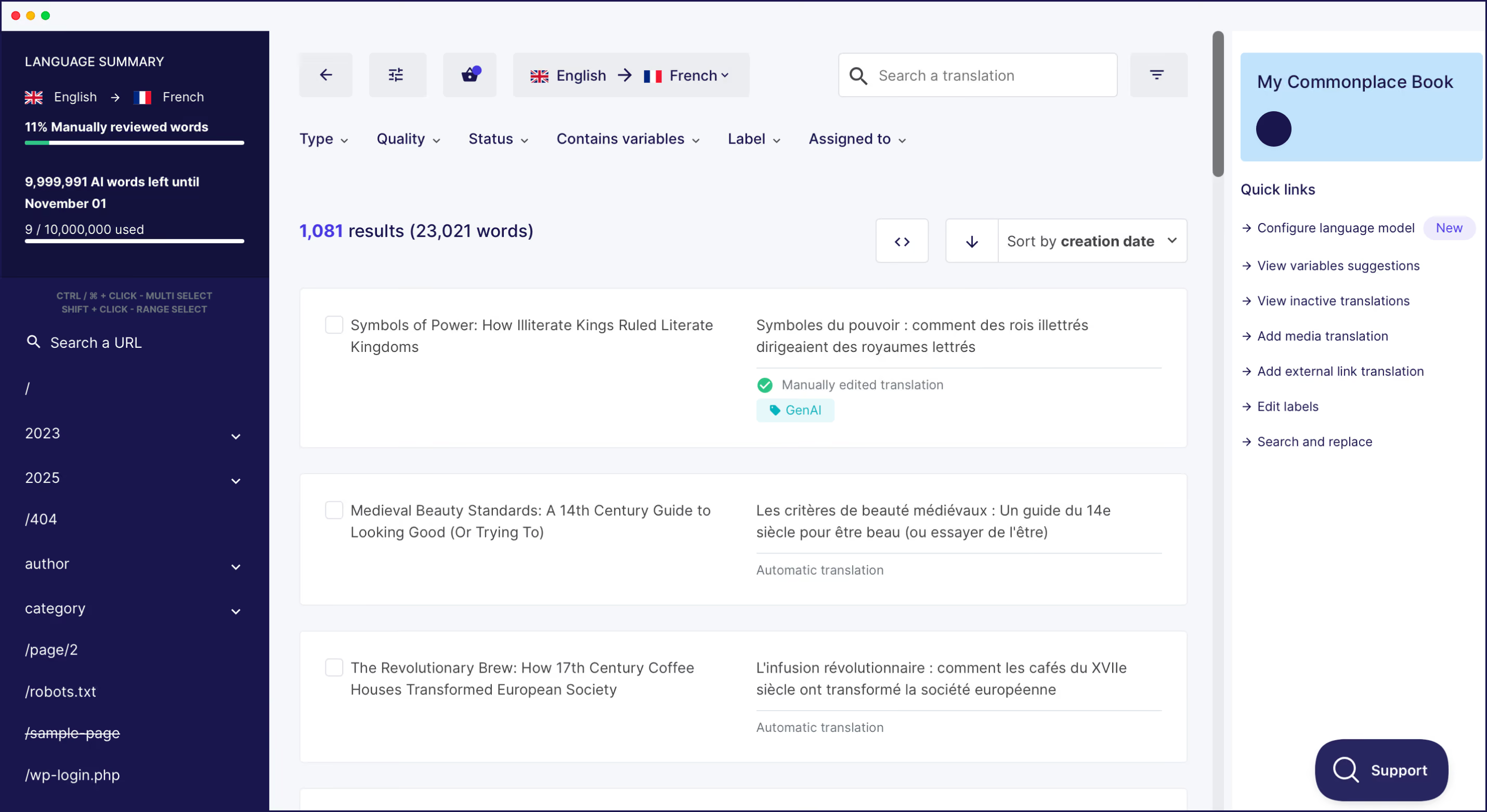
From the point of install, the platform will detect all translatable content automatically. For example:
In short, nothing escapes translation, either for existing content or new additions in the future. Weglot first uses AI translation from top solutions such as DeepL and Google Translate. These engines understand context, maintain tone, and adapt your content steps above basic word-for-word translation.
You can even take things a step further with Weglot’s AI Language Model, which learns from your custom instructions, manual translation history, and Glossary. The result is near-perfect translation from day one that you can refine based on your standards.
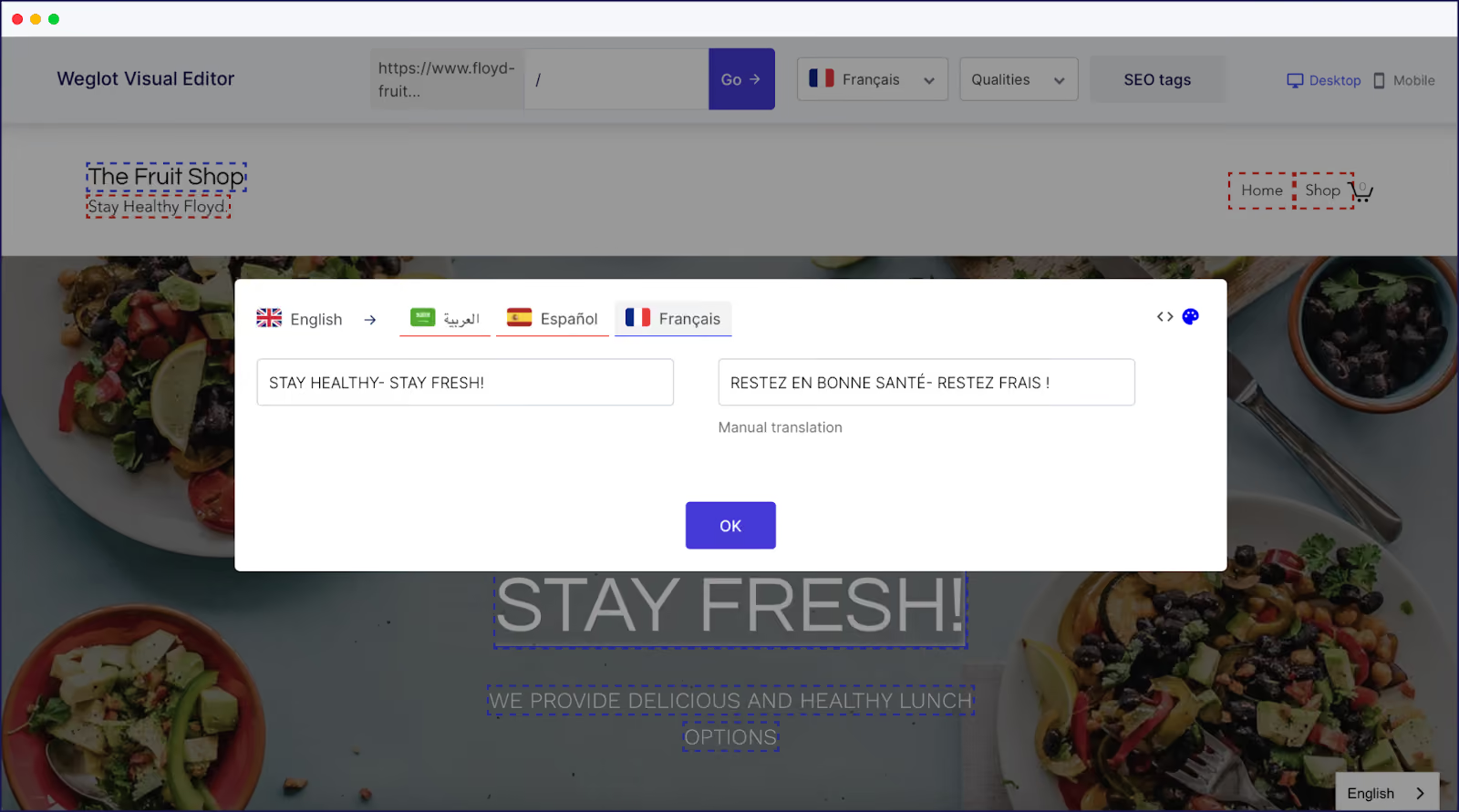
Also, Weglot's Visual Editor shows translations in place on your actual website. This is ideal as you can see how French language text affects button sizing, whether German product names fit in navigation menus, and how Spanish paragraphs flow within your layout. This context can help you make better decisions than editing in isolation.
Another element of Weglot's automated translation process is that it implements multilingual SEO best practices for you, too. Weglot generates language-specific URLs, implements hreflang tags correctly, creates translated metadata, and handles complex technical requirements that search engines need to index multilingual content properly.
It's clear that Weglot and qTranslate-XT handle website translation very differently. But understanding how these solutions differ can help you clarify whether one approach or the other suits your needs better.
The following comparison examines some of the key criteria that matter most for WordPress translation projects.
You install Weglot in a typical way for WordPress. The onboarding wizard will walk you through selecting original and target languages. Within minutes, your site displays a language switcher and has already translated your content automatically.
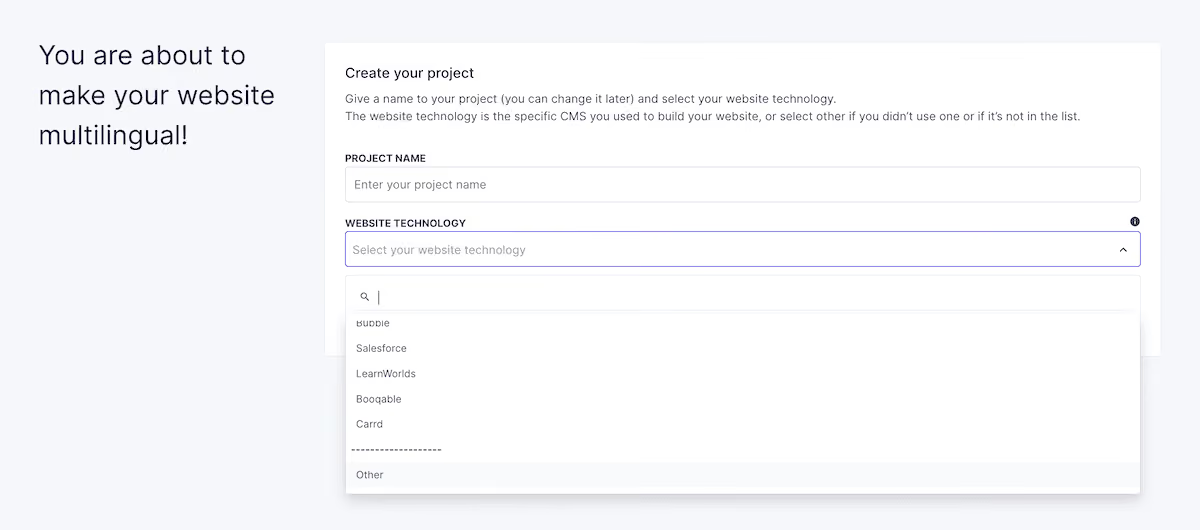
In contrast, qTranslate-XT requires you to download a ZIP file from GitHub, upload this through the WordPress plugin uploader, and rename the folder correctly within your sites files. While Weglot will get automatic updates, qTranslate-XT needs either manual re-installation or configuration of GitHub Updater to check for releases.
Even the basic daily workflow differences between plugins is substantial. With Weglot, you write content in your original language. After the first layer of AI translation, you can refine translations through the Visual Editor or translation list as needed.
With qTranslate-XT, you have to toggle between languages while writing each post using language switching buttons. So, a standard workflow would be to write the English version, switch to French, write the French version, switch to German, and continue this process for every piece of content.
We can start simply here. qTranslate-XT-XT provides no automated translation process. Every word requires manual input or integration with external translation services through custom development. The inline editing interface works for managing translations once they exist, but creates no path for efficient initial translation.
However, Weglot's automatic content detection identifies every translatable element. This includes visible content such as posts and pages, but also hidden elements: image alt text, form placeholders, JavaScript strings, and dynamic content that loads after the initial page render.
Weglot's starting AI translations often need only minimal refinement. This is due to the modern AI translation engine foundations. It can understand idioms, maintain consistent terminology across pages, adapt content for cultural context, and much more. And when you use its AI Language Model, it immediately tailors translations to your instructions, giving you hands-off translation quality.
{{ai-banner}}
Search engines require specific technical signals to understand multilingual content. Weglot implements these requirements automatically. For instance, the platform generates language-specific URLs in either a subdirectory or subdomain format based on your preference. For WordPress, we generally recommend using subdirectories.
Something much more complex is hreflang tags. These tell search engines which language version to show users in different regions. The tags are notoriously difficult to implement as they need strict formatting and exact syntax. However, Weglot generates these tags automatically for every page, which maintains accuracy as you add content or languages.
Because Weglot translates all site content, this extends the SEO optimization to title tags, meta descriptions, and structured data. Each language version gets its own optimized metadata rather than showing English metadata on French pages.
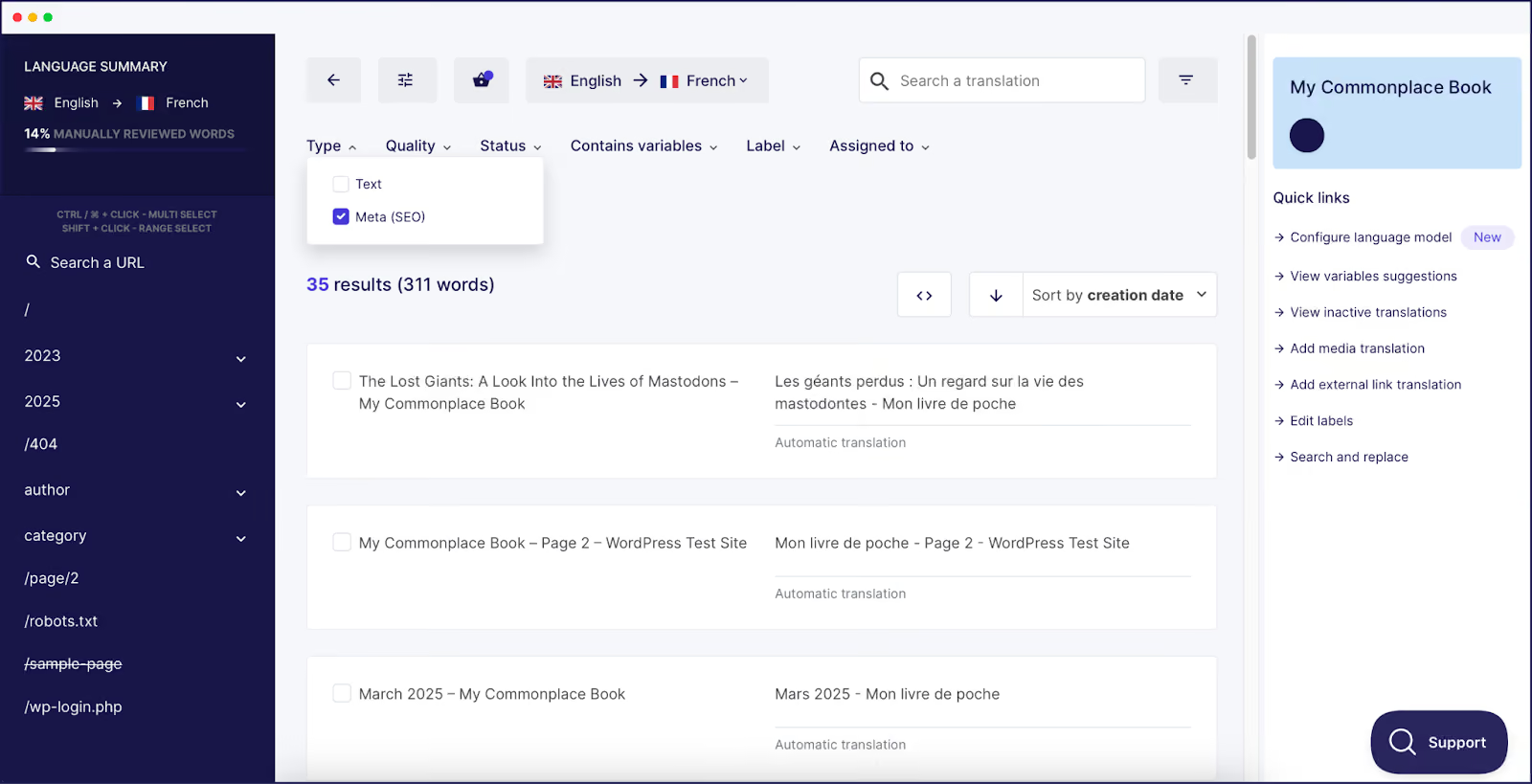
Unfortunately, qTranslate-XT leaves SEO implementation largely to users. The plugin provides URL structure options, but generating correct hreflang tags will require custom code—not to mention money, resources, and time.
Weglot's pricing for an all-encompassing, AI-powered translation model starts at its free plan. But for access to more languages and for websites with larger word counts, paid plans start at $17 per month for 10,000 translated words, 10,000 AI credits, and 1 language.
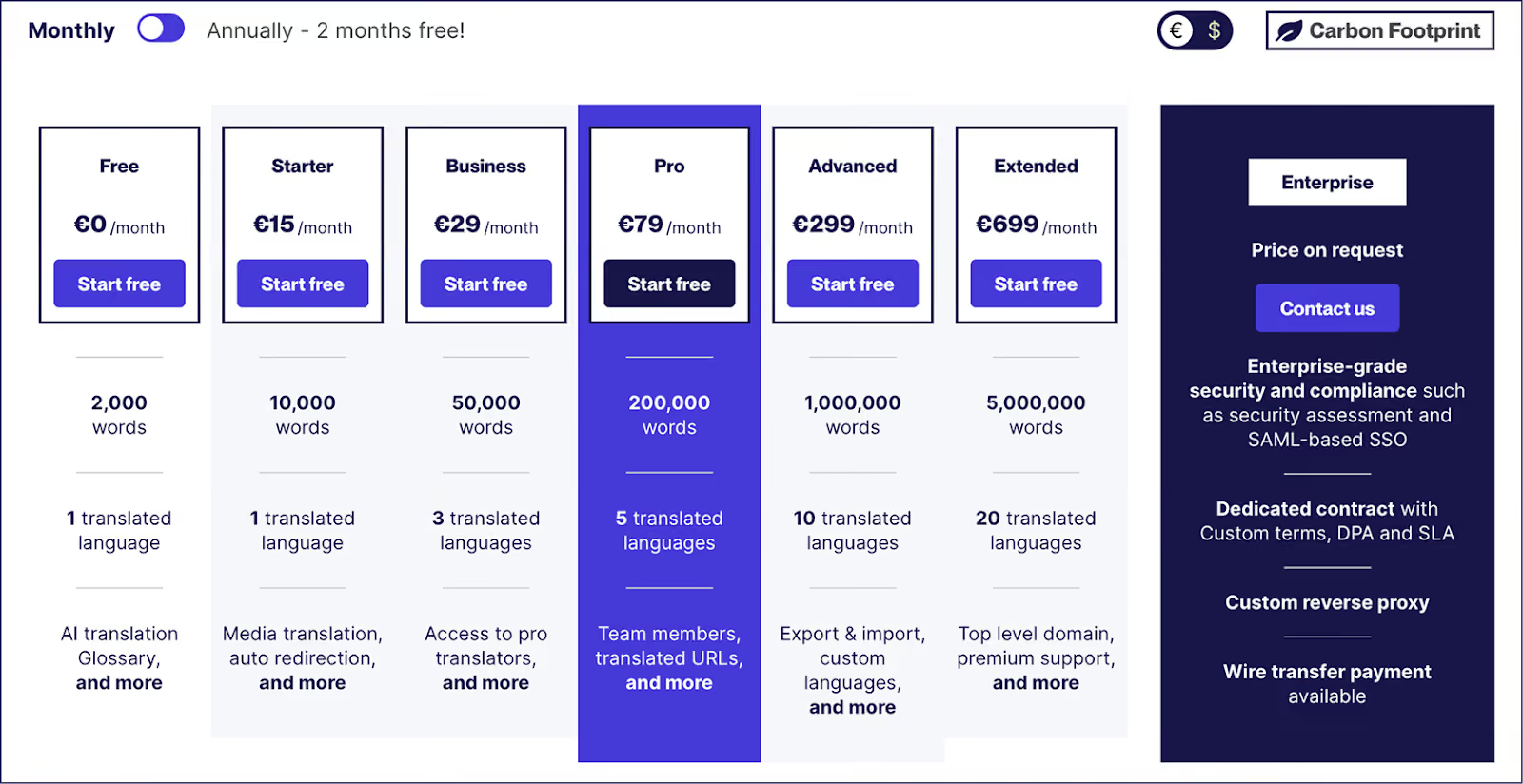
Yes, qTranslate-XT costs nothing in direct fees as free open-source software. However, consider the additional costs you'll incur:
Technical setup incurs indirect costs too: installing from GitHub, configuring updates, troubleshooting compatibility issues, and implementing SEO will take up developer time that can rapidly exceed monthly subscription costs at typical freelance rates.
How does qTranslate-XT store multilingual content?
The plugin stores all language versions in the same post entry using embedded language tags. A title might appear as [:en]Welcome[:fr]Bienvenue[:de]Willkommen[:] in the database. This approach keeps languages together but creates challenges when migrating to other platforms or when the plugin is deactivated, as these tags will become visible on the front end.
What URL structures does qTranslate-XT support?
The plugin offers multiple URL modification modes including query parameters (?lang=en), subdirectories, subdomains, and per-domain structures.
Is qTranslate-XT compatible with the Block Editor and modern WordPress?
The Block Editor is only "partially supported". The documentation recommends installing the Classic Editor to maintain functionality. However, many users on GitHub have reported issues with current versions of WordPress and PHP.
What happens to language tags when I disable qTranslate-XT?
Deactivating the plugin without cleanup leaves language tags visible in your content. The documentation explicitly warns that there currently is no "full uninstall" process.
My theme or plugin doesn't work with qTranslate-XT. What should I do?
Many themes and plugins require custom integration through JSON configuration files. While built-in modules exist for WooCommerce, ACF, and slugs, other extensions need manual integration or remain incompatible.
How do I migrate from qTranslate-XT to Weglot?
Weglot provides dedicated migration support and documentation. The process involves installing Weglot alongside qTranslate-XT, configuring matching language settings, and letting Weglot detect and translate content. From there, you can refine those translations based on your existing work, then clean up qTranslate-XT language tags from the database.
qTranslate-XT's uncertain future creates an objective risk for sites that depend on it for multilingual content. Community maintenance cannot match the stability and support that businesses require. Limited Block Editor compatibility, manual installation requirements, and uncertain response times make qTranslate-XT a foundation with structural concerns.
Instead, Weglot fits with businesses that can't afford translation gaps or broken functionality. Ecommerce stores that sell internationally need every product description translated without manual effort. Marketing sites targeting multiple regions require SEO implementation that works from launch. SaaS companies with evolving interfaces need translation that keeps pace with changes.
If you're ready to move beyond qTranslate-XT, you can try Weglot free for 14 days.

We’ll get your first languages live. You decide how far you want to go. Try Weglot for free today.
Trusted by 70,000+ global brands





Weglot is tested and trusted by brands worldwide since 2016. Join them today.


The best way to understand the power of Weglot is to see it for yourself. Test it for free and without any engagement.
A demo website is available in your dashboard if you’re not ready to connect your website yet.