

Try Weglot for free




Lovable uses AI to make building a professional website fast and accessible. For that reason alone, we think its name is pretty apt.
But many who use the no-code platform still launch in a single language, limiting who can discover and engage with their brands. And often it’s just because they don’t realize how easy translation can be.
The good news is that there are tools and techniques to make going multilingual on Lovable incredibly straightforward. With the right software, you can translate your Lovable website in minutes – without rebuilding it, managing multiple versions, or touching complex code.
This guide explains how translation supports faster growth and the easiest way to reach new countries and communities literally overnight using Weglot.
Why did you create a website on Lovable? Or why are you planning to soon?
Chances are, it’s for brand engagement. You want potential customers to:
You could do all of that for a small, English-speaking section of your target market. Or you could reach a much bigger audience of visitors who speak any number of 100+ other languages.
Whichever website builder you use, making content accessible to people in different regions and communities pays.
In a DeepL survey, 75% of global marketers agreed that localized content significantly boosts customer engagement. That engagement underpins the entire buyer journey, helping people build trust and ultimately hit “buy” or “contact” with confidence that you’ll deliver value.
Even if your goal isn’t to sell across borders, translating a Lovable website can still be very worthwhile depending on your location.
In the US alone, over 10 languages are spoken by more than one million people at home (including regional variations). And many countries have multiple official languages, like Belgium (Dutch, French, and German) and Switzerland (French, German, Italian, and Romansh).
Launching in any of these markets with a single-language Lovable website is like whispering “hey, check out our brand” when you should be shouting it.
Historically, that “shouting” meant duplicating sites for each language, translating the content by hand or outsourcing everything, and manually maintaining multiple versions of every page.
That technical overhead defeats the purpose of using a no-code platform like Lovable, whose purpose is to simplify web design and management.
The good news is that modern translation tools like Weglot remove much of this friction, making marketers’ and site owners’ lives a whole lot easier. Let’s look at how Weglot works and what puts it above other options.
Weglot’s no-code integration helps you instantly and accurately translate your Lovable (or any) content with AI, refine it with human edits, and go live in your chosen languages in minutes.
Its built-in AI Language Model then learns, improves, and adapts to your brand’s tone, giving you a consistent voice across your multilingual site. You can create set-and-forget translation rules while still giving you full editing control for any optimization needs.
Weglot also handles the technical SEO setup, including language-specific URLs, hreflang tags for accurate indexing, and translated metadata to boost your online visibility in every market.
There are alternative approaches to website translation, but not all are equally efficient or scalable.
Here’s how they compare to Weglot:
Weglot stands out for combining the speed of automation with full control over your translations, without adding technical complexity. Let’s explore how straightforward it is to get this no-tech translation tool to work on your Lovable site.
The easier it is to translate your Lovable website, the faster you can reap the benefits of having a multilingual online presence: think more traffic, better engagement, and increased trust.
That’s why we’ve broken the process down into 4 very easy steps below using Weglot.
First, decide which languages you want your website to be available in.
For most businesses, this means prioritizing markets where they already have customers, traffic, or growth opportunities.
For example:
It doesn’t have to be a choice of one language or another. The best translation tools let you translate content into multiple languages without repeating any steps. For example, Weglot supports 110+ languages for AI translation, including regional variations.
Here’s what choosing languages looks like in Weglot once you’re signed up and setting up the project:
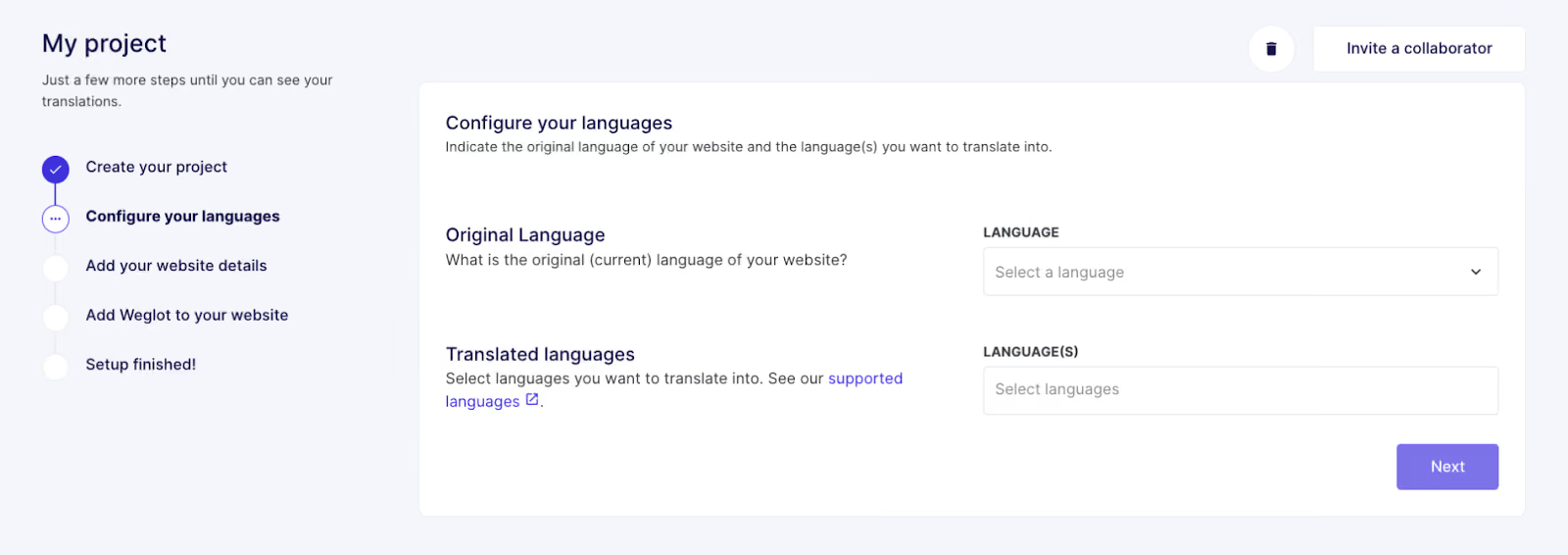
You’ll also need to provide your site’s original language in the next step, (but we’re guessing you’ll know that already!)
Next, connect your Lovable website so it can detect the content and generate translated versions.
In Weglot, all it takes is signing up for the 14-day free trial, creating an account and starting a new project, where you’ll choose Lovable as the website technology. Our tech-free integration means anyone can instantly add multiple languages to their Lovable build.
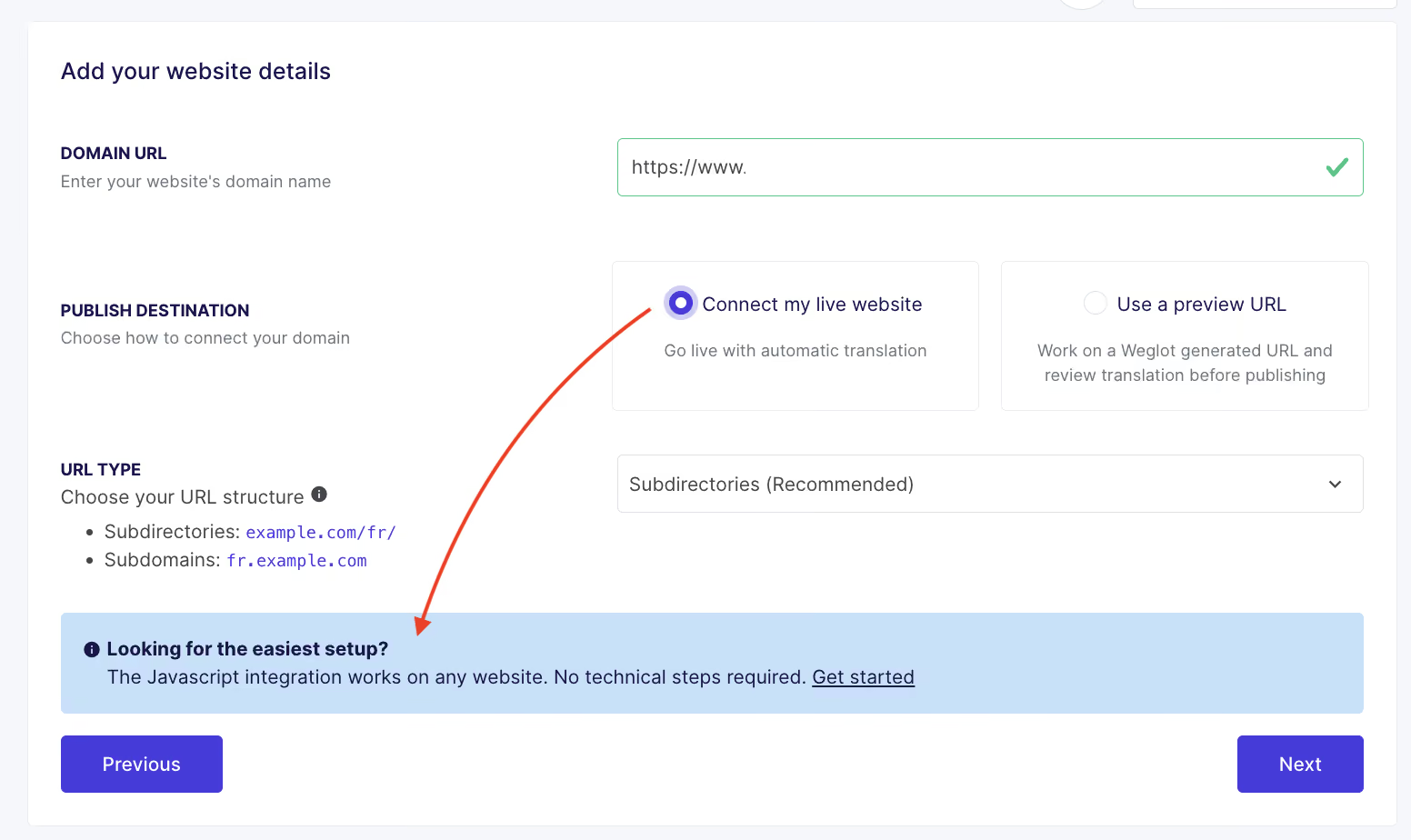
Then, add your original and translated languages and select whether you want to use subdirectories (e.g., weglot.com/fr/) or subdomains (fr.weglot.com).
Like this:
The next step involves adding some JavaScript code to your Lovable site’s HTML, given to you in your Weglot Dashboard. And it’s not as technical as it sounds, thanks to Lovable’s conversational AI.
First, copy the code from your Weglot Dashboard. Weglot makes it really clear in the “Add Weglot to your website” tab:
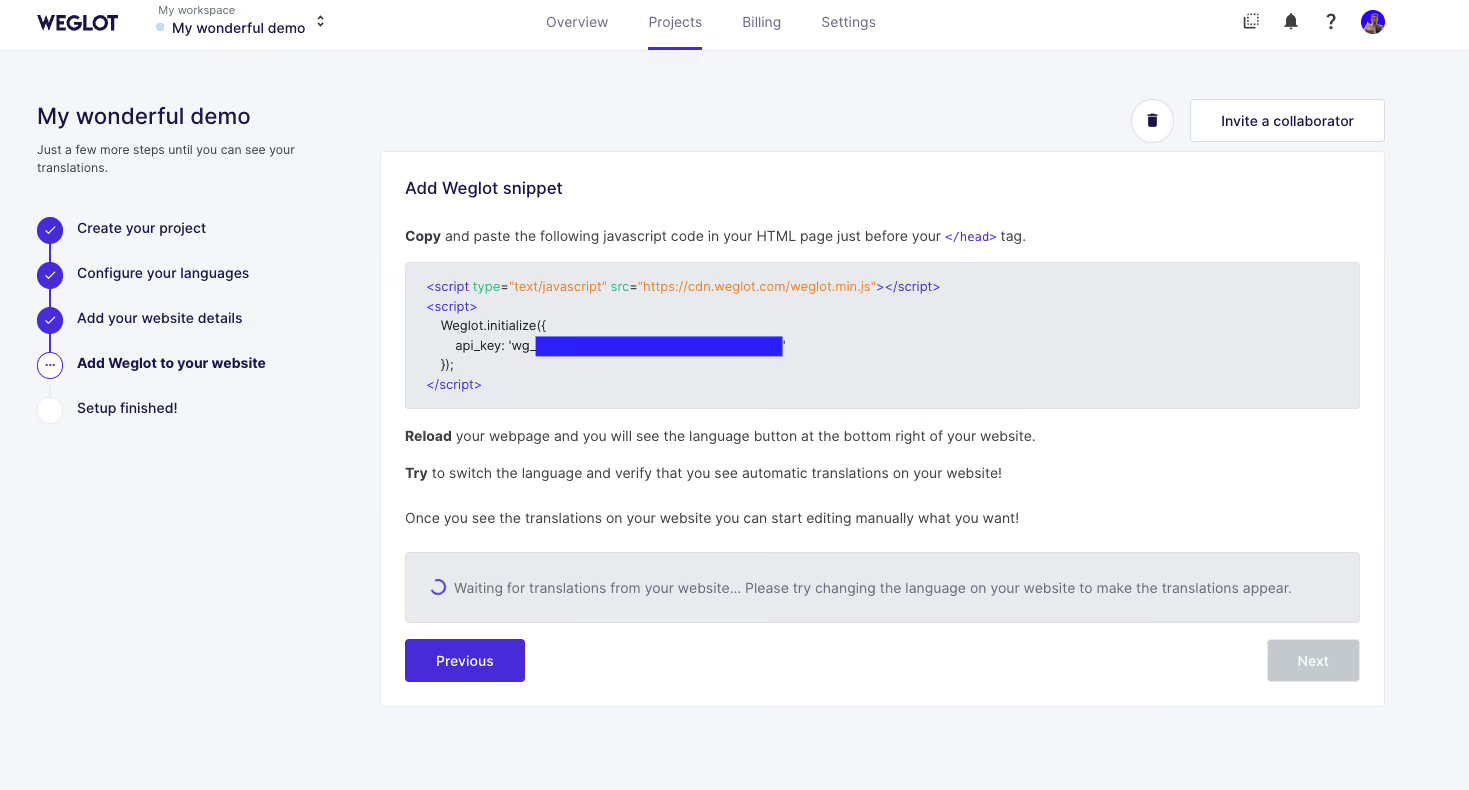
Paste that into Lovable’s chat interface and prompt it to “add the Weglot JS snippet to my website’s HTML header”, like so:
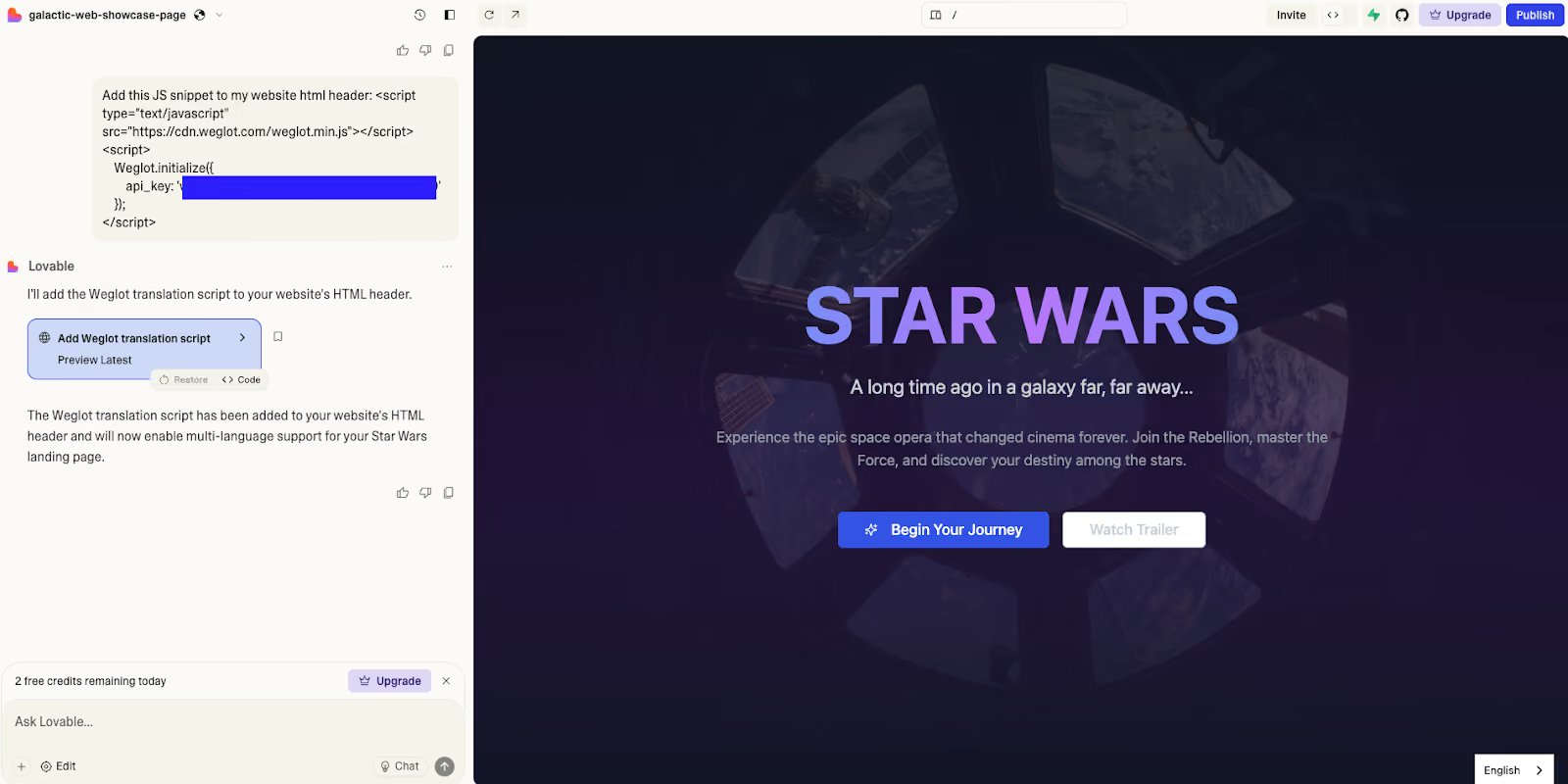
Using the AI bot will cost 1 Lovable credit. But you can also use Lovable’s manual “Code Mode” if you have a paid Lovable subscription. Follow the manual steps for that in our full documentation.
Either way, your website becomes multilingual the moment you hit “Publish” in Lovable. Confirm by looking for a language switcher in the bottom right of each page.
Or, if you prefer, complete the next step before publishing.
If you need to check or tweak individual translations, you can do so in your Weglot Dashboard.
After making your Lovable site multilingual in seconds, you can access your translations through a live preview of your website with Weglot’s Visual Editor and choose quick options such as:
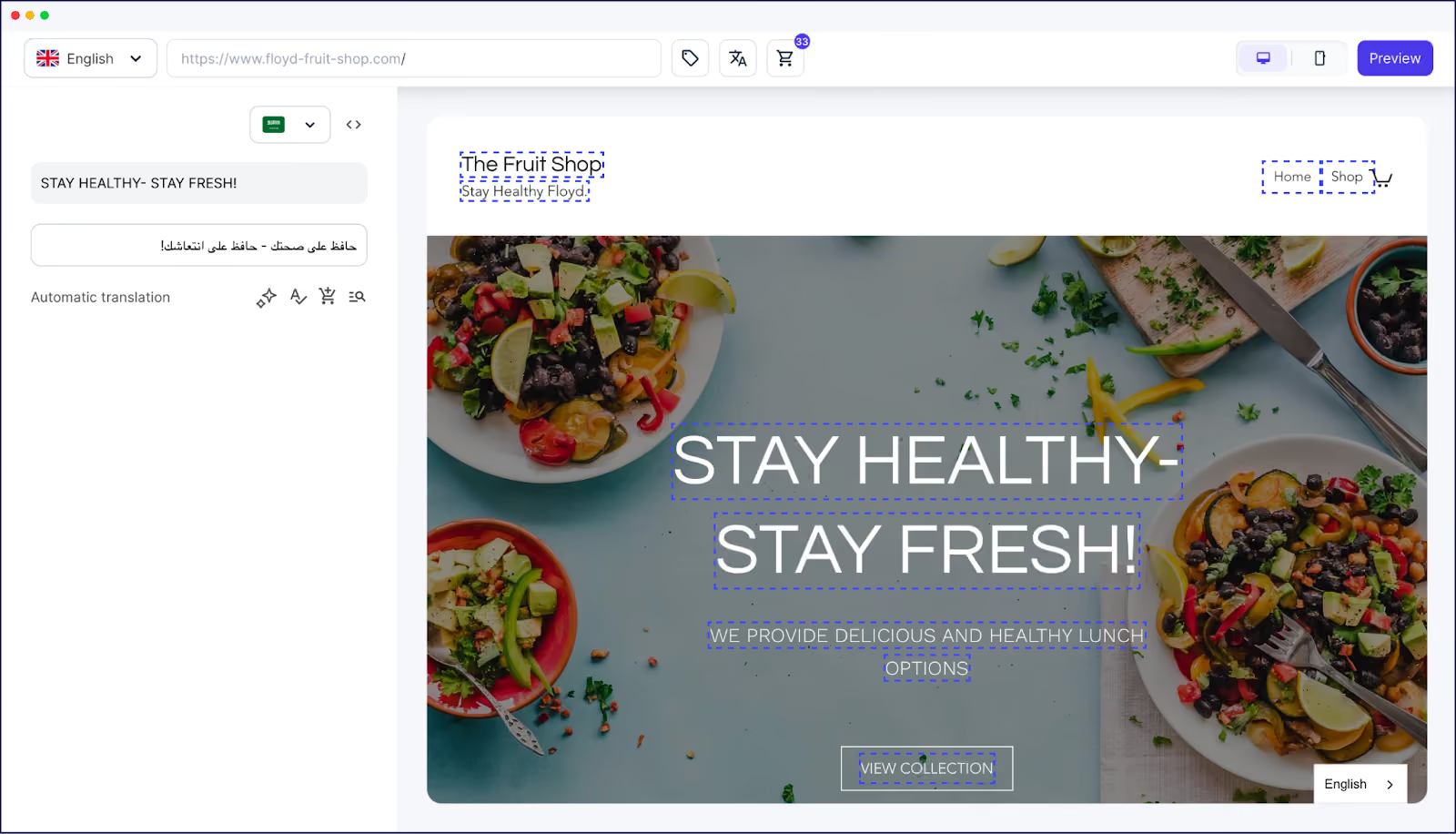
The alternative is to also review translations through your Translations List, which looks like this:
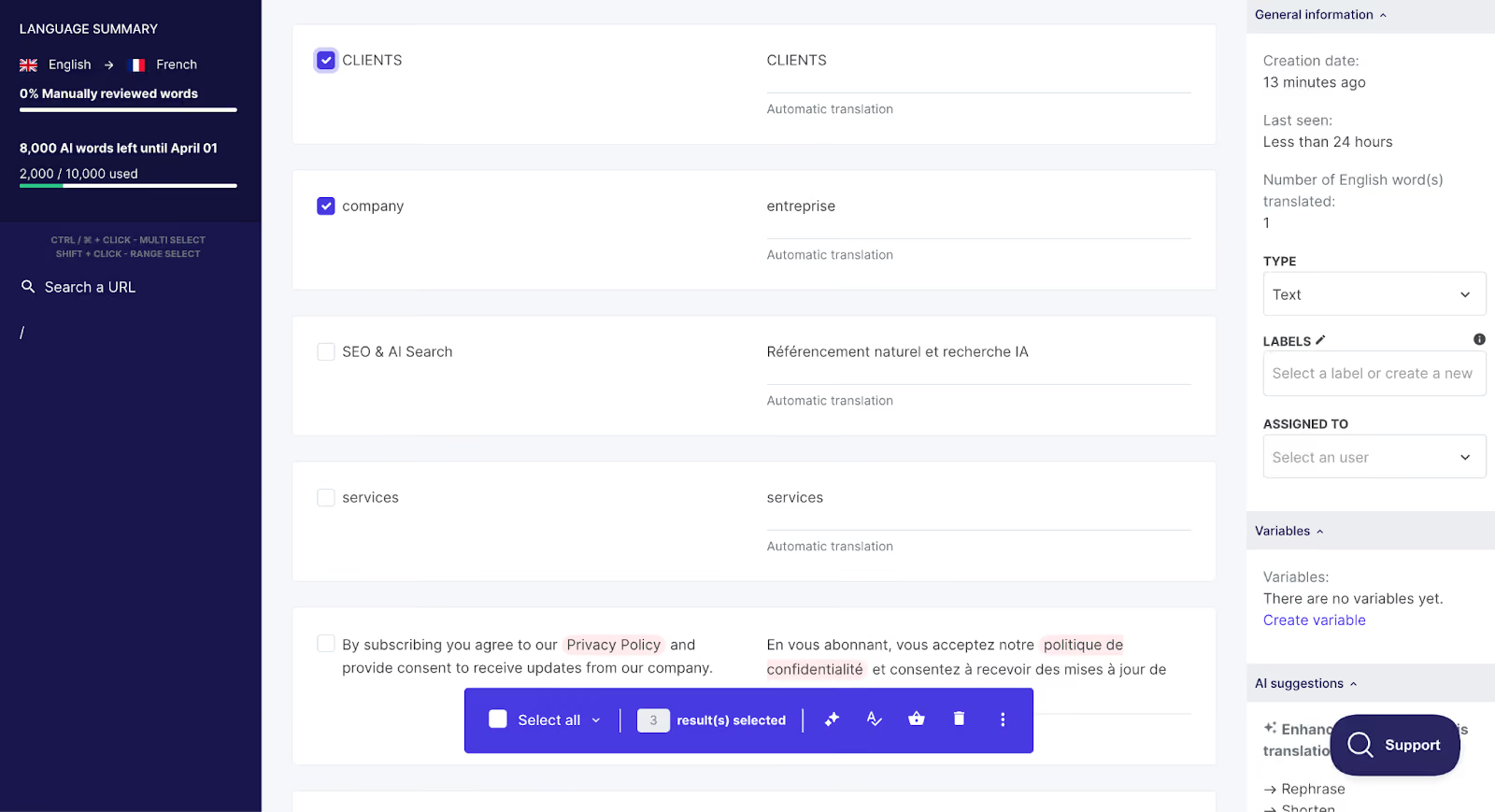
Rather than seeing the translations in context, this view shows them side-by-side, by URL. Both views allow you to access the same editing features; it’s just a matter of preference!
With Weglot, you get the speed and convenience benefits of AI translation (which is far more accurate than many people realize), all while still keeping total control over what your audience sees, through Weglot’s AI Language Model, professional translation, or simply editing with teammates.
The right AI website translation tool makes translating a Lovable site easy for anyone, whether technically skilled or not. But you don’t have to stop at adding a language switcher.
Here are 4 ways to make any multilingual site more engaging for visitors and valuable to your business with minimal extra effort.
Scan your website in its new languages to check that translated text still displays correctly.
Different languages need different amounts of space. Making sure everything still fits post-translation is how you’ll ensure all site visitors get the same smooth, clear experience.
In particular, look out for words that may now be doubled in length in the new language and therefore change the overall formatting of the page.
Buttons, menu items, headings, and text boxes are common places where layout issues can appear after translation, simply because they have such limited space.
Review your most important content to ensure translations accurately reflect your brand voice and terminology.
Prioritize the pages that get the most attention from prospective new customers.
For example, your homepage and product descriptions carry the bulk of your brand’s latest messaging. Years-old blog posts gathering digital dust in your CMS are far less important.
A glossary is essential here. It helps you keep terminology consistent across your site by defining how specific terms should be translated, or whether they should be translated at all (e.g., most brand names stay the same across languages).
Even better, reduce manual work further with an AI model that self-learns your preferred tone and terminology over time.
For instance, Weglot’s AI Language Model provides context-aware, brand-aware, and fully customizable translations by continually learning from your glossary, manual translation history, and custom instructions.
Once you’ve translated and verified your site’s text, adapt other aspects of key conversion pages to suit new international audiences.
After all, translation really is only one aspect of effective localization. Other elements to localize include:
Test your localized site with a fluent speaker of your chosen language(s) to ensure everything feels natural to real users – building on the strong foundation provided by AI.
If possible, test before launching so you can make any final tweaks before users are impacted. If your site’s already live, quick changes could help optimize the user experience.
Using AI translation is far more accurate than many people realize, but even small refinements can help engagement. Over half (52%) of web users surveyed by Applause said they’d abandoned a website or app due to poor translations or inaccurate localization.
A professional translator or someone in your network who speaks the language will know exactly what to improve, making the process faster and more accurate. Alternatively, you can work through the localization testing checklist in our e-book, Best Practices for Translating a Website.
Make sure search engines can find and index your translated website versions correctly. Otherwise, your audience may not see your multilingual pages in search results.
This is the final step in most website translation projects and helps online visibility and brand awareness.
The main must-do actions are assigning URL structures and adding hreflang tags.
A clear URL structure makes it easy for search engines to understand that different versions of your site exist for different languages or regions.
Common approaches include:
Meanwhile, hreflang tags tell those same search engines which language and region each page is intended for, so they know when to serve that version of the content.
You can manage URL structures and hreflang tags manually, if you have the time. Or, if you’re using a website translation tool like Weglot, it automatically applies multilingual SEO best practices as part of your project.
Lovable removes friction from building websites. Weglot removes friction from international growth.
Together, they make it possible to launch multilingual business websites fast – without technical skills, speaking multiple languages, or huge outsourcing costs.
Excited to go multilingual? See how Weglot works with Lovable and other site builders with our 14-day free trial.

We’ll get your first languages live. You decide how far you want to go. Try Weglot for free today.
Trusted by 70,000+ global brands





Weglot is tested and trusted by brands worldwide since 2016. Join them today.


The best way to understand the power of Weglot is to see it for yourself. Test it for free and without any engagement.
A demo website is available in your dashboard if you’re not ready to connect your website yet.
