

Try Weglot for free




Your site is translated. Google shows your French pages, the traffic looks normal, and Search Console has nothing to complain about. Then someone in Paris asks ChatGPT for a recommendation in your category, and you’re not in the answer.
I audit multilingual sites for a living, and this comes up often enough that I decided to measure it. In September 2026 I tested 97 multilingual sites and 174 language versions, to see what an AI assistant’s crawler receives when it asks for a translated page.
I found problems at 5 different layers. Some of the worst failures in my study came from sites that had passed the very first one.
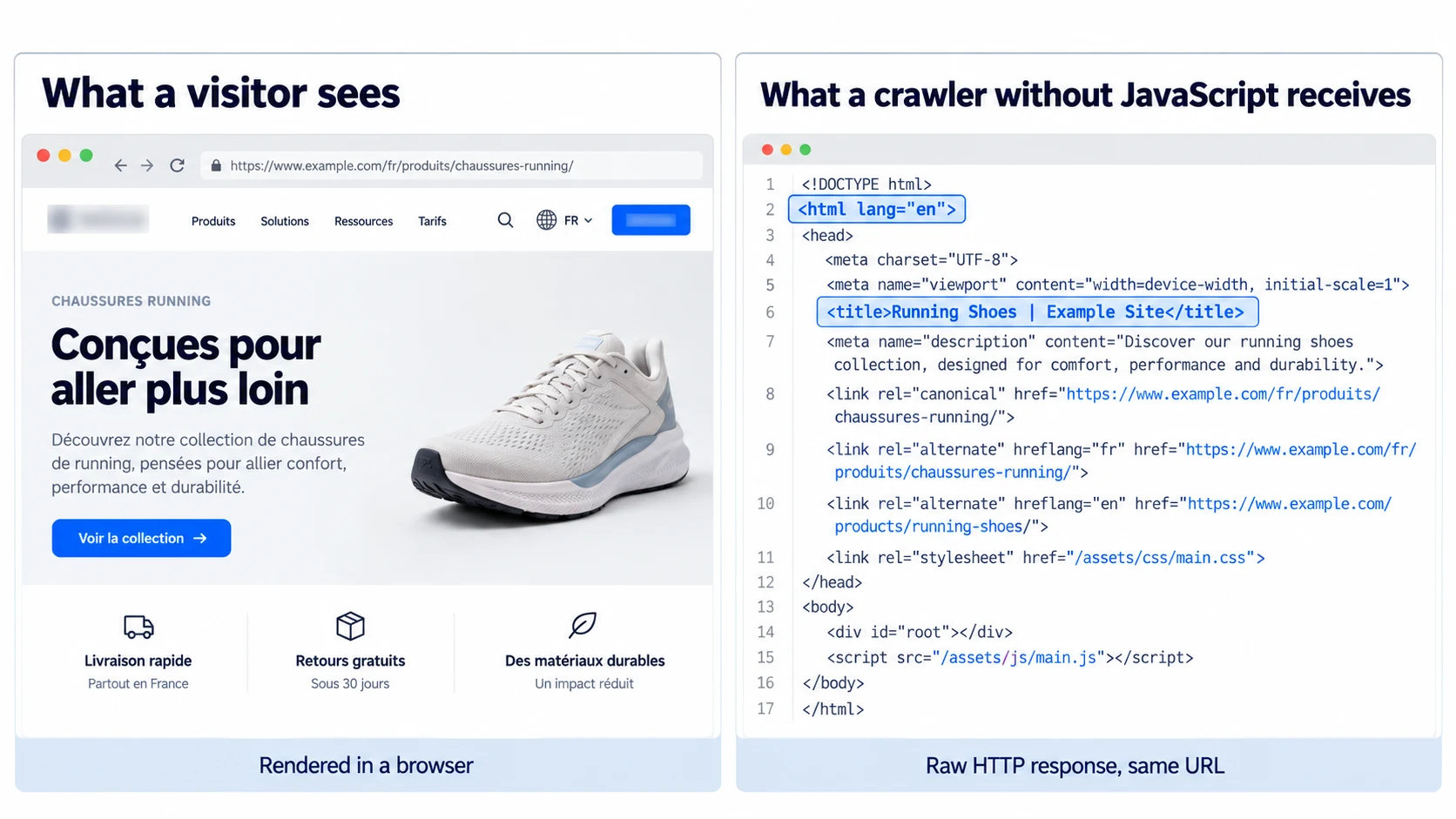
When you open a page, your browser does 2 jobs. It downloads the page your server sends, then it runs the scripts that finish building what you see.
Google, Bing, and Apple say their crawlers run scripts. The rest, including the bots behind ChatGPT, Claude, and Perplexity, say nothing either way, and the main public evidence is a single study from December 2024 covering only 3 websites.
So for the other AI crawlers, there’s no official answer. Even Bing, whose crawler does run scripts, tells site owners to avoid “hiding critical content behind client-side rendering”. That’s good advice to follow until the other AI companies explain how their crawlers work.
There are 2 ways to translate a website. Either your server sends the page already in French, or it sends the English page and a script swaps the words once the page reaches the browser.
To a visitor, both look the same. But to a crawler that doesn’t run scripts, it only ever sees the first one.
The test is easy to do yourself; it doesn’t need any tools and takes 10 seconds. Open your French page, right-click, and choose “View page source”. If the French text isn’t in there, a crawler that doesn’t run scripts won’t see it either.
The data surprised me. The median page I measured already delivers 84.6% of its text without scripts, so the story of multilingual sites as empty shells doesn’t hold. The severe cases are concentrated instead: about 1 page in 7 delivers less than 30% of its text, and ecommerce and travel sites did far worse than software, media, or institutional ones.
On Weglot’s subdomain, subdirectory, and WordPress setups, the translation happens on the server, so it’s written into the page source before it reaches the visitor. On WordPress, that means language URLs like /fr/about/ return translated content without creating extra pages in your back end.
The exception is Weglot’s JavaScript integration, which exists for custom setups and comes with a documented trade-off: those translations aren’t in the page source. If AI visibility matters to you, a subdomain, subdirectory, or an integration with a CMS works best.
I checked weglot.com’s French homepage as a reference point: 97.6% of the text and 17 hreflang tags were there before any script ran.
If your site runs behind a content delivery network (CDN) or security service, such as Cloudflare, it checks every request before it reaches your server and can block any visitor it treats as a threat, including bots. It absorbs attacks and speeds your site up, but it also decides which visitors to turn away.
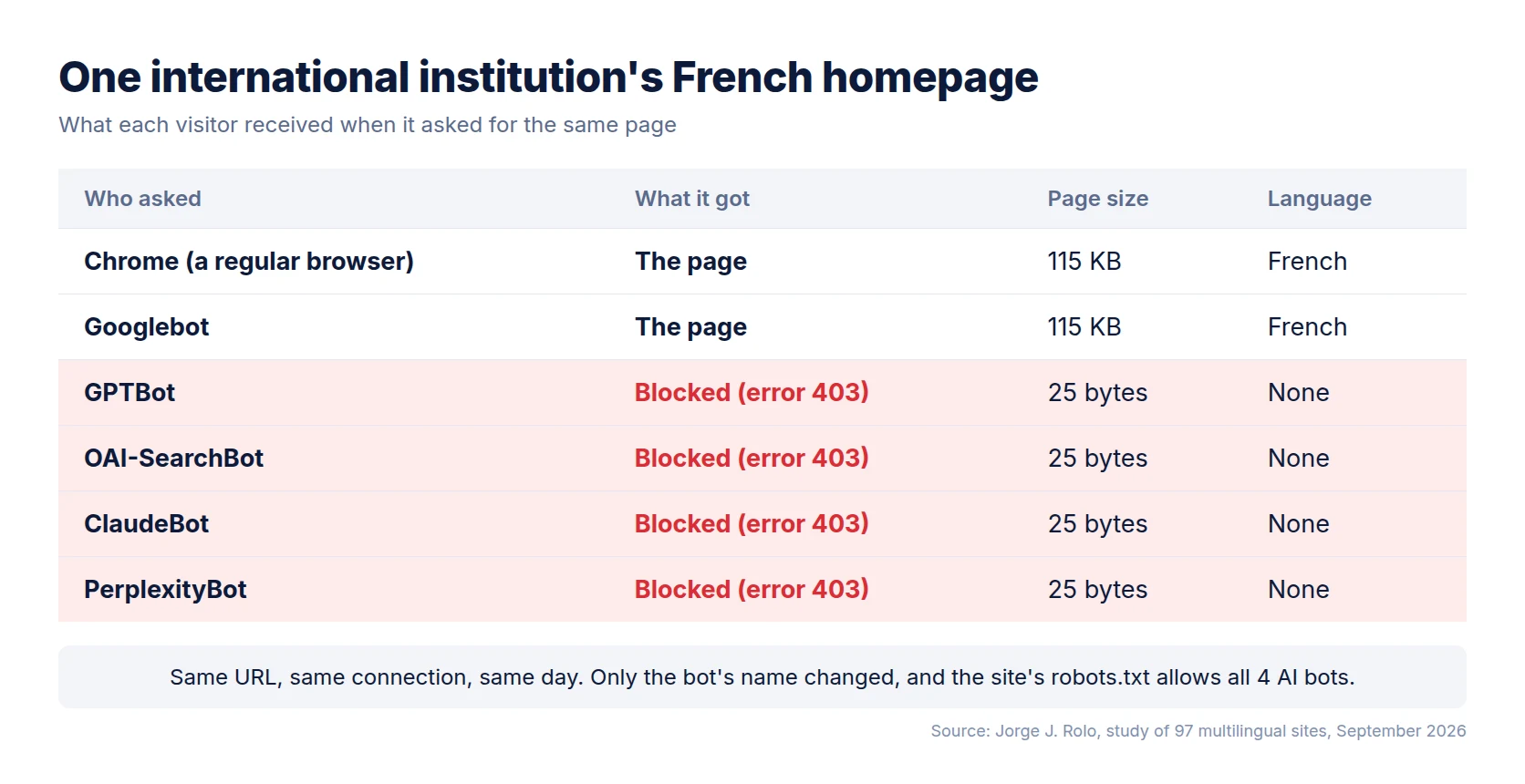
In my study, 11.6% of the sites I tested served Google’s crawler a normal page and gave AI crawlers an error instead, with only the name of the bot different. In 9 of those 11 cases, the site’s robots.txt, the public file where you tell bots what they may read, allowed the very crawler its security service was turning away. 8 of the 11 were public institutions, universities, or tourism boards, organizations that usually want to be read.
Your CMS, Search Console, and analytics won’t flag any of this, because the page loads normally for you and for Google.
Every AI company runs several bots for different jobs. OpenAI documents GPTBot for training and OAI-SearchBot for search.
Blocking GPTBot keeps your content out of future model training, but it doesn’t take you out of ChatGPT’s search answers. Blocking OAI-SearchBot does, so check which of the 2 your robots.txt names.
In my sample, 27.7% of sites named at least 1 AI bot in robots.txt and 11.7% blocked at least 1 on their language pages, while no site blocked Google or Bing.
Your French page can be perfect and still be unreachable, because a crawler has to find it first, which it does by following links in the page source.
For 42.4% of the language versions I measured, the only route from the original page to the translated one was the hreflang tag, which is the tag that tells search engines which page is the French version of which. There was no ordinary link at all, because the language menu is a script.
Those sites work today because their hreflang tags are in the page source. But if you move them into a script, as some translation widgets do when they add the language menu, those pages lose the only path a bot can follow to reach them. In my sample, that was 4 out of 10 translated pages.
Weglot adds these tags to your pages automatically, without anyone touching code. Its SEO documentation explains how that works for each type of setup.
Some sites pick a language from a setting the browser sends. That works, as long as the site also adds a one-line note saying “this page changes depending on the visitor’s language”.
Without it, a copy stored for speed can be handed to the next visitor whatever their language. 10 sites in my sample changed their page by visitor language, with only 1 of them explicitly mentioning this.
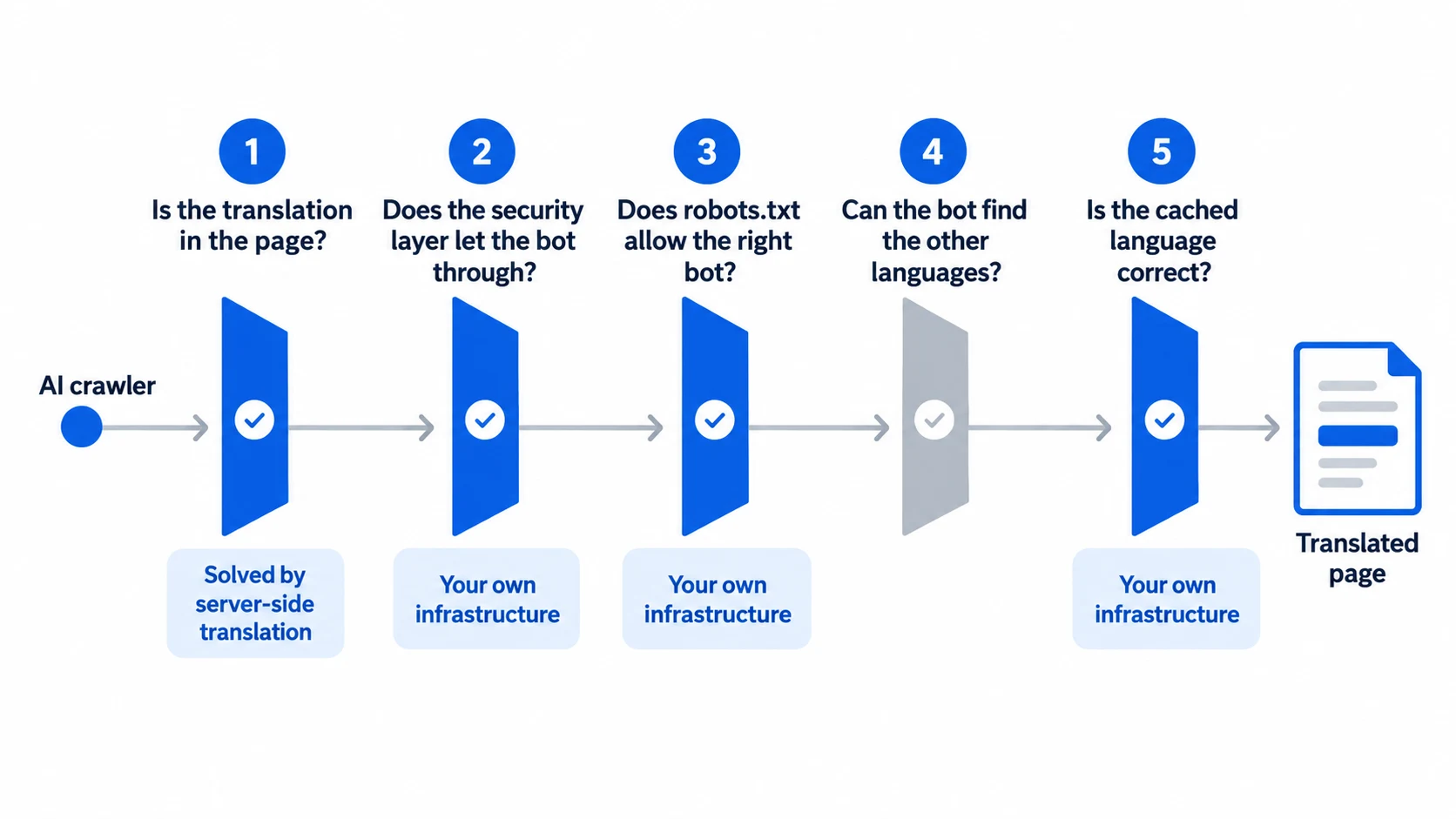
Do these in order: each step only works once the one before it passes.
Search Console’s URL Inspection shows Google’s rendered view, and Google runs scripts, so a page translated by scripts looks perfectly translated in there. It can’t show you this problem, which is why check 1 exists.
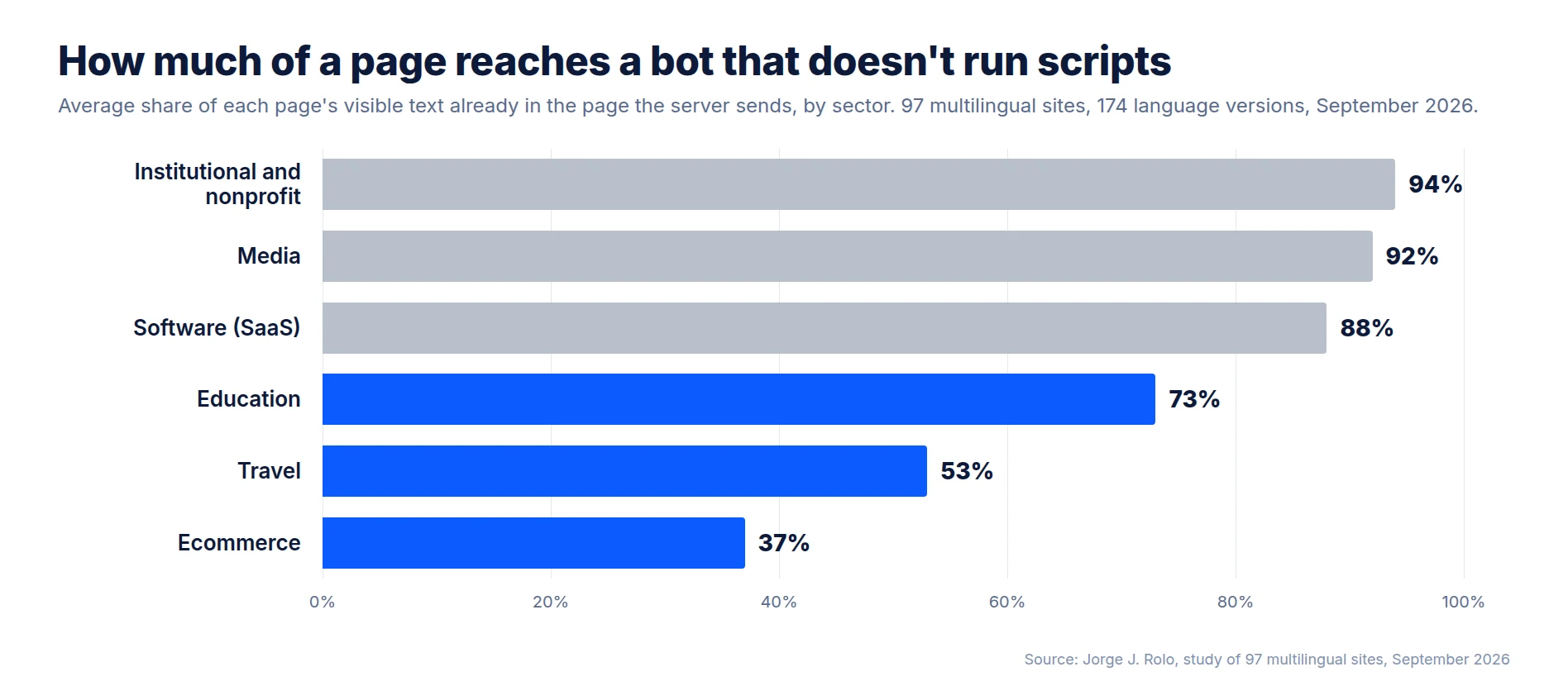
I looked at 97 multilingual sites and 174 language versions, across software, travel, ecommerce, media, education, institutional, and nonprofit sites.
For each site, I requested every page twice: once as a browser that runs scripts, and once as a bot that doesn’t. I then sent the same request under 6 different crawler names and checked each site’s robots.txt rules for its language paths. To avoid bias, I wrote down and time-stamped how I’d classify each site before testing any site I wasn’t already familiar with.
The study has 2 limits. My requests came from an ordinary connection rather than from the AI companies’ own servers, so I measured what a bot calling itself GPTBot receives, which may differ from what the real GPTBot gets. I also measured what crawlers receive, not how often AI assistants cite these sites. That would have to merit its own study.
If you only do 1 thing this week, view the source of your most important translated page. If the translated text isn’t there, you’ve found your answer, and the fix is to serve your translations from the server rather than from the browser.
If it is there, move to layer 2, because that’s where I found the failures that standard checks miss.
Being translated and being readable aren’t the same thing, but you can measure the gap between them in an afternoon.
Make sure AI crawlers can read every language you publish. In my study, about 1 translated page in 7 delivered less than 30% of its text to crawlers that don’t run scripts. With Weglot’s subdomain, subdirectory, and WordPress setups, your translations are served from the server and hreflang tags are added automatically, so every language is in the page source from the first request. Start your 14-day free trial, then run check 1 on your own translated pages.

We’ll get your first languages live. You decide how far you want to go. Try Weglot for free today.
Trusted by 110,000+ global brands





Weglot is tested and trusted by brands worldwide since 2016. Join them today.


The best way to understand the power of Weglot is to see it for yourself. Test it for free and without any engagement.
A demo website is available in your dashboard if you’re not ready to connect your website yet.


