Try Weglot for free


As a Shopify store owner, you’ve probably thought about expanding your reach and selling internationally. After all, it’s guaranteed to help you sell more. Perhaps you’ve already started that journey by offering international shipping?
However, when it comes to localizing your offering for different countries all over the world, one thing’s for certain: if buyers can’t explore your products or services in their native languages, they’ll likely abandon your storefront. There’s no point in offering your products in cross-border markets if language barriers stop you from hitting your conversion goals.
It’s easy to be complacent and presume that English dominates the web. In reality, most of the many online searches are conducted in languages other than English, with English-speaking users making up just 17% of the Internet’s users.
This is why store owners need to consider searches that are being conducted in other languages. Simply put, if your online store isn’t in the language your potential customer is searching in, you won’t appear in search results…which means they won’t find you!
Organic search is a key growth driver when entering new markets. You'll need to localize your store content in your target users’ preferred language(s) to be able to compete. Handily, Shopify supports selling in multiple languages through built-in features and third-party apps. Stores on Basic plans and higher can add up to 20 languages from a single admin, so you already have a great foundation for going multilingual.
In this guide, we’ll look at how you can easily translate the whole of your Shopify store within minutes Shopify’s native features, and how integrating your CMS with our AI translation tool Weglot gives greater options and more control as your store grows
Note: If you’re more of a “learn-by-doing” type of person, sign up for our free trial, where you can start translating your website immediately, or check out our product tour to see Weglot in action, no sign-up required.
There are a number of ways to translate your Shopify store from its default language. Here's how the main four approaches compare:
As you can see from the table, the best option for your own store is dependent on your own circumstances and future expansion plans. Let's explore each approach in detail.
Shopify has an option for displaying multiple languages on your Shopify store through Shopify Markets, but there are a few requirements to be met.
Shopify Markets requires a Basic plan or higher to access multiple language features. Your theme must be compatible with Shopify’s language system to display translations correctly.
The free Translate & Adapt app provides automatic translation for two languages using Google Cloud Translation API, with manual translation or additional apps handling any additional languages. A compatible theme with language selector functionality is required for visitors to switch between languages.
Translate & Adapt also lacks URL slug customization for additional languages. Tags including product tags, article tags, and blog tags also can’t be translated.
Option 2: CreateMultiple Stores
Another option is to create separate stores for each market. Multiple stores multiply management work without solving translation needs, since each store requires separate content translation.
Each separate store requires choosing a translation method – Translate & Adapt, CSV workflow, or a third-party app like Weglot. Creating multiple stores is challenging, costly, and time-consuming to maintain and manage.
Imagine having to add new products, manage inventory, and make updates across so many stores!
This was exactly Angell Mobility’s dilemma when wanting to launch the website for the MINI E-Bike 1 they designed and distributed. They were thinking of setting up multiple websites on Shopify per target country. But their Shopify agency, Stellar Projects, found an easier way.

After adding 3 languages to their website using Weglot, half of their sales became international. Even better, since Weglot automated a bulk of the process, they saved 50+ hours on website translation—hours that they spent on more cognitive tasks that pushed their growth.
Increase your visibility like Angell Mobility did by trying Weglot for free today.
A misconception when creating a multilingual Shopify store is that you’ll just need to pick a theme or template that’s multilingual-ready and comes shipped with a language switcher. But there’s much more to it than that.
Multilingual Shopify themes provide language switcher functionality but require manual translation of all content, including product descriptions, checkout text, and system messages.
What’s more, Shopify’s templating language, Liquid, controls the on-screen appearance of your website. You’d need to be careful to only translate the text around Liquid and not Liquid’s tags, filters, or objects. If you do, you can completely break your store’s functionality.
While it’s possible to use a multilingual Shopify theme, its manual translation drawbacks can be pretty problematic. This can be worse when your store is already up, needing you to revisit every single element to add language translations.
The easiest and most complete way to translate your Shopify store is to use a multi-language translation app. You won’t need to duplicate your Shopify store, and you won’t need a multilingual theme either.
Adding multiple languages to your store using an app such as Weglot is simple. Weglot detects and translates entire Shopify sites including checkout pages and email notifications in under 10 minutes. And, you can add more than 110 different languages to your online store, including custom languages, allowing you to communicate with your customers, no matter where they are in the world. Weglot also comes with an AI Language Model which learns from your translations to deliver a more human output for readers.
Weglot not only takes care of detecting and automatically translating the whole of your Shopify site (including Shopify checkout and email notifications), but it also handles multilingual SEO of your newly translated store. Weglot generates language-specific subdirectories (example.com/fr), implements hreflang tags automatically, and updates XML sitemaps for search engine indexing, so it’s optimized for international search engines.
To integrate Weglot with Shopify Markets, it’s just a case of installing the app, rather than looking for and configuring a new theme or having to go through the tiresome process of creating a bunch of localized stores.
Think of the four options we’ve just covered above as ‘store structures’, all still requiring a translation method to make your site multilingual. Whatever your chosen set up, Shopify relies on three core methods for translation:
Here’s how the three methods compare in detail:
Most Shopify stores choose either Translate & Adapt for basic needs (1-2 languages) or a translation app like Weglot for comprehensive automation and scaling. The CSV workflow option typically serves as a bridge – exporting from Translate & Adapt for professional translation, then reimporting onto your site.
Now that we’ve covered structural options and translation methods, let’s take a look at how these affect your international search visibility.
Adding multiple languages expands search visibility by creating independent ranking opportunities in each language.
Language-specific pages rank for local search terms that don’t exist in English. French searches for "robe d'été" differ completely from English "summer dress" searches, creating new keyword opportunities. Users engaging with content in their native language typically show longer session durations and lower bounce rates.
Proper multilingual SEO requires unique URLs per language, hreflang tag implementation, and translated metadata. Shopify automatically generates language-specific URLs using a subdirectory structure where each language has a unique path. The platform also adds hreflang tags to page code, signaling language and regional targeting to search engines.
Translated pages receive dedicated URL slugs (example.com/fr/products/chaise for French) that search engines index independently. And automatic sitemap updates include all published language versions for complete search engine discovery. Should you pair Shopify with a translation app, these features are normally handled by the app, to avoid any duplication or confusion.
Poor machine translation quality without human review can harm search relevance and user trust, and missing or incorrect hreflang tags cause duplicate content issues that dilute ranking potential. To get the best search results, international SEO needs to be a primary concern for Shopify store owners.
As we mentioned previously, there are no special requirements needed to add new languages to your Shopify store with Weglot.
Using Weglot’s AI translations, you can provide your customers with translated content in as many languages as you would like and get full editing control.
Using Weglot means that 100% of your Shopify store is translated, and that includes everything from your drop-down menus to your full checkout flow. Your store can go from speaking English to being fully conversant in Spanish with just a few clicks!

That’s what French skincare brand Polaar did – they added 2 languages to their Shopify store through Weglot. The result? Hundreds of hours were saved and their US website traffic doubled.
“We spend 70% less time on website translation,” said Sophie von Kirchmann, the brand’s E-store Manager. “Weglot automatically translates and publishes all modifications on our multilingual pages.”
When you have hundreds of product listings to maintain, having software that automatically translates and displays them for you definitely makes things easier.
Once integrated with Shopify, Weglot also handles all of your SEO requirements – and all this in just a 10-minute set up!
So let’s take a look at this most straightforward way to add multiple languages to your Shopify store.
This video walks through adding multiple languages to Shopify with Weglot – and in less than 60 seconds!
Search for Weglot inside Shopify’s App Store, click ‘Add App’, and then hit ‘Install.’

The next step is to create a Weglot account (this is where you’ll manage your store’s translations). It’s also at this point that you can start your 14-day free trial.

Next, add the original language of your website and the new language you want to add to your Shopify store.

That’s it! Your Shopify store is now available in multiple languages. Everything on your store is translated, including your checkout page.
Visit your store to see Weglot in action, or select ‘Go to Weglot app settings’ to change the look and position of your language switcher and move its position such as into the header for better UX.

If you want more details, check our Shopify language configuration master guide.
As a final thought, Weglot allows you to switch your subdirectory structure if you prefer subdomains – something native Shopify cannot do. Read our guide to subdirectories vs subdomains to find out more.

One of the best things about Weglot is how you can manage and customize your translations.
As we’ve seen, Weglot translates all store content types including product descriptions, collection pages, blog posts, navigation menus, and checkout processes. The tool also handles system-generated content like email notifications, cart messages, and error pages automatically.
You’ll also find that popular Shopify apps such as smart search apps and image galleries are also 100% translatable with Weglot, so you don’t need to worry about the other aspects of your Shopify store being unreadable for your new potential customers.
Weglot offers a fast first layer of AI translation, which is perfect for translating at scale. For example, when you need to translate thousands of product pages that you have on your Shopify store at once.
You can then manually edit those translations.
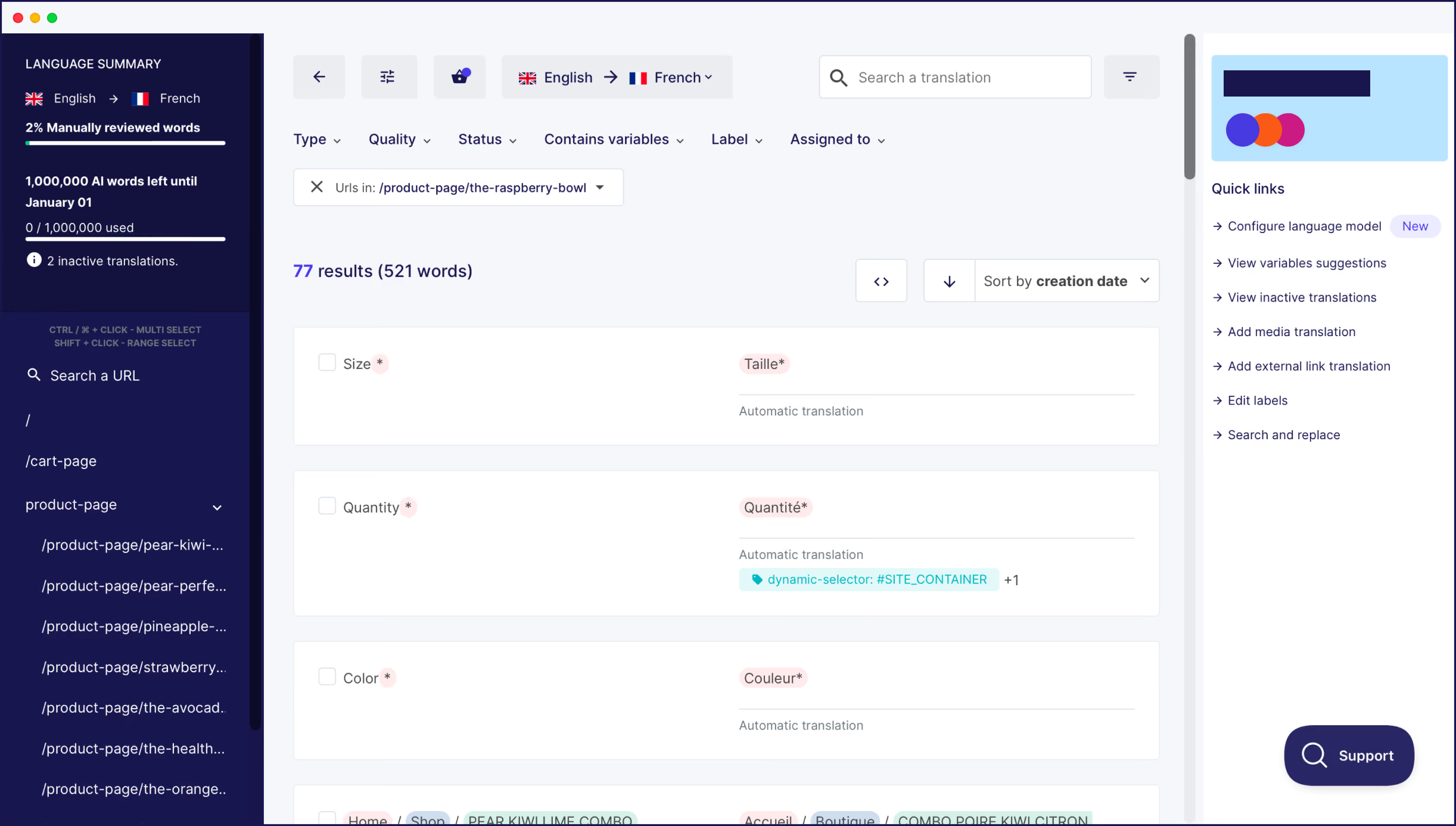
Weglot offers two different ways to edit your translations. The first way is through your Translations List inside your Weglot Dashboard, where you’ll see the languages side-by-side.
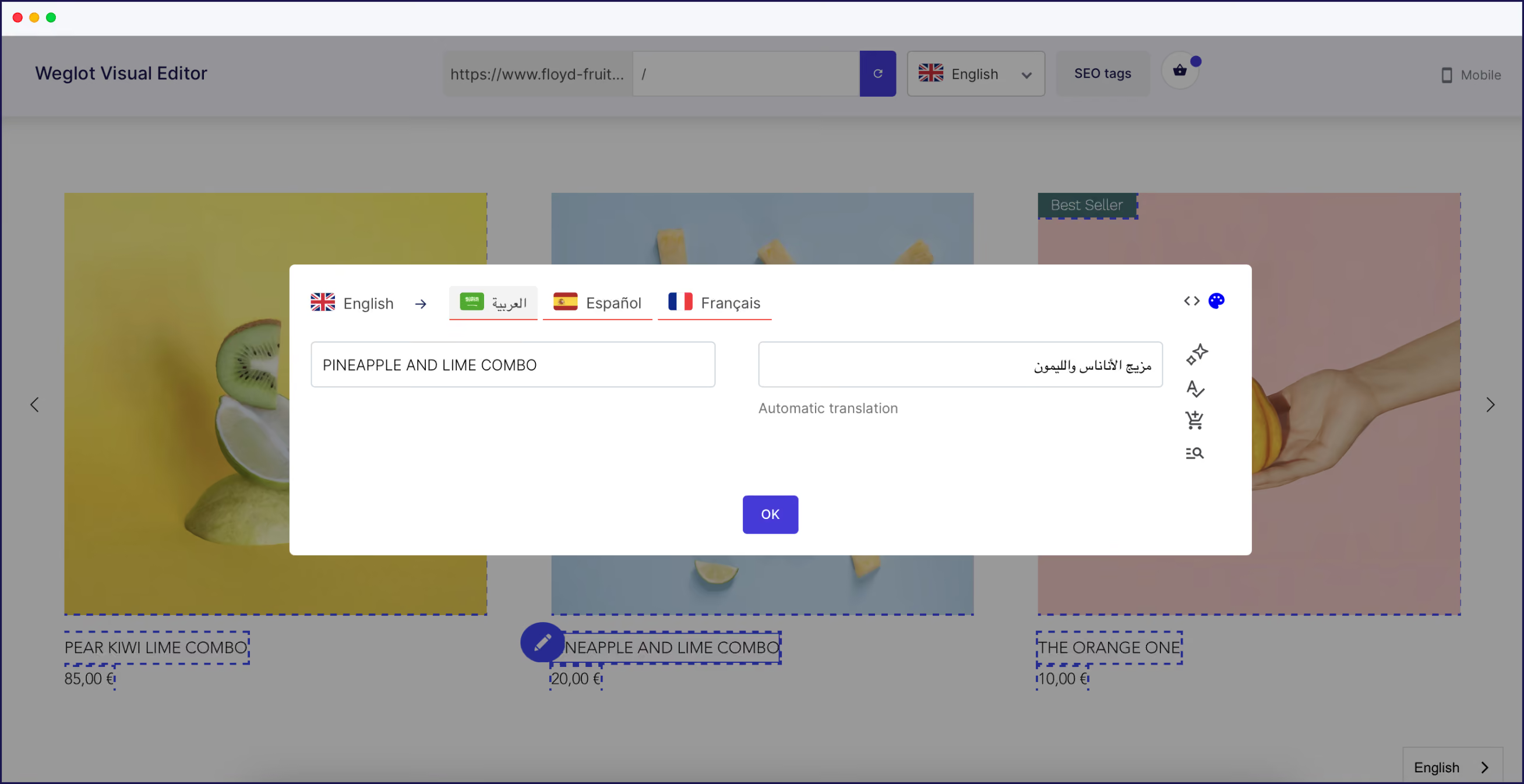
The second is a more visual approach: Weglot’s Visual Editor. Here, you can edit your translations through a live preview of your Shopify store, so you know precisely where the translations are on your website.
If you’re not familiar with the target language, you can order professional translators straight from your Weglot Dashboard.
t’s important to localize your website, not just translate it. Localization isn’t as simple as just translating words directly into your users’ native languages. Ecommerce trends vary from country to country, and the kind of sales tactics and language that work on your storefront in your home region might not work abroad. You’ll need to research word trends and consider cultural nuances – direct translations may be out of touch with your customers’ word preferences, or even cause offense.
For more information, follow our quick tutorials to access the translations for your checkout, or translating your email notifications. And remember – Weglot’s reactive support team is always on hand to answer any questions you might have.
Headless Shopify implementations using custom frontends require translation integration through the Storefront API. Weglot provides client-side translation detection that works with headless architectures while maintaining automatic SEO configuration. The translation layer operates independently of your frontend framework, eliminating custom Storefront API translation logic.
You can learn more about Weglot's headless compatibility with Weglot's i18n solution.
Expanding your Shopify store to include multiple languages is a must-have when trying to reach international audiences. Weglot simplifies the process with AI translations for every part of your site, including checkout and email notifications, while allowing manual edits for language refinement. With powerful SEO features and problem-free integration, Weglot saves time, simplifies management, and builds a foundation for your global expansion.
Interested in seeing how Weglot can translate your Shopify or Shopify Plus store into multiple languages? Start your 14-day free trial today and set up a Shopify multi-language store in just a few steps!


Trusted by 70,000+ global brands


The key differences include:
Using the Weglot app to translate your store is an instant way to create an international ecommerce store. In under 5 minutes, Weglot translates all the content on your Shopify store, including customer notifications and your checkout so you can offer a completely translated shopping experience.
Weglot also adds key technical SEO elements, including hreflang tags.
Plus, as a dedicated translation tool, Weglot has an expert support team that is regularly praised for its 5-star support, responsiveness, and reactiveness to any customer issues.
Once you’ve installed the Weglot app on your Shopify store, all the content displayed on your site will be automatically translated. This includes dynamic content and content for third-party apps.
Notifications are also translated, including the order and shipping notifications and any customer notifications. As the content isn’t technically on your website, Weglot requires you to add a simple code into your liquid file. A full guide has been created here.
Weglot implements the technical SEO elements required for a Shopify multilingual strategy. It automatically creates language subdomains or subdirectories (depending on your preference), translates metadata, and offers the option to translate your URLs on Pro plans and above. Another complex element that is automatically handled is the implementation of hreflang tags, which inform SEO bots about the language your pages are targeting.
Weglot’s no-code install is handled directly inside the Shopify App Store. Once installed following the simple onboarding steps, a language switcher will be automatically added to your storefront. At this point, you can use Weglot’s visual language switcher editor to change the design and position without having to manually add any code (unless you want a custom design).
With the Weglot translation app, available on the Shopify App Store, you can add 110+ languages instantly. The process takes less than 5 minutes to have a fully translated site using AI translation. You can later choose to activate your custom AI Translation Model that enhances the AI translations based on your brand guidelines, glossary rules, manual edit,s and any custom rules you’ve created. Plus, you’ll always have full manual editing control through Weglot’s translation management dashboard.
Are Shopify themes sufficient for multilingual stores, or do I need an app for full translation? There are a couple of limitations of using a Shopify multilingual theme to translate your store.
Essentially, for full store translation, a Shopify multilingual theme is not enough and the theme does not handle everything.
Multilingual themes provide language switchers with limited functionality but require manual translation, while apps like Weglot automate content detection and translation.
Theme translations are limited to only cover static text components, like your menu, buttons, and so on. They don’t cover the core content of your site, like product descriptions, reviews, and checkout.
With a Shopify multilingual theme, you’ll still need to actually translate the content using a Shopify translation app like Weglot.

Reach new audiences in minutes without sacrificing your team’s time. Anyone can install it.